

Behavioral health EMR software connects clinical documentation, billing, and compliance tracking into a single operational system, and how well your team uses it determines whether you see that investment in reduced administrative burden and faster claims. But how to use EMR software will turn a software solutions to a true system and process optimization partner. Behavioral health teams get this in Alleva’s EMR.
Role-focused steps throughout the sections below help you complete core EMR tasks confidently, reduce common bottlenecks, and apply practical improvements starting today.
Key Takeaways
- Configurization & customization is critical for audit readiness: Configuring your EMR correctly at setup, accounts, roles, and permissions, saves hours of remediation during CARF, Joint Commission, or state licensing reviews.
- Ambient AI is changing documentation workflows: A 2025 JAMA Network Open study found clinician burnout dropped from roughly 52% to 39% after 30 days of ambient AI scribing, a meaningful shift for behavioral health teams managing high note volumes.
- Role-based templates cut charting time per visit: Clinicians who document with specialty-focused note types and pre-built smart phrases consistently report lower time-per-chart metrics than those using generic templates.
- Audit log retention is an accreditation requirement: CARF and Joint Commission surveyors expect access logs, change records, and reconciliation trails, configure your EMR to generate and retain these automatically.
Why Getting Your EMR Workflows Right Matters
Documentation burden is one of the most consistent operational problems in behavioral health. Studies suggest clinicians spend roughly two hours on documentation for every hour with a patient, a ratio that affects both care quality and staff retention.
Top features to look for in a behavioral health EMR provides useful context on what a purpose-built system should deliver.
Getting your EMR configured and used correctly from the start reduces that burden meaningfully. Clinicians working in well-designed, role-specific templates document faster, make fewer billing errors, and are more likely to stay in your organization.
Organizations that go live without proper role configuration, tested templates, or trained superusers often spend months recovering from documentation gaps and claim denials that were avoidable.
EMR vs. EHR: What the Distinction Means for Daily Operations
| Term | Primary Use | Key Feature | Behavioral Health Relevance |
| EMR (Electronic Medical Record) | Single-organization documentation | Clinical chart for one practice | Core documentation tool for therapy notes, treatment plans, and assessments |
| EHR (Electronic Health Record) | Cross-organization data sharing | Interoperable longitudinal record | Required for referrals, hospital transitions, and payer data exchange |
| RCM (Revenue Cycle Management) | Billing and claims processing | Links clinical notes to payer claims | Integrated RCM reduces duplicate entry and claim errors |
| HIPAA | Federal privacy compliance | PHI protection rules | Applies to all patient data in both EMR and EHR systems |
| 42 CFR Part 2 | SUD record protection | Stricter consent for disclosure | Behavioral health-specific; requires data segmentation in your EMR |
| FHIR | Interoperability standard | API-based data exchange | Used for referrals, care coordination, and payer reporting |
Behavioral health providers typically rely on an EMR for day-to-day clinical documentation and an EHR for sharing records across care settings. For a detailed breakdown of how the two systems differ in practice, understanding EMR vs. EHR helps clarify which capabilities matter most for addiction and mental health EMR software.
Most purpose-built behavioral health platforms combine both functions so your team works in one system rather than two.
Preparation: Accounts, Devices, and Secure Access
Behavioral health EMR requires prepared accounts and configured devices before go-live. Confirm user accounts and role assignments, ensure workstations or approved BYOD devices meet browser and VPN requirements, and complete required training before signing in.
HHS cybersecurity guidance recommends 15 to 30-minute auto-lock settings for clinical workstations. Follow your organization’s policy for session timeouts and password rotation to maintain audit readiness from day one.
Role setup checklist before go-live:
- Role-based user account (clinician, admin, billing, compliance) assigned and tested
- Designated superuser or training contact identified per department
- Supported browser (latest Chrome or Edge) and VPN or secure network access confirmed
- Device policy compliance verified and initial training completed
Login flow and troubleshooting:
Start at your organization portal, authenticate with single sign-on, and complete multi-factor authentication. If access fails, clear browser cache once, then use password reset or contact IT. For missing privileges, submit a formal access request with role, location, and justification documented.
Creating Patient Records and Navigating the Chart
Accurate patient record creation is the foundation of compliant clinical documentation. Start a new chart by entering legal name, date of birth, and primary contact, then save a draft and finalize to generate a medical record number.
For a look at how Alleva structures the intake-to-documentation workflow, understanding what EMR software does provides a useful orientation.
Behavioral health-specific demographics to collect at intake:
Capture preferred name, pronouns, housing status, emergency contact, referral source, primary language, and Medicaid or Medicare IDs. These fields support care planning, accreditation reporting, and audit readiness while reducing follow-up calls from billing and compliance teams.
Preventing duplicate records:
Run duplicate checks using name, date of birth, and SSN matching with fuzzy-match tools. Verify identifiers before merging or linking records to avoid fragmented histories and billing errors.
Intake documentation essentials:
Document presenting problem, current medications, allergies, legal holds, advance directives, and signed consent forms at intake. Timestamp entries and note the information source for audit trails. Accreditation surveyors review intake documentation for completeness, gaps here create findings.
Finding past encounters quickly:
Use date ranges, diagnosis or clinician filters, and a timeline view. Save frequently used filters to speed lookups and keep clinicians focused on care rather than chart navigation.
Documenting Visits: SOAP Notes, Vitals, and Medication Reconciliation
| Documentation Type | Purpose | Behavioral Health Considerations |
| SOAP Note | Structured clinical narrative | Include psychiatric rating scales (PHQ-9, GAD-7, AUDIT) |
| Progress Note | Session-level treatment documentation | Must link to active treatment plan goals |
| Treatment Plan | Longitudinal care roadmap | Required for CARF/Joint Commission; updated at defined intervals |
| Medication List | Active med reconciliation | Compare at every visit; document discrepancies |
| Allergy Record | Contraindication tracking | Include environmental and medication allergies |
| Consent Form | Authorization documentation | Separate consents required for 42 CFR Part 2 disclosures |
| Psychiatric Assessment | Diagnostic and risk evaluation | Document suicide risk screening with validated tool at each visit |
Behavioral health visits require documented SOAP notes that align with the correct encounter type and CPT code. For a deeper look at how built-in EMR documentation tools connect to billing and compliance workflows, built-in billing in your EMR explains why integrated documentation matters for claim accuracy.
Choose the encounter type that matches the service to pull relevant templates and billing codes automatically. Record vitals and brief objective data to surface safety concerns, then document the SOAP note using validated rating scales like PHQ-9 or GAD-7 to quantify symptoms.
Medication reconciliation at every visit:
Compare the patient-reported medication list to the EMR’s active med record at each session. Resolve discrepancies with the patient or pharmacy, update the active med list, and sign reconciliation to create an audit trail. Medication errors are a patient safety and compliance risk, reconciliation is not optional.
Smart phrases and macros for efficiency:
Build macros for common clinical phrases, safety plan language, and follow-up instructions. Clinicians who use well-built templates consistently report shorter charting time per visit and more accurate coding.
Ambient AI Documentation: Reducing the Charting Burden
Ambient AI documentation is one of the most significant workflow shifts available to behavioral health EMR users in 2025. Unlike dictation or template-based charting, ambient AI passively listens to the clinical encounter and generates a structured SOAP note draft that clinicians review and approve before it enters the EMR.
The AI does not independently diagnose or make clinical decisions, it captures the session and maps it to your note format.
The clinical evidence is meaningful. A 2025 JAMA Network Open study of 263 clinicians across six health systems found burnout rates dropped from roughly 52% to 39% after just 30 days of ambient AI scribe adoption.
After-hours documentation time decreased, and clinicians reported being more present with patients during sessions. For behavioral health specifically, where high note volume, complex treatment narratives, and group session documentation create disproportionate charting load, the impact may be even more significant.
What to evaluate before adopting ambient AI in a behavioral health setting:
Behavioral health encounters present specific considerations that general ambient AI platforms may not handle well. Group session documentation requires separate chart entries for multiple patients from a single recorded encounter. Therapy sessions involve disclosures patients expect to remain private, so consent language and data-handling agreements with the AI vendor require careful review.
California AB 3030, effective January 2025, requires disclosure to patients when generative AI is involved in their care documentation. Several other states have similar legislation in progress. Before activating any ambient AI feature in your EMR, confirm your consent workflows and patient notification language meet your state’s current requirements.
Configuring ambient AI for documentation accuracy:
Set note format preferences to match your organization’s SOAP structure and accreditation requirements. Review the AI-generated draft before signing, ambient AI outputs are starting points, not finished notes. Document the review and approval step in your training materials so all clinical staff understand their responsibility for the final note.
For more on how AI tools are being applied in behavioral health clinical workflows, the role of AI in behavioral health covers the current landscape, including documentation, risk screening, and care coordination applications.
E-Prescribing and Prior Authorization
E-prescribing allows clinicians to transmit prescriptions directly to the pharmacy from the EMR, creating an audit-ready record without paper or phone-based handoffs. For controlled substances, confirm your EMR supports DEA-certified Electronic Prescriptions for Controlled Substances (EPCS) and complete identity-proofing for each prescribing clinician before activation.
EPCS workflow steps:
Open the patient record, verify at least two identifiers, and review the active medication list before prescribing. Enter drug, dose, quantity, and directions. For controlled substances, complete two-factor authentication per DEA EPCS requirements and document the PDMP query when regulations require it.
Prior authorization routing:
Start electronic prior authorization directly in the chart, attach clinical rationale and supporting encounter documentation, and track status with automated alerts to the care team. Delayed prior authorization is a common source of treatment interruption, configure your EMR’s PA workflow to route time-sensitive requests to the right staff member automatically.
Ordering and Reviewing Diagnostic Tests
Behavioral health programs that conduct toxicology testing, lab panels, or diagnostic imaging need accurate order entry workflows to avoid billing errors and chain-of-custody problems. Open the encounter, select the appropriate lab or imaging module, choose the test panel, and verify CPT and LOINC codes before placing the order.
Attach requisitions and consent documentation to each order so collection sites and billing teams have audit-ready records. Upload scanned or electronic requisitions and tag them with document type and date.
Reviewing and acting on results:
Review incoming results in the inbox, flag abnormalities, and reconcile findings with the current medication list and clinical context. Assign timed tasks or automated alerts for critical results so care coordinators can act without delay. Document your clinical interpretation and the rationale for any treatment changes in the progress note.
Scheduling for Individual and Group Therapy
Standardized scheduling templates reduce no-shows, speed billing, and prevent double bookings. Define visit types with default durations and required CPT or HCPCS codes so staff book consistently and billing data flows without manual correction.
For organizations managing complex scheduling across multiple clinicians and program tracks, optimizing task management in substance abuse clinics covers workflow coordination strategies that apply to scheduling as well.
For group therapy scheduling, assign facilitators to specific sessions, reserve rooms and equipment, and align front-desk confirmations with billing verification. Each group session participant requires individual documentation in the EMR, configure your group note workflow before go-live.
Enable automated recall messages and waitlists to fill cancellations quickly. For organizations managing complex multi-level programs including IOP, PHP, or residential tracks, standardized scheduling templates prevent the CPT mapping errors that generate denied claims.
Sharing Patient Data and Managing Interoperability
Behavioral health data exchange requires more careful consent and segmentation planning than most other specialties. Map your required exchanges before building interfaces, choose the appropriate standard (CCDA/CCD for clinical summaries, HL7 FHIR for API-based exchange), and define consent workflows and data segmentation rules upfront.
42 CFR Part 2 requires specific handling: Substance use disorder treatment records cannot be disclosed without explicit patient consent that meets federal standards, even to other treating providers. Your EMR’s segmentation settings must label and restrict these records separately from standard HIPAA-protected information. For more on privacy compliance in behavioral health EMR systems, privacy in behavioral health EMR systems covers the key distinctions.
Setting up referral and interface workflows:
Configure ADT/ORM feeds or FHIR API connections with receiving systems. Map fields to your data model and build referral task workflows that match operational handoffs. Run unit, integration, and UAT tests with test patients before go-live to validate data segmentation and prevent surprises in production.
Securing PHI and Maintaining HIPAA Compliance
HIPAA compliance in behavioral health EMR starts with least-privilege role design, strong authentication, and encryption for data at rest and in transit. Enforce audited access provisioning and automatic session timeouts as baseline controls.
Audit logging and breach response:
Enable immutable audit logs and schedule routine log reviews to detect anomalous access early. Confirm your EMR generates logs that capture user ID, timestamp, action, and affected record, these are the records accreditation surveyors and OCR investigators expect.
For a plain-language review of HIPAA violation scenarios and what to avoid, our HIPAA violation examples article is a useful clinical staff reference.
Train teams on breach notification timelines and document policies for inspections. Substance use records under 42 CFR Part 2 require separate training from standard HIPAA content; most clinical staff are not aware of the distinction.
Customizing Templates, Order Sets, and Smart Phrases
Template co-design with clinicians is one of the highest-leverage activities in any EMR implementation. Map your clinical workflow first so templates, order sets, macros, and smart phrases reflect real documentation patterns rather than default system content.
Build and test templates in a sandbox environment with representative clinicians before moving anything to production. Run realistic documentation scenarios, not just demos, so clinicians encounter the edge cases they’ll face daily.
After piloting with one team, collect click-count metrics and time-per-chart data to validate performance. After rollout, monitor usage and feedback, then iterate on content that isn’t being used.
Running Reports and Extracting Billing Data
Behavioral health organizations need consistent reporting on admissions, average length of stay, and readmission trends, as well as claim-level billing data for RCM workflows. Use standard behavioral health dashboards for operational metrics and build custom queries when a needed field is missing.
Scheduling exports and formatting for RCM:
Automate nightly or weekly exports of encounter and claim-level datasets. Format CSVs to include payer, CPT/HCPCS, ICD-10, units, charges, and internal patient IDs. Add a manifest file to describe file contents and reduce back-and-forth with your RCM team.
Validating data quality before submission:
Run automated checks for record counts, required fields, code validity, and date ranges. Spot-check samples and reconcile billed totals against revenue ledgers to catch mapping errors before submission. Clean exports reduce denials, unchecked exports produce them.
Billing, Coding, and Claims Submission
Alleva’s behavioral health EMR connects clinical documentation directly to charge capture and claims submission, reducing the manual steps that create billing errors. For an overview of how integrated systems benefit behavioral health clinical operations more broadly, the benefits of the right EHR system covers what to expect from a well-configured platform.
Capture charges immediately after each visit so CPT and ICD selections match the clinical note and reduce revenue leakage. Link every encounter note to its claim and run payer-specific scrub rules to catch missing modifiers, eligibility gaps, and bundled-service issues before submission.
Triage denials by root cause, refile within payer windows, and use daily RCM dashboards to prioritize appeals. Send scrubbed claims through an integrated clearinghouse and retain clinical notes and coding rationale to support audits.
Setting User Roles and Permissions
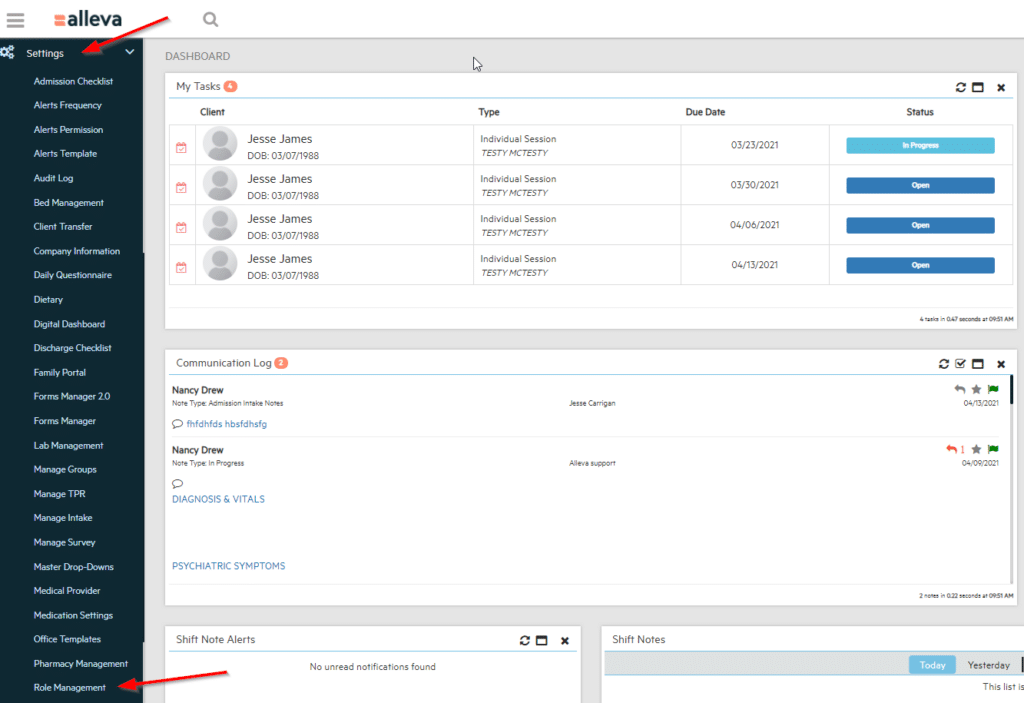
Design role templates that map to real job functions, intake coordinator, clinician, therapist, billing specialist, and assign least-privilege permissions. Tie system account creation to HR approval and training completion so access matches duties from day one.
Separate high-risk functions: no single user should be able to both edit clinical records and approve payments. Log approved exceptions with manager signoff and a retention note for audit purposes.
Access review schedule:
Hold quarterly access reviews with department managers to certify role accuracy. Record approvals and timestamp every change in an access-change register. Treat this register as part of your audit packet for CARF, Joint Commission, or state licensing inspections.
For a practical overview of how compliance documentation integrates with EMR access controls, how record management software helps your organization stay compliant covers the intersection of access governance and audit readiness.
Data Migration and Go-Live Planning Timeline Chart
| Phase | Activities | Timeline |
| Scope and mapping | Define migration scope; create field-by-field mapping document | 4–8 weeks pre-go-live |
| Validation sampling | Sample records across sites; verify clinical fidelity | 2–4 weeks pre-go-live |
| Parallel testing | Run live parallel workflows; tune templates and training | 2–4 weeks pre-go-live |
| Cutover | Execute big-bang or phased cutover; off-hours freeze window | Go-live weekend |
| Stabilization | Monitor, triage issues, complete post-load reconciliation | Weeks 1–4 post-go-live |
Start by defining the data scope: demographics, encounters, medications, treatment plans, consents, and attachments. Create a field-by-field mapping document and resolve vocabulary mismatches between source and destination systems. Keep regulatory and billing requirements front of mind when prioritizing what migrates first.
Run live parallel operations for two to four weeks to catch documentation and billing gaps. Use parallel testing findings to tune staff training and adjust templates before full cutover.
Rollback planning:
Document rollback triggers, backup processes, and decision authority before go-live. Rehearse at least one rollback drill so your team knows the steps and timing before you need them.
For guidance on managing a smooth EMR transition without disrupting clinical operations, successfully migrating your EMR with Alleva covers the key steps and common friction points.
Training, Support, and Ongoing Optimization
A clear support model pairs vendor helpdesk coverage with trained local superusers and a searchable knowledge base. Superusers reduce ticket volume, speed issue resolution, and serve as the first line of support for clinical staff who encounter problems during high-volume periods.
For training, use front-loaded role-specific sessions and live workflow shadowing before go-live. Include competency checks and one-on-one coaching for high-volume clinicians. Research published in JAMA Internal Medicine found that team-based documentation support lowered EHR time for clinicians after implementation.
Ongoing optimization cadence:
Track time-per-chart and click-count metrics weekly after go-live. Run focused workflow audits when metrics drift from baseline. Pair scenario-based microlearning with superuser coaching to reduce documentation errors and recover clinician time.
For ongoing platform training and certification resources, Alleva University provides role-specific learning materials for platform users. For the full comparison, see our buying guide.
Clinical Decision Support and Alert Configuration
Clinical decision support (CDS) improves patient safety when configured well and creates alert fatigue when it isn’t. Translate clinical policies into discrete, actionable rules that specify when an alert fires, who must respond, and what documentation or escalation is required.
Tier alerts by severity:
Route high-priority alerts, suicide risk screening flags, severe drug interactions, critical lab values, to real-time notifications for the assigned clinician. Route lower-priority informational items to daily digest summaries to reduce interruptions during sessions.
Conduct periodic alert audits to track false positive rates and recalibrate thresholds. Treat alert tuning as an ongoing operational task, not a one-time configuration.
Telehealth, Patient Portal, and Secure Messaging
Telehealth visit documentation requires the same clinical completeness as in-person visits. Create the appointment in the EMR, mark it as telehealth, and record platform details, start and end times, and patient consent in the encounter metadata at check-in.
Store signed e-consents with timestamp, signer identity, and versioning for audit readiness. Use encrypted messaging through the patient portal and enable auto-notifications to reduce missed communications. Configure role-based portal permissions for patients, caregivers, and proxies, and require multi-factor authentication for clinician logins.
Messaging triage workflow:
Route urgent clinical flags to on-call clinicians, administrative messages to front desk, and non-urgent clinical items to the assigned clinician. Train staff on response SLAs and use templates for common communication types.
Backup, Disaster Recovery, and Data Continuity
Your EMR’s backup and disaster recovery plan must meet HIPAA Security Rule contingency requirements. Set backup cadence and retention to match your recovery point objective and applicable state or accreditation standards, daily snapshots or more frequent point-in-time backups are appropriate for most behavioral health programs.
Vendor SLAs to confirm in your contract:
Require documented recovery time objectives and recovery point objectives, encryption at rest, access controls documentation, and breach notification timelines that match HIPAA expectations. Make audit-readiness part of procurement criteria.
Run restore drills at least quarterly, log outcomes, and train staff on the restore playbook. Time the restore, validate data integrity, and track open issues to resolution. A documented, tested recovery plan is an accreditation requirement, not just a best practice.
Measuring Clinician Efficiency and Data Quality
Clinician efficiency drives throughput and documentation accuracy. A study in Annals of Internal Medicine measured approximately 16 minutes of EHR work per outpatient visit, a baseline that varies significantly by specialty, visit type, and template design.
Metrics to track:
- Time per chart and documentation lag (reveals charting bottlenecks)
- Click counts to complete common note types (reveals template inefficiency)
- Template usage rates versus free-text rates (reveals inconsistent documentation patterns)
Running data quality audits:
Audit missing fields, inconsistent coding, and template misuse on a defined schedule. Prioritize templates that touch billing, consent documentation, and accreditation evidence, errors in these areas create the highest downstream risk.
Fix issues with targeted training, template cleanup, and automations that remove manual steps. Cleaner notes shorten billing review time, reduce denial rates, and free clinician capacity for patient care.
See Alleva EMR in Action
A behavioral health EMR that connects admissions, clinical documentation, compliance, and billing into one workflow can meaningfully reduce the administrative burden your team carries. The right configuration, purpose-built templates, verified internal links, role-based access, and integrated billing, makes the difference between a system your clinicians work around and one they rely on.
Request a demo of Alleva’s behavioral health EMR platform to see how the platform handles clinical documentation, billing integration, and compliance workflows in practice.
Frequently Asked Questions
Here are some questions people also ask about how to use EMR software, and EMR/EHR tools more generally.
What is the difference between an EMR and an EHR, and which do behavioral health providers need?
An EMR is a digital record of care within a single organization. An EHR is a longitudinal record designed for cross-organization sharing and care coordination.
Behavioral health programs typically need an EMR built for therapy workflows, treatment plans, and consent segmentation. Programs that routinely exchange records with hospitals, primary care providers, or payers benefit from EHR-level interoperability.
How do I set up a new patient record and avoid duplicates?
Search for existing records using full name, date of birth, phone number, and insurance ID before creating a new chart. If your platform supports probabilistic matching, review candidate matches before proceeding. Document any assumed or temporary demographics to avoid creating a second account for the same person.
Can I e-prescribe controlled substances through a behavioral health EMR?
Yes, in most cases, provided the EMR supports DEA-certified EPCS, the prescribing clinician has completed identity-proofing, and the dispensing pharmacy is EPCS-enabled. Confirm your EMR vendor’s EPCS certification status and verify state-specific controlled substance prescribing rules before activating.
How do I protect sensitive behavioral health records during data sharing?
Share only the minimum necessary information and use document-level or field-level segmentation when the system supports it. Obtain and record patient consent where required, redact or tag psychotherapy notes, and use secure exchange standards with consent flags so receiving systems can respect segmentation. For substance use disorder records specifically, 42 CFR Part 2 consent requirements apply regardless of HIPAA.
What should I do if I discover unauthorized access to a patient chart?
Report the incident immediately to your privacy or security officer, preserve audit logs, and follow your organization’s incident response procedures. Notify affected patients and regulators as required, complete a root-cause analysis, and implement corrective actions, role changes, updated access reviews, or additional training, to prevent recurrence.
How do I migrate historical records from an existing system?
Define the migration scope, map source fields to your new templates, and validate a representative sample before bulk migration. Run samples first, validate clinical fidelity with clinicians, correct mapping issues, then execute the full migration with post-load reconciliation. Preserve original timestamps and author metadata where possible.
How can we reduce clinician documentation time without losing clinical detail?
Start with role-based templates and smart phrases that surface the right fields and reduce clicks. Create focused note types for common visit categories so clinicians can capture core information quickly. Consider ambient AI documentation for high-volume clinicians, the 2025 JAMA data on burnout reduction is specific and meaningful for behavioral health teams.

Kayla Briones is Sr. Product Marketing Manager at Alleva.