

Group therapy software selection depends on three factors: how securely a platform runs multi-participant sessions, how well it documents and bills group encounters, and how it proves compliance during an audit. This guide helps U.S. clinicians and program leaders evaluate, pilot, and implement the right platform for telehealth and in-person groups.
You will find a vendor demo checklist, pricing guidance, security checks, and a step-by-step migration plan. A behavioral health EMR built for clinical and operational teams shows how session video, group notes, attendance, and billing can live in one connected workflow instead of stitched-together tools.
The focus stays on software built for behavioral health teams, not general medical systems adapted after the fact.
Key takeaways
- Shortlist 6 to 8 vetted platforms: Cover group video, group documentation, billing, and EHR integration before you compare finalists side by side.
- Security is non-negotiable: Request a signed Business Associate Agreement (BAA) and SOC 2 report, and verify encryption at rest, audit logs, and access controls during demos.
- Group billing is audited hard: Group psychotherapy (CPT code 90853) is billed per participant, per session (not per group), so your software must map attendance to per-member claims and avoid cloned notes that trigger denials.
- Telehealth rules shifted in 2026: Multiple-family group psychotherapy (CPT 90849) was added to Medicare’s permanent telehealth list for calendar year 2026, changing how virtual groups can be delivered and billed.
Want to see how one platform handles group video, notes, attendance, and billing together? You can schedule a personalized demo to evaluate fit for your team.
What is group therapy software
Group therapy software runs clinical groups securely by combining group video, clinical documentation, scheduling, and billing in one system. For U.S. clinicians and program leaders, the safest platforms support HIPAA-compliant group video and workflows, consistent with federal telehealth guidance from the Substance Abuse and Mental Health Services Administration (SAMHSA).
This review evaluates platforms on BAA availability, group-video capability, documentation and billing workflows, EHR integrations, measurement-based care (MBC) support, price, and vendor support. Using consumer video apps without a BAA can create privacy exposure, so common HIPAA pitfalls to avoid are worth reviewing before you buy.
Who uses group therapy software
Group therapy platforms are used by U.S.-based clinicians, practice owners, program directors, and behavioral health operations leaders. They support programs across outpatient mental health, addiction-recovery groups, school and college counseling, and community clinics.
This review focuses on adult and program-level use. It defines acronyms on first use so you can read vendor proposals without guessing.
Key features of group therapy platforms
Group therapy platforms share a core set of capabilities that individual-therapy tools often handle poorly. Prioritize the features that keep group care secure, documented, billable, and audit-ready.
- Secure group video: Host controls, waiting rooms, breakout rooms, and encrypted, consented recording.
- Group scheduling and rosters: Recurring groups, co-facilitator roles, and one-tap or kiosk attendance capture.
- Group note templates: SOAP, DAP, BIRP, or GIRP formats with per-participant attendance and response stamps.
- Group billing: Correct CPT/HCPCS mapping, modifiers, and per-member claims that flow into revenue cycle management.
- Measurement-based care: Built-in PROMs with per-member scoring and cohort trends, not just aggregate scores.
- Consent and confidentiality: Signable group consent, 42 CFR Part 2 segmentation, and clear documentation of shared expectations.
- Security and compliance: A signed BAA, encryption, audit logs, and role-based access controls.
- EHR and RCM integration: Connected documentation, scheduling, and billing to avoid duplicate entry.
Top 8 group therapy platforms
Here is a list of the best group therapy platforms, with key features and what each does best. Behavioral health platforms bundle documentation, billing, and specialty workflows; video-first tools prioritize scalable teleconferencing but usually lack built-in billing or clinical templates.
1. Alleva – Best for addiction and behavioral health centers that want EMR, CRM, and billing in one system
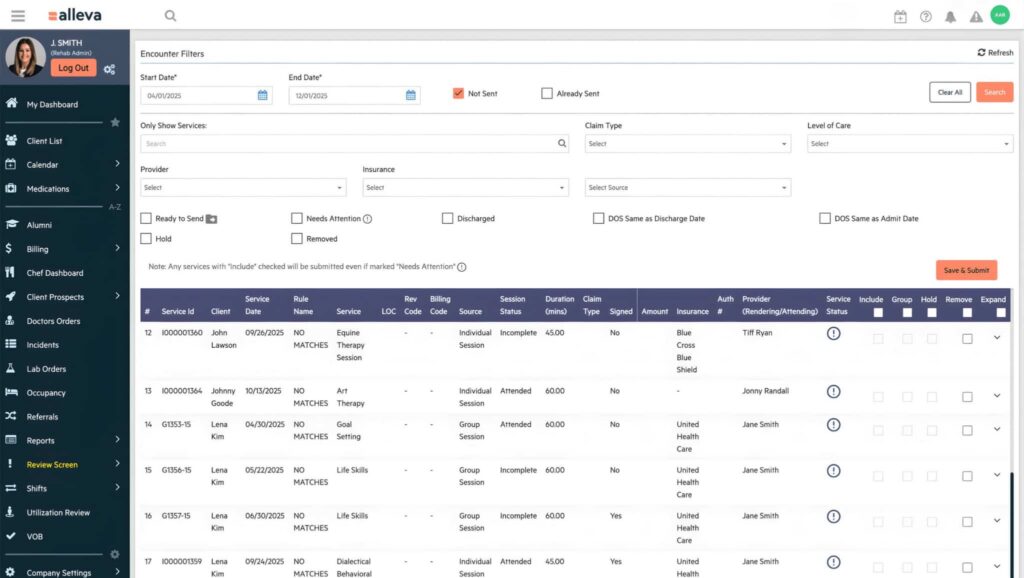
Alleva is an all-in-one operations platform built specifically for addiction and mental health treatment centers, combining EMR, customer relationship management (CRM), billing, AI-assisted notes, and compliance tools in one system. It is designed to reduce paperwork and support compliance so clinical teams can spend more time with clients and less on administration.
Alleva can work well for treatment centers that want AI-assisted clinical documentation generated during sessions, with a clinician reviewing the final note.
ALLEVA FEATURES
- Ambient AI notes with audit-ready templates
- Integrated revenue cycle management and billing
- Task-based note scheduling tied to the calendar
Pros
- Purpose-built for behavioral health across the full continuum of care
- EMR, CRM, and RCM combined
- Hands-on U.S.-based implementation and support
Cons
- Pricing is not published publicly
- More depth than a solo practitioner needs
- Setup and training take longer than lightweight tools
Want to see how one connected system runs group video, notes, attendance, and billing together? Take a guided tour of the Alleva platform built for behavioral health teams.
2. SimplePractice – Best for solo and small private practices.
SimplePractice is a widely adopted all-in-one EHR and practice-management platform for therapists and allied wellness practitioners. It handles scheduling, documentation, telehealth, a client portal, and insurance billing.
SIMPLEPRACTICE FEATURES
- Integrated telehealth video
- Client portal with online scheduling
- ePrescribe and insurance claim tools
Pros
- Broad specialty coverage
- Polished client experience
Cons
- Some features sit on higher tiers
- Not built specifically for treatment centers
- Per-clinician costs add up at scale
3. TherapyNotes – Best for small and group behavioral health practices.
TherapyNotes is a documentation-and-billing-first EHR for behavioral health that links notes, scheduling, and insurance billing. Its calendar automatically generates a to-do list of outstanding notes and pending billing actions.
THERAPYNOTES FEATURES
- Electronic claims to thousands of payers
- Automatic to-do list for notes
- Assisted ERA posting and superbills
Pros
- Clearinghouse included
- Transparent published pricing
- Unlimited non-clinical users
Cons
- Per-clinician pricing adds up
- Enterprise tiers can carry user minimums
- Some features cost extra
4. TheraNest (Ensora) – Best for outpatient practices and nonprofits.
TheraNest, now under Ensora Mental Health, is an all-in-one mental health practice-management tool covering scheduling, notes, treatment plans, billing, and reporting. It scales by active-client count and includes supervision workflows.
THERANEST FEATURES
- Individual and group therapy notes
- Supervisor review and co-signing
- Electronic claims and CMS-1500 forms
Pros
- Scales by clients
- Strong reporting
- Free trial
Cons
- Client portal can cost extra
- Pricing tiers get complex
- Outpatient focus rather than centers
5. TheraPlatform – Best for teletherapy and allied-health therapists.
TheraPlatform is a telehealth-first EHR and practice-management platform spanning mental health plus speech, occupational, and physical therapy. Its standout is a library of interactive therapy apps usable live during video sessions.
THERAPLATFORM FEATURES
- Built-in interactive therapy apps
- Two-way screen sharing with whiteboard
- Observer function for supervision
Pros
- Unlimited telehealth included
- Multi-discipline support
- Affordable with unlimited clients
Cons
- Basic plan limits added providers
- Several features are metered add-ons
- Interface feels dated
6. Owl Practice – Best for private-practice therapists wanting to grow.
Owl Practice is a mental-health-focused EHR and practice-management suite that also supports caseload growth through an integrated referral directory. It covers scheduling, telehealth, secure messaging, MBC, and billing.
OWL PRACTICE FEATURES
- 85+ clinical assessments
- HIPAA-compliant telehealth with screen share
- Benefits verification across many payers
Pros
- Client acquisition built in
- Purpose-built for mental health
- Free-to-start option
Cons
- Not aimed at multi-location centers
- Pricing not fully public
- Some value is tied to the referral directory
7. Sessions Health – Best for budget-conscious mental health practices.
Sessions Health is a therapist-designed, all-in-one EHR for mental health practices, covering scheduling, documentation, billing, telehealth, and a client portal. It emphasizes ease of use and transparent low-cost pricing.
SESSIONS HEALTH FEATURES
- Auto-scored assessments with progress graphs
- Load-from-previous-note with objective carry-over
- AI Assist for notes
Pros
- Affordable and transparent
- Easy to use
- Well-reviewed support
Cons
- Mental-health-only rather than medical
- Some features cost extra
- A few AI features are still rolling out
8. Valant – Best for behavioral health practices needing outcome measures.
Valant is an all-in-one EHR and practice-management platform built exclusively for behavioral health. It supports individual psychotherapy, medication management, and group counseling, in person or virtually.
VALANT FEATURES
- 100+ clinical templates for DBT, CBT, and more
- 80+ reportable outcome measures with auto-scoring
- Retention and financial reports
Pros
- Behavioral-health-only
- Deep outcome-measurement tooling
- Strong reporting
Cons
- Pricing not public
- Heavier than solo tools
- Onboarding takes planning
Best group therapy platforms comparison matrix
| Platform | Best for | BAA / security | Group documentation and billing | EHR / RCM integration | Pricing model |
|---|---|---|---|---|---|
| Alleva | Multi-location addiction and behavioral health centers | BAA available on request | Group note templates, attendance, group CPT/HCPCS support, built-in RCM | Native behavioral health EMR plus API | Custom quote |
| SimplePractice | Solo and small private practices | BAA available | Group appointment types, simple attendance, billing split | Calendar and payment integrations, API partners | Per clinician / month |
| TherapyNotes | Small and group behavioral health practices | BAA and HIPAA attestation | Mature group-note templates, detailed billing, clearinghouse included | API and common PM integrations | Per clinician / month |
| TheraNest (Ensora) | Outpatient practices and nonprofits | BAA available | Individual and group notes, supervisor co-sign, electronic claims | Practice-management integrations | Scales by active clients |
| TheraPlatform | Teletherapy and allied-health teams | Signs BAA, attests HIPAA | Group templates, attendance, billable-session support | API and practice-tool integrations | Per provider / clinic |
| Owl Practice | Growing private-practice therapists | BAA available | 85+ assessments, MBC, benefits verification | Zencare directory, billing tools | Per clinician / month |
| Sessions Health | Budget-conscious mental health practices | HIPAA-compliant, BAA | Auto-scored assessments, AI-assisted notes | Standard integrations | Low per clinician / month |
| Valant | Behavioral health practices needing outcome measures | HIPAA-compliant, BAA | 100+ templates, 80+ outcome measures, group counseling | All-in-one behavioral health EHR | Custom quote |
Why group therapy software is a different discipline
Group care follows documentation, billing, and confidentiality rules that individual-therapy tools rarely handle well. This is the single most important thing to evaluate, because a platform that ignores these rules can create compliance and revenue risk no matter how polished the video looks.
Named group note formats (SOAP, DAP, BIRP, GIRP)
Group progress notes use specific structures: SOAP (Subjective, Objective, Assessment, Plan), DAP (Data, Assessment, Plan), BIRP (Behavior, Intervention, Response, Plan), and GIRP (Goal, Intervention, Response, Plan). Look for configurable templates in these formats, plus per-participant attendance stamps on a single group encounter.
The platform should let you document one group note while recording each member’s participation and individual response. Tools that support AI-assisted documentation for group, individual, and family notes can generate structured notes to reduce duplicate charting.
Group billing mechanics beyond a single code
Group psychotherapy is commonly billed with CPT code 90853 when one clinician runs a session with two or more unrelated patients. It is billed per participant, per session (not once per group), so attendance must map cleanly to per-member claims.
Related codes include 90849 (multiple-family group psychotherapy) and HCPCS H0005 (substance use disorder group counseling). Confirm your platform captures the right code, units, and modifiers per payer, and verify current rules with the American Medical Association CPT codebook and your payers.
Layered confidentiality for groups
Group care carries confidentiality obligations that stack on top of HIPAA. Substance use records add protections under the federal 42 CFR Part 2 rule, and every group also depends on member-to-member confidentiality agreements.
Software should support consent capture, Part 2 segmentation, and clear documentation of the group’s shared confidentiality expectations. No platform can enforce member-to-member confidentiality on its own, so policy and facilitation still matter.
Why choosing the right group therapy platform matters
The right platform can shape compliance exposure, revenue capture, and how much time clinicians spend on paperwork versus care. The wrong fit tends to surface later as denied group claims, audit findings, and staff workarounds that are costly to unwind.
What is at stake in the decision:
- Compliance and audit risk: Per-participant documentation and Part 2 handling can support you during CARF, Joint Commission, and payer reviews.
- Revenue integrity: Clean per-member claims and correct group codes may reduce denials and days in accounts receivable.
- Clinician time: Connected notes, attendance, and billing cut duplicate entry so teams can focus on groups.
- Switching cost: Migrating rosters, notes, and recordings is disruptive, so a durable fit matters more than a low sticker price.
Because this is a multi-stakeholder, longer-term decision, involve clinical, billing, compliance, and operations leaders before you commit.
How we evaluated and scored group therapy platforms
We evaluated platforms with behavioral-health priorities front and center: security, clinical workflow fit, and group-video performance. We tested vendor claims against documentation, demos, and industry guidance, and weighted criteria to reflect operational and regulatory needs for 2024 to 2026.
| Criterion | Weight | What we checked |
|---|---|---|
| HIPAA/BAA and security | 20% | Encryption, role-based access, audit logs, signed BAA |
| Clinical workflow support | 20% | Group scheduling, co-facilitator roles, group-note templates, outcomes tracking |
| Video features for groups | 15% | Multi-party stability, waiting-room controls, breakouts, recording, bandwidth resilience |
| Documentation and billing | 15% | Group-note templates, group CPT/HCPCS support, claims export, audit trails |
| Integrations / EHR connectivity | 10% | API availability, HL7/FHIR readiness, behavioral-health EHR connectors |
| Pricing / model transparency | 10% | Clarity on per-user vs. per-location licensing and add-ons |
| Vendor support / reliability | 10% | SLAs, onboarding resources, training, uptime, escalation paths |
Scoring rubric and how to calculate a weighted score
We used a reproducible 0 to 10 raw scale per criterion, then converted to weighted points. Rate each criterion 0 to 10, multiply the raw score by the criterion weight, and sum the results for a 0 to 100 composite score.
Example: security 8/10 gives 16.0; clinical workflow 7/10 gives 14.0; video 9/10 gives 13.5; documentation and billing 6/10 gives 9.0; integrations 5/10 gives 5.0; pricing transparency 4/10 gives 4.0; vendor support 8/10 gives 8.0. That totals a composite of 69.5 out of 100.
You can swap weights to reflect your priorities and recalculate. If compliance is your top risk, raise HIPAA/BAA and security to 30 to 40 percent; if telehealth quality drives outcomes, boost video features and run real-world stress tests during trials.
Research methods and date
Our review combined primary and secondary sources. We reviewed vendor feature sheets and documentation, attended live demos, and analyzed user feedback on third-party sites. Research and scoring were completed in July 2026.
To strengthen experience and expertise signals, this review incorporates input from clinical directors, compliance officers, revenue-cycle managers, and multi-site operations leads.
[EXPERT QUOTE: clinical director on why HIPAA-compliant group workflows matter; include name, role, and license.]
Group video and telehealth controls
Secure video with host controls and breakout rooms is the baseline for virtual groups. Prefer platforms that are HIPAA-compliant and give a designated host explicit controls.
Telehealth use expanded sharply after the COVID-19 pandemic. The lessons from the rapid shift to telehealth still shape group-video expectations today.
Practical example: a cognitive behavioral therapy (CBT) skills group where the facilitator mutes everyone except the sharer, uses breakout rooms for paired exercises, and locks the room after start time.
Facilitator checklist for virtual groups:
- Host controls: Waiting room, admit flow, mute and unmute, spotlight, and recording toggles.
- Breakout rooms: Create, assign co-facilitators, and move participants easily.
- Security: Room locking, meeting passwords, and encrypted streams.
- Media tools: Screen share, whiteboard, file share, and controlled recording storage.
- Tech test: Run bandwidth and device checks with a mock participant.
In-person and hybrid group workflows
The best platforms handle in-person and hybrid groups, not just video. For in-person groups, look for roster-based or kiosk check-in, room scheduling, and one-tap attendance capture that flows into the group note.
Hybrid groups add complexity: some members join in the room while others attend remotely. Confirm the platform can capture attendance, place-of-service, and consent for both in-room and remote members on the same encounter.
What 2026 billing and telehealth-policy changes mean for group software
Group therapy software requirements shifted in 2026 as payers tightened per-patient billing rules, telehealth policy stabilized for some group codes, and privacy enforcement moved from written policy toward demonstrable technical controls. Buyers now ask vendors to prove safeguards, not just describe them.
Per-patient billing is enforced, and cloned notes get denied
The single billing rule most programs get wrong is that CPT 90853 is billed per patient, not per group. If ten patients attend one session, ten separate claims are submitted, each tied to that member’s own coverage and treatment plan.
Payers scrutinize group size and documentation when auditing these claims. Copy-pasting identical notes across members is a common denial trigger, so software should generate one group note while capturing each member’s individual response and attendance.
Medicare guidance generally expects group sizes at or below ten participants, and each patient must meet medical necessity with an active treatment plan. Your platform should tie attendance and the treatment plan to each per-member claim automatically.
Telehealth policy for groups changed in 2026
For calendar year 2026, multiple-family group psychotherapy (CPT 90849) was added to Medicare’s permanent telehealth services list, which affects how some virtual groups can be delivered and reimbursed. Telehealth groups often require a telehealth modifier (such as 95) and the correct place-of-service code (02 or 10) depending on payer.
Rules still vary by payer and state, so confirm current requirements before you build billing workflows. Software should let you flag telehealth delivery, capture clinician and participant location, and apply the right modifier and place-of-service per payer.
42 CFR Part 2 alignment for substance use groups
Recent updates aligned the federal 42 CFR Part 2 rule more closely with HIPAA for substance use disorder records, changing consent and disclosure expectations for programs that run addiction-recovery groups. Group software handling substance use records should support Part 2 segmentation and granular consent tracking.
For programs verifying coverage before groups begin, a clean verification of benefits (VOB) process reduces downstream denials. Keeping consent, Part 2 segmentation, and payer rules inside one system limits manual handoffs that create risk.
Vendors must now show proof, not badges
Privacy enforcement in 2024 to 2026 shifted toward vendor-focused reviews, so technical controls matter as much as written policies. Ask vendors for a SOC 2 Type II report with scope and date, encryption and key-management documentation, and penetration-test summaries with remediation status.
Make these demo asks non-negotiable: a live view of the audit-log interface, an exported sample that includes session and admin events, and region-based data-residency controls for multi-state programs. If a vendor cannot show controls or produce timely attestations, treat that as a red flag for audit and reimbursement readiness.
Tools like continuous compliance management built for behavioral health are designed to keep this documentation organized year-round.
Pricing and licensing
Pricing for group therapy software varies by vendor, charging model, and practice size. Common structures include per-user, per-site, per-session, and EHR-bundled packages. Storage, telephony, integrations, and implementation fees often push total cost well above the base price.
Common pricing models
- Per-clinician user: Monthly fee per licensed clinician; common for EHR-first products.
- Per-site: Flat fee for a clinic or location; helpful for small teams who share access.
- Per-session: Pay-as-you-go for telehealth or group sessions; useful for low-volume programs.
- Bundled with EHR: Group features included in a broader platform; simpler, but may hide add-ons.
Vendors often mix models, such as a per-user base plus per-session telehealth fees. Watch for implementation fees and one-time setup costs, which can equal several months of subscription.
How to verify pricing and what to watch for
- Confirm per-user vs. per-site billing and how the vendor defines a “user.”
- Ask what the base subscription includes (telehealth, charting, billing, reporting).
- Get written estimates for storage, telephony, API access, and per-session fees.
- Ask about implementation, training, data-export, and termination fees.
- Verify governance features: audit logs, HIPAA-compliant recording, and retention controls.
Legal, security, and billing controls
Legal, security, and billing controls protect patient privacy, reduce regulatory risk, and preserve reimbursement. Software should support documented consent, secure records, and payer-specific billing workflows so teams can run compliant group care without extra manual work.
BAA requirements and how to verify them
A BAA is required whenever a vendor creates, receives, maintains, or transmits PHI on your behalf. Ask for a signed BAA that covers subcontractors, breach-notification timelines, use limits, and return or deletion of data at termination. Federal guidance on covered entities and business associates explains where contractual responsibility sits.
Request the vendor’s SOC 2 Type II report or HITRUST attestation, the auditor name and report date, and any bridge letters covering gaps before you sign.
State variations and cross-state practice
State rules differ on licensure, consent language, and whether telehealth group sessions are permitted. Build intake workflows that capture participant location, timestamp, and state-specific consent, plus automated licensure checks for clinicians working across state lines.
Because group confidentiality already layers HIPAA, 42 CFR Part 2, and member-to-member agreements, apply the strictest applicable standard when participants join from different states.
Recording, encryption, and access controls
Require affirmative consent from every participant before recording, and let hosts disable recording at any time. Store recordings encrypted at rest (AES-256 or equivalent), publish a retention schedule, implement automated deletion, and log every access event.
Expect encryption in transit (TLS 1.2 or higher), plus multi-factor authentication (MFA), single sign-on (SSO), and fine-grained role-based access controls (RBAC). Require immutable, timestamped audit logs and the ability to revoke access instantly when staff change roles.
Keeping documentation audit-ready
Keep security attestations and the signed BAA in your procurement file for audits. Continuous compliance is easier when your documentation, chart audits, and credentialing live in one system rather than scattered spreadsheets.
For a practical routine, follow steps to keep your compliance documentation audit-ready between surveys. A single system can track CARF, Joint Commission, HIPAA, and state standards year-round.
Sample consent language (template only, adapt to state law)
Recording consent: “This group session may be recorded for clinical and quality-assurance purposes. By remaining in the session you consent to being recorded and acknowledge recordings will be stored securely, accessed only by authorized staff, and retained for [X] unless you request deletion. If you do not consent, notify the host now to be removed.”
Telegroup confidentiality: “Telehealth sessions involve virtual transmission of information. You agree not to record, photograph, or share session content outside the group, and you understand that absolute confidentiality cannot be guaranteed in virtual settings. Please join from a private location and use headphones.”
Implementation and migration playbook
This playbook walks you through adopting or switching group therapy software so you protect clinical workflows, reduce downtime, and measure return. Follow discovery, demo, pilot, migration, training, go-live, and KPIs for a controlled rollout.
Discovery and stakeholder alignment
Name your core use cases: closed vs. open groups, co-facilitated sessions, telehealth recordings, supervision, and reporting requirements. Hold a kickoff with clinical, operations, IT, compliance, and finance leads, and capture must-haves versus nice-to-haves.
Confirm budget, timeline, and whether you need EMR integration or a full platform replacement.
Demo checklist: 11 questions to ask every vendor
- Do you sign a HIPAA-compliant BAA, and do you list subcontractors?
- How is data encrypted at rest and in transit, and who manages keys?
- What are session recording retention policies and export formats?
- Can we export backups of recordings and clinical notes in bulk?
- Do you provide open APIs for attendance, roster, and notes?
- How do multi-site licensing and tenant separation work?
- Does the product integrate with our EMR, SSO, and user directory?
- What role-based access and audit logging exist for group notes and recordings?
- Which group CPT/HCPCS codes and telehealth modifiers do you capture?
- What onboarding and training costs and timelines apply?
- What is your data-deletion and vendor-exit process?
Pilot, migrate, train, and go live
Run a live pilot with one experienced facilitator and a representative cohort. Treat it like a 2 to 6 week sprint that tests roster sync, attendance capture, facilitator tools, recording workflows, and note templates.
For migration, export attendance logs, group notes, and recordings in native and open formats. Map fields (group event to encounter ID, attendees to member IDs, notes to chart links), migrate a small test batch first, and validate before retiring source systems.
Build a role-based training calendar with short micro-trainings, recorded how-tos, and live practice labs. Expect a full rollout to take 2 to 4 months, longer for deep EMR integrations or multi-site setups.
Post-launch KPIs to track
- Group attendance rate and no-show rate.
- Average group size and session fill percentage.
- Percent of notes closed within 24 to 72 hours.
- Monthly admin hours saved on scheduling and billing.
- Recording exports and compliance requests fulfilled.
Final recommendations and next steps
Your best choice depends on practice size, specialty focus, and compliance needs, so plan to test before full rollout. A connected platform that unifies clinical documentation, CRM, and RCM can help you avoid stitching together point tools.
For small practices, pick a lightweight, configurable system with strong templates and predictable pricing. For a budget start, begin with core documentation and scheduling, then add billing modules once return is clear, and ensure open APIs so you avoid vendor lock-in.
To narrow vendors, run side-by-side demos using your own workflows, score each against the criteria above, request a sandbox or pilot with real staff, and keep security attestations and the signed BAA in your procurement file.
Implementation and migration need a staged timeline and group-specific attention. Plan each phase with owners and milestones to protect active groups and preserve clinical history. Allow extra time for mapping group rosters, attendance logs, session recordings, and 42 CFR Part 2 consent reconciliation.
Confirm acceptance criteria before cutover. Our overview of key steps for migrating your EMR walks through the export-and-mapping sequence in more detail.
Talk to our team
If you want to see the full intake-to-payment flow for group programs in one system, we are glad to help. You can request a personalized demo to walk through group video, notes, attendance, and billing with your workflows in mind, or call us at (877) 425-5382.
Frequently asked questions
What is group therapy software?
Group therapy software runs multi-participant clinical sessions by combining group video or in-person check-in, group progress notes, attendance capture, scheduling, and billing in one system. Behavioral-health-specific platforms add group-note templates, per-participant attendance stamps, and group billing codes that general tools often miss.
How is group therapy billed?
Group psychotherapy is commonly billed with CPT code 90853, per participant and per session rather than once per group. If ten patients attend, ten separate claims are submitted, each tied to that member’s coverage and active treatment plan. Confirm current codes, modifiers, and rates with CMS and your payers.
Is consumer video like Zoom or FaceTime HIPAA-compliant for groups?
Consumer video apps can create privacy exposure when they handle PHI without a signed BAA. For clinical groups, use a platform that signs a BAA and documents encryption, access controls, and audit logging. Video-first tools with a healthcare BAA can work, but usually need a separate EHR for documentation and billing.
What group note format should we use?
Common structured formats are SOAP, DAP, BIRP, and GIRP. Choose the format your payers and accreditation bodies expect, and use configurable templates that capture one group note with each member’s individual response and attendance. Avoid cloned, identical notes across members, which payers frequently flag.
How long does implementation take?
A focused pilot usually runs 2 to 6 weeks, and a full rollout commonly takes 2 to 4 months. Multi-site programs and deep EMR integrations take longer. Migrating active rosters and mapping billing codes before go-live helps prevent revenue gaps.
How much does group therapy software cost?
EHRs with group features commonly run about $30 to $150 per clinician per month, while multi-site organizations typically receive custom enterprise quotes. Storage, telephony, integrations, and implementation fees affect the total. Verify current pricing on each vendor’s page and record the date you checked.
Key terms and acronyms
- BAA (Business Associate Agreement): HIPAA-required contract defining how a vendor protects PHI on your behalf.
- HIPAA (Health Insurance Portability and Accountability Act): Federal standards for protecting individually identifiable health information.
- EHR (Electronic Health Record): Digital patient record storing notes, orders, and health data across settings.
- MBC (Measurement-Based Care): Routine use of validated measures to guide clinical decisions and track outcomes across a cohort.
- VOB (Verification of Benefits): Confirming coverage, eligibility, and financial responsibility before services; determines group billing rates and copays.
- CBT (Cognitive Behavioral Therapy): Structured therapy targeting thoughts and behaviors; group modules attach curricula, homework, and aggregated scores.
- DBT (Dialectical Behavior Therapy): Skills-based therapy for emotion regulation and distress tolerance; software tags skills taught and tracks practice.

Kayla Briones is Sr. Product Marketing Manager at Alleva.