

You can select the best outpatient EHR for behavioral health through vendor subscription plans, an all-in-one behavioral health operations platform, or an RCM (revenue cycle management)-integrated managed service. Alleva is built exclusively for behavioral health — one operations platform spanning EMR/EHR, billing/RCM, and compliance — so outpatient programs can shortlist against connected workflows instead of stitching point tools together.
Vendors typically return RFP responses and schedule demos in 7–21 days, and implementations commonly run 12–20 weeks. This practical guide provides a TCO model, a demo and RFP checklist, and a migration timeline so you can shortlist and plan with confidence.
TL;DR: For outpatient behavioral health, the real choice is an all-in-one operations platform (EMR + RCM + compliance in one) versus a standalone EHR you wire to separate billing, PDMP, and compliance tools. Match the pick to clinic size, care model, and billing complexity — and gate every finalist on SOC 2 evidence plus a HIPAA BAA.
Key Takeaways
- Decision rule: Choose an all-in-one platform if you run multi-site, group-heavy, or audit-frequent programs; a standalone EHR plus a selective RCM partner can work for a single-site clinic with simple billing.
- Implementation window: Plan for a 12–20 week implementation for single-site outpatient programs.
- Training estimate: Budget 10–30 clinician training hours per FTE during rollout.
What does an outpatient EHR do?
An outpatient EHR centralizes patient scheduling, encounter-level clinical documentation, progress and group therapy notes, and billing workflows so your clinic can manage high-volume ambulatory care. It connects to labs, pharmacies, telehealth, and payer verification tools to reduce manual steps. It also supports audit readiness for standards like CARF and reporting expectations from SAMHSA.
How does it differ from inpatient EHRs?
Outpatient systems are built for short, frequent encounters and visit-level billing. Inpatient EHRs focus on bed management, continuous nursing orders, and stay-level billing. The difference makes inpatient systems a poor fit for ambulatory behavioral-health workflows.
When you compare platforms, check:
- How easily the EHR handles multi-provider, multi-session treatment plans
- Whether group therapy documentation is native and searchable
- Support for encounter-based billing and payer integrations
- Built-in tools for verification of benefits and denials management
Who benefits most from a purpose-built outpatient EHR?
If you run an addiction clinic, outpatient mental-health practice, PHP, or IOP, an outpatient EHR reduces administrative work and supports revenue capture for encounter-based billing. Operations teams save time, clinical directors gain clearer treatment visibility, and revenue-cycle teams can see fewer denials when VOB and payer integrations are native.
Because Alleva is a full behavioral-health operations platform, compare EMR (electronic medical record), RCM, and compliance capabilities when you evaluate systems so you get connected workflows across admissions, treatment, and billing. Clinics narrowing the field by clinical specialty rather than level of care can start from EHR systems built for mental health and apply the same connected-workflow test.
Best Outpatient EHR for Behavioral Health & Healthcare Needs in 2026
Here are the best outpatient EHR to choose from, plus what each does well.
1. Alleva – Best outpatient treatment centers that need clinical, billing, and compliance tools in one system
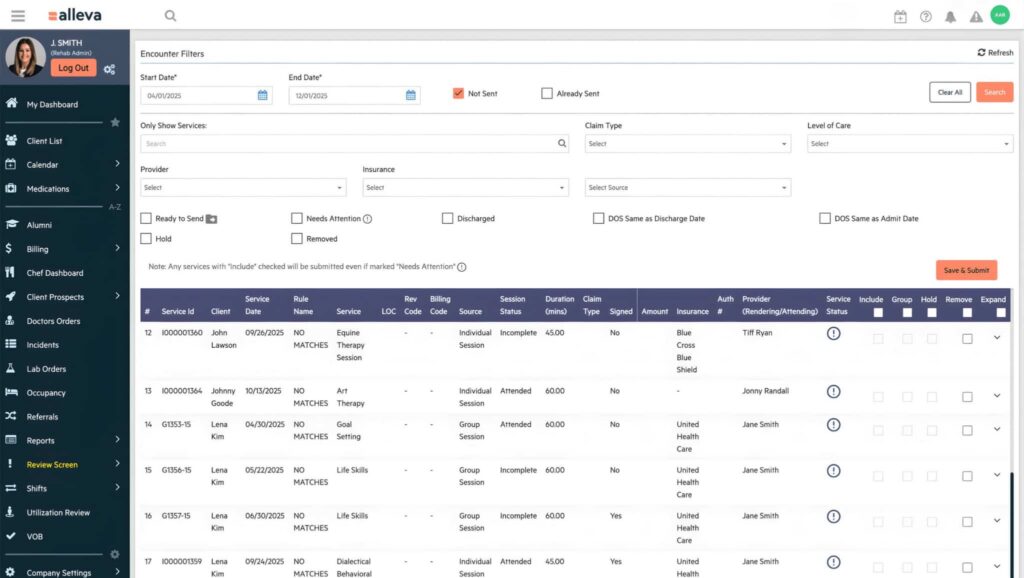
Alleva is an all-in-one EHR platform built exclusively for behavioral health and addiction treatment programs, combining clinical documentation, admissions, e-prescribing, billing, and outcomes tracking in a single system. It’s designed to support the full continuum of care—from detox and residential to PHP, IOP, and outpatient—so teams don’t have to stitch together separate tools.
Alleva works well for centers that want ambient AI note-taking, with its Echo tool listening to sessions and generating audit-ready notes in real time without saving recordings.
ALLEVA FEATURES
- Ambient AI note generation with Echo
- Built-in revenue cycle management and billing
- Task-based workflow for clinical documentation
- E-prescribing with drug-interaction safety alerts
- Client and family portal with telehealth
- Level-of-care support for detox, PHP, IOP, RTC
Pros
- All-in-one behavioral health platform
- Ambient AI clinical documentation
- Integrated billing and eligibility checks
- Purpose-built for treatment-center workflows
Cons
- Behavioral health only, not general practice
- Likely more than solo practitioners need
2. NextGen Behavioral Health – Best for large behavioral health and human-services agencies that also deliver primary and oral care
NextGen Behavioral Health is an integrated EHR built for behavioral health, human-services, and addiction-treatment organizations that also provide primary and oral care in one platform. It targets larger outpatient, residential, and community-based agencies that need documentation, billing, and reporting unified across service lines.
NextGen works well for residential programs, offering electronic medication administration records (eMAR) and bed-board tools most private-practice tools skip. If residential is your primary level of care, compare the residential treatment software options built specifically for 24/7 programming.
NEXTGEN BEHAVIORAL HEALTH FEATURES
- Integrated behavioral, primary, and oral care
- eMAR and bed board for residential
- Feature-rich behavioral health billing system
- Packet navigation for documentation workflows
- Analytics-driven, interoperable clinical workflows
Pros
- Broad multi-service care model
- Strong residential and facility tooling
- Handles complex behavioral health billing
Cons
- Built for larger organizations
- No public pricing
- Overkill for solo practices
3. SimplePractice – Best for solo and small-group mental health private practices
SimplePractice is practice-management software for therapists and small mental-health practices, covering scheduling, documentation, billing, and a client portal. It’s designed for solo and group private practices rather than facility-based treatment centers.
SimplePractice works well for client-facing engagement, pairing a client portal with integrated telehealth, online booking, and self-service AutoPay.
SIMPLEPRACTICE FEATURES
- Scheduling with automated appointment reminders
- Client portal with integrated telehealth
- Billing, claims, and AutoPay
- Insurance credentialing assistance
- Measurement-based outcome tracking tools
Pros
- Easy setup for solo practices
- Transparent public pricing and trial
- Strong client-facing portal
Cons
- No facility admissions or RCM
- Not built for treatment centers
- Limited multi-location operations support
4. TherapyNotes – Best for solo and group practices that want notes-first documentation
TherapyNotes is behavioral-health practice-management software centered on clinical documentation, scheduling, and billing for solo and group practices. It’s built around structured notes and records management rather than facility operations.
TherapyNotes works well for connected workflows, tying appointments, note templates, and billing together in one records system.
THERAPYNOTES FEATURES
- Structured behavioral health note templates
- Scheduling with calendar and reminders
- Integrated billing and electronic claims
- Client portal and telehealth
- E-prescribing for behavioral health
Pros
- Strong structured documentation workflow
- Public pricing and free trial
- Reliable scheduling and billing
Cons
- No treatment-center operations layer
- Not for multi-location facilities
- Limited CRM and admissions functionality
5. ICANotes – Best for psychiatry and behavioral health teams that want fast button-driven charting
ICANotes is a behavioral-health EHR built around narrative, button-driven charting for psychiatrists, therapists, and other mental-health clinicians. It bundles scheduling, integrated billing, telehealth, and e-prescribing, and isn’t intended for general medicine or large hospital systems.
ICANotes works well for speed, generating narrative clinical notes largely from menu and button selections instead of typing.
ICANOTES FEATURES
- Button-driven narrative note generation
- Scheduling and appointment management
- Integrated billing and claims
- HIPAA-compliant telehealth
- E-prescribing including controlled substances
Pros
- Very fast psychiatric charting
- Purpose-built for behavioral health
- Free trial available
Cons
- Not for general medicine
- No facility or enterprise operations
- No CRM or admissions
6. athenahealth – Best for practices wanting a networked ambulatory EHR with a behavioral-health configuration
athenahealth’s athenaOne is a cloud ambulatory platform combining EHR (athenaClinicals), revenue cycle (athenaCollector), and patient engagement (athenaCommunicator), offered in a behavioral-health configuration. It’s a general ambulatory system adapted for behavioral health rather than an addiction-treatment specialist.
athenahealth works well for care coordination, tapping a large national provider network for record sharing and referrals.
ATHENAHEALTH FEATURES
- Behavioral health screeners (HAM-A, HAM-D, CFARS)
- Integrated EHR, RCM, and engagement
- Large national interoperability network
- E-prescribing including controlled substances (EPCS)
- DAP and SOAP documentation layouts
Pros
- Broad networked interoperability
- Combined clinical and billing suite
- Built-in behavioral health screeners
Cons
- General ambulatory, not addiction-specialist
- No facility admissions or bed management
- No public pricing
7. eClinicalWorks – Best for large medical networks needing a general cloud EHR with a behavioral-health module
eClinicalWorks is a large cloud-based ambulatory EHR serving many medical specialties, with a behavioral-health configuration plus add-ons like an AI scribe and revenue cycle management. It’s built for broad medical networks rather than dedicated treatment centers.
eClinicalWorks works well for automation, offering an AI documentation scribe (Sunoh.ai) and an AI contact-center tool (healow Genie).
ECLINICALWORKS FEATURES
- Cloud EHR across many specialties
- Behavioral health EHR configuration
- Revenue cycle management services
- Sunoh.ai AI documentation scribe
- Patient engagement and telehealth (healow)
Pros
- Broad specialty and feature coverage
- AI scribe and automation tools
- Established interoperability infrastructure
Cons
- General EHR, not BH-specialist
- Not built for treatment centers
- Can be complex to implement
8. AdvancedMD – Best for general medical and independent practices wanting unified PM and EHR
AdvancedMD is a scalable practice-management, patient-engagement, and EHR suite for general medical and independent practices. It offers a mental/behavioral-health configuration but lacks addiction-treatment-specific clinical workflows.
AdvancedMD works well for practices scaling up, bundling practice management, billing, and EHR into one suite that grows with the office.
ADVANCEDMD FEATURES
- Practice management and scheduling
- EHR with charting templates
- Integrated medical billing and claims
- Patient engagement and telehealth
- Reporting and analytics dashboards
Pros
- Unified practice management and EHR
- Scalable for growing practices
- Strong billing and PM tools
Cons
- No addiction-treatment workflows
- General practice, not BH-specialist
- No facility admissions layer
9. CharmHealth – Best for small general and psychiatry practices wanting a flexible cloud EHR
CharmHealth is a cloud-based EHR with practice management, billing, and telehealth used by general and small behavioral-health practices, including psychiatry. It supports customizable notes and private charting but isn’t a treatment-center operations platform.
CharmHealth works well for sensitive records, with a “Private Charting” feature that restricts psychotherapy notes to the treating psychiatrist only.
CHARMHEALTH FEATURES
- Customizable SOAP and progress note templates
- Private charting for psychotherapy notes
- Billing, e-claims, and eligibility checks
- Telehealth video consultations
- Patient portal and mobile app
Pros
- Flexible, customizable documentation
- Private charting for sensitive notes
- Web and mobile access
Cons
- Not a treatment-center platform
- General and small-practice focus
- Limited facility operations tooling
How We Evaluated Outpatient EHRs (Methodology)
At Alleva, we score outpatient behavioral health EHRs against clinical, operational, and compliance criteria specific to behavioral health. Research updated July 2026. We use ONC certification guidance as a baseline, then adjust weights to reflect program size, specialty needs, and multi-site complexity.
Findings were informed by vendor demos, aggregated user reviews, accreditation standards, and interviews with behavioral health operations leaders.
Evaluation criteria we scored
We scored vendors on seven core dimensions that map to real operational pain points.
| Criterion | What we measured | Why it matters | Weight (%) | Our take |
| Behavioral-health-specific clinical templates | Group notes, measurement-based care (MBC), customizable care plans | Enables documentation without workarounds | 20 | Prioritize vendors with ready-made templates for addiction and mental health workflows |
| RCM (Revenue Cycle Management) | Payer rules engine, eligibility checks, real-time verification of benefits | Helps cut denials and speed cash flow | 18 | Strong RCM can reduce revenue leakage quickly |
| GRC (Governance, Risk, and Compliance) | Audit logs, retention policies, role-based access controls | Supports audits and accreditation readiness | 16 | Look for granular controls and easy audit exports |
| Integrations | Telehealth, PDMP, ePCS, clearinghouse and lab interfaces | Prevents workflow fragmentation across systems | 14 | Favor native integrations, not just APIs |
| Multi-site reporting | Consolidated reporting, location KPIs, roll-up dashboards | Essential for groups with multiple clinics | 10 | Reporting should show both site and enterprise views |
| Implementation / time-to-value | Deployment timeline, prebuilt configs, training support | Faster ROI and less disruption to care delivery | 12 | Shorter time-to-value matters for cash-strapped programs |
| Total cost of ownership | Licensing, implementation, training, integrations, ongoing support | Real-world affordability over 3 to 5 years | 10 | Evaluate true TCO, not just sticker price |
Scoring rubric and weighting
Each vendor received a 0–5 score per criterion, where 5 means best-in-class for behavioral-health-first features. We multiplied scores by the weights above to create a composite score. Vendors scoring below 2 in GRC or RCM were excluded from the shortlist to protect compliance and financial stability.
Final rankings favored balanced platforms that reduce administrative work and support billing outcomes.
Research sources and E‑E‑A‑T signals
Primary inputs included:
- Vendor demos and product documentation.
- Aggregated user reviews and client reference checks.
- Accreditation standards from CARF and The Joint Commission.
- Certification frameworks from the Office of the National Coordinator for Health IT (ONC).
We also conducted interviews to surface real-world trade-offs.
How to verify vendor security and compliance
Ask vendors for these items and verify them in writing:
- Current SOC 2 report and a signed HIPAA business associate agreement (BAA).
- Evidence of audit log capabilities and documented data retention policies.
- Sample payer-rule configurations and proof of clearinghouse connectivity.
- Details on encryption, access controls, and incident response procedures.
Pilot critical workflows with real users and request client references from similar-sized behavioral health programs.
Top outpatient EHRs for behavioral health
[SECTION REMOVED — for Carmen’s hand-rewrite.] The prior version named and ranked six vendors (five competitors + Alleva #1) with a comparison table and competitor pricing. That violates the no-competitor-citation rule and the Webserv-authored-superlative rule (config §4/§10). Rebuild here on neutral, defensible ground: “best for [use case]” framing tied to clinic size, care model, and billing complexity, or lean on the all-in-one vs. standalone comparison below. If you reintroduce a list, add ItemList + FAQPage schema and keep any pricing/feature claims sourced and current (freshness rule 1F&L-2).
Feature comparison: clinical documentation, RCM, integrations and compliance
This section compares core outpatient EHR features to buyer needs for U.S.-based outpatient behavioral health clinics. At Alleva, we frame comparisons around operational outcomes: clinical efficiency, revenue, and audit readiness.
Which feature differences matter most for outpatient behavioral health?
Comparing an all-in-one behavioral health platform with a standalone outpatient EHR shows which features drive clinician workflow, compliance, and revenue. Platforms bundle EMR (electronic medical record), RCM, and GRC tools to reduce handoffs and centralize reporting. Choose a standalone EHR only when simplicity and lower up-front cost outweigh the integration and reconciliation work of multiple vendors.
How do all-in-one platforms and standalone EHRs compare overall?
| Feature | Why it matters (context: compliance, revenue, clinician workflow) | Buyer need / Impact | Our take |
| Group therapy notes & cohort scheduling | Group documentation affects billing rules, attendance tracking, and outcomes reporting. | Ensures correct session counts, appropriate modifiers, and less roster work. | Choose platforms with native group-note templates and cohort calendars to cut manual reconciliation. |
| Measurement-based care (PHQ-9/GAD-7) | Routine symptom scales give objective progress data and support outcomes reporting. | Simplifies scoring, trend displays, and ties results to treatment plans. | Integrated MBC reduces duplicate entry and speeds clinical decisions. |
| Payer rules engine & claims scrub | Front-end edits and payer-specific rules catch coding and eligibility issues before submission. | Can lower denials, shorten AR days, and reduce payer back-and-forth. | A robust rules engine is essential for behavioral health RCM; standalone EHRs often lack this depth. |
| Telehealth + SSO / scheduling sync | Native telehealth linked to scheduling keeps sessions tied to the chart and claim. | Reduces admin time, lowers no-shows, and avoids duplicate entries. | Prefer platforms with built-in telehealth over bolted-on third-party tools. |
| PDMP & ePCS support | State PDMP checks and electronic prescribing for controlled substances are often required. | Supports compliance, prescriber workflow, and audit readiness for medications. | Verify state PDMP integrations and ePCS readiness before you buy. |
| Multi-site reporting & role-based access | Aggregated metrics and fine-grained access support centralized ops and accreditation. | Enables consolidated finances, clinical dashboards, and least-privilege security. | Platforms built for multi-site groups reduce reporting gaps and build time. |
| Audit logs / GRC features (CARF / Joint Commission) | Audit trails, policy libraries, and corrective-action workflows matter for surveys. | Cuts prep time and helps show continuous quality improvement. | Pick software that exports evidence and includes GRC content for CARF and Joint Commission reviews. |
Notes on impact (evidence-backed)
- Automated payer rules engines and front-end claim edits help reduce preventable denials by catching eligibility and coding issues, improving clean-claim rates, according to HFMA analyses.
- Embedding PHQ-9 and GAD-7 into workflows shortens documentation time and improves treatment tracking, supported by implementation studies in behavioral health settings.
- Native telehealth tied to scheduling and single sign-on lowers admin overhead and can reduce no-show rates versus disconnected systems, as shown in telemedicine reviews.
All-in-one behavioral health platform
All-in-one platforms unify behavioral health EMR, RCM, GRC, CRM, and analytics into one system. They eliminate many manual handoffs between clinical documentation and billing, which reduces duplicate entry and reconciliation work. If you manage multi-site programs, group therapy, or frequent audits, an integrated platform centralizes evidence for accreditation and finance teams. Alleva’s compliance tooling, InCheck, is built around CARF, Joint Commission, and state behavioral-health requirements.
Standalone outpatient EHR
A standalone outpatient EHR focuses on clinical documentation, scheduling, and basic workflows. It often deploys faster and costs less up front, but you may need separate vendors for behavioral health RCM, telehealth, PDMP/ePCS, and compliance tooling. That can increase integration effort and shift reconciliation work back to operations.
Which is best for you?
If you prioritize connected revenue operations, multi-site reporting, and accreditation readiness, an all-in-one behavioral health platform usually delivers better operational efficiency and lower long-run admin costs. If you are a small, single-site clinic with simple billing needs and tight upfront budgets, a standalone EHR plus a selective RCM partner may work short term. Evaluate total cost of ownership, integration risk, and whether the vendor offers behavioral-health-specific templates and GRC content before deciding.
What makes the best outpatient EHR for behavioral health clinics
The best outpatient behavioral health EHR pairs behavioral-health-first clinical workflows with integrated RCM (revenue cycle management) and audit-grade GRC (governance, risk, and compliance) controls. Evidence links integrated behavioral health IT to better care coordination and lower administrative burden, according to SAMHSA. At Alleva, we also recommend weighing implementation complexity, data migration needs, and interoperability limits before you buy.
Clinical workflow
Templates for individual, group, and family therapy, plus measurement-based care for PHQ‑9 (Patient Health Questionnaire‑9) and GAD‑7 (Generalized Anxiety Disorder‑7), reduce documentation time and improve capture. Favor systems with built-in templates for CBT (Cognitive Behavioral Therapy), DBT (Dialectical Behavior Therapy), and EMDR (Eye Movement Desensitization and Reprocessing), and configurable pathways for PHP and IOP programs. Alleva’s ambient documentation and analytics layer, Alleva Intelligence, is built to support clinicians rather than replace them.
What to ask in a demo
- Can you show a completed progress note for an individual, group, and family session using your templates?
- How does the system calculate and trend PHQ‑9 and GAD‑7 scores across visits?
- Can templates be duplicated and adapted by clinician role or program (PHP/IOP)?
Revenue cycle
A strong RCM should include automated VOB (verification of benefits), real-time eligibility, claim scrubbing, and denials workflows so your team spends less time on rework. Prioritize systems that surface payer rules during charge capture and provide dashboards that shorten A/R days.
What to ask in a demo
- Do you run automated VOB and show the coverage summary before intake?
- How do you surface payer-specific rules and modifier logic during charge capture?
- Show a denials dashboard and an example of an automated appeals workstream.
Compliance & GRC
Audit logs, configurable retention controls, and policy templates for CARF and Joint Commission readiness are essential for behavioral health. Your EHR should keep immutable audit trails, let you set state- and program-level retention rules, and support MRO workflows for controlled-substance testing.
What to ask in a demo
- Can you pull an audit log for a client and show who edited each field and when?
- Are retention policies configurable by state and program type?
- Do you include policy templates or checklists for CARF and Joint Commission readiness?
Integrations
First-class integrations cut clinician clicks and compliance risk. Look for native telehealth, PDMP query support, ePCS (electronic prescribing of controlled substances), lab connections, and a certified clearinghouse for claims to avoid point-to-point work.
What to ask in a demo
- Can you demonstrate a live PDMP lookup inside a patient chart and attach results to the note?
- Show ePCS for a controlled substance and how it records to the med list.
- Which clearinghouses and telehealth vendors are supported out of the box?
Multi-site operations
For multi-site groups, centralized billing, location-level reporting, and role-based access make scaling sane. You should centralize billing rules while exposing site dashboards for utilization, payer mix, and clinician productivity, with clear PHI partitioning by role and location.
What to ask in a demo
- Can you show a centralized billing view that rolls up across locations and drills to site-level detail?
- How do you manage location-specific payer contracts and rate schedules?
- Demonstrate role-based access and how you restrict PHI by site or program.
How 2024–2026 interoperability and privacy rules change outpatient EHR selection
Recent 2024–2026 rules accelerate demand for APIs, real-time patient access, and state-level PDMP integrations. These trends should shift your vendor shortlist.
The immediate consequence: require FHIR Patient Access, documented APIs, PDMP hooks, and consent-management flags to avoid prescribing interruptions and compliance penalties. See ONC information-blocking guidance and CMS interoperability resources for details.
Must-ask API and interoperability checklist
Ask these questions in every demo and RFP to avoid surprises during implementation.
- Do you support FHIR Patient Access (R4) APIs for clinical data and scheduling, and can you demonstrate live reads from a test EHR?
- Can you deliver FHIR Bulk Data exports for population health reporting and payer data requests?
- Do you support real-time Patient Access endpoints, and can patients download their full record?
- Is there a documented consent-management system that surfaces consent-management flags to clinical workflows?
- Do you have a PDMP integration path for my state’s PDMP, including automated checks at prescribing and discrete e-prescribing support for controlled substances?
- Are your e-prescribing flows certified for controlled substances and compatible with state-specific workflows?
- What is your API uptime SLA, rate limits, and developer sandbox access for integrations?
- Do you publish an open API spec and an integration guide, and do you provide a technical point of contact for implementation?
If a vendor can’t answer these, expect delayed integrations, extra custom development, and added compliance risk during audits.
Vendor claims to verify
Vendors often use shorthand claims that hide implementation gaps; verify these during technical due diligence.
- Claim: “We support FHIR Patient Access.” Verify: request an on-the-record demo hitting live Patient, Observation, and Medication endpoints, and ask for their API docs.
- Claim: “We integrate with state PDMPs.” Verify: confirm which states are supported and whether the integration is automated or manual. Ask for a reference where PDMP checks run at the point of prescribing, and review California CURES guidance.
- Claim: “We are compliant with CMS/ONC rules.” Verify: ask which specific ONC and CMS rule sections they mapped to, and request evidence of sandbox testing or participation in an API conformance program.
- Claim: “We support controlled-substance e-prescribing.” Verify: request documentation of controlled-substance e-prescribing workflows and any state e-prescribing exceptions they handle.
New vocabulary and 2026 buyer search queries
You’ll see new technical terms in vendor docs; know them and how buyers will search next.
- FHIR Bulk Data: a way to export large patient datasets for reporting and analytics. Buyers will search “FHIR Bulk Data export for outcome reporting” or “bulk FHIR for payer uploads.”
- Consent-management flags: discrete, machine-readable indicators that block or permit data sharing per patient choice. Expect searches like “consent flag propagation in EHR” and “behavioral health consent flags FHIR.”
- PDMP hooks: automated links that query a state Prescription Drug Monitoring Program at prescribing. Expect queries such as “PDMP API integration for outpatient EHR” and “automated PDMP check at e-prescribe.”
Consequences for vendors that lack these capabilities
If a vendor lacks modern API tooling, you’ll face stalled integrations, manual workarounds, higher total cost of ownership, and possible noncompliance with state PDMP or ONC/CMS access obligations. Over the next 12 to 24 months, these gaps can translate into slower admissions, prescribing delays, and audit exposure. For behavioral health organizations, make FHIR, PDMP connectivity, consent management, and documented APIs non-negotiable in your shortlist.
How to evaluate pricing, calculate total cost of ownership (TCO), and budget
This section explains how to evaluate pricing, calculate total cost of ownership (TCO), and budget for an outpatient EHR.
How much will an outpatient EHR really cost?
Total cost varies widely, so budget beyond the license fee. Include software, implementation, integrations, training, revenue-cycle management (RCM), and ongoing support. Run a TCO model that separates those cost buckets, projects savings, and includes migration downtime and a contingency line.
1. Inventory the license and subscription fees
Ask vendors for a clear price sheet showing per-user, per-clinic, and module pricing. Capture one-time setup fees, monthly or annual SaaS subscriptions, optional modules (for example, e-prescribing, PDMP/ePCS), and API costs. Note whether pricing is per clinician FTE, per named user, or per location and map that to your staffing roster.
2. Estimate implementation and data migration costs
List tasks: project management, data mapping, chart export/import, template configuration, and validation testing. Get vendor and partner quotes for each task and estimate internal staff hours (IT and clinical SMEs). Model lost productivity on go-live days by calculating average daily revenue and expected reduced throughput.
3. Count integration and third-party costs
Itemize integrations you need: telehealth, clearinghouse or claims gateway, e-prescribing/PDMP, labs, and SSO/identity providers. Ask for per-integration engineering estimates and any ongoing per-transaction fees from clearinghouses. Add monthly costs for middleware or an interface engine when present.
4. Plan training and change management
Budget clinician training of about 8–16 hours per FTE and administrative staff training of 8–24 hours as planning anchors. Price training as hours times trainer rate or vendor training fees, and include release-train cycles for documentation and super-user support. Use ONC guidance on EHR implementation to shape your plan.
5. Model revenue-cycle management (RCM) costs
Decide between internal RCM FTEs or a vendor-managed service. For internal modeling, use loaded FTE cost (salary + benefits + overhead) and estimated FTEs needed. For vendor RCM, get the fee basis: per-claim, per-claim-type, or percent of net collections, and include A/R follow-up and denial-appeals labor.
6. Add ongoing support, SLAs, and product roadmap fees
Clarify what the vendor includes: helpdesk hours, priority SLA response times, uptime guarantees, and regular patch/releases. Budget for premium support or accelerated SLAs if uptime or rapid fixes are critical. Include annual maintenance or customer-success fees the vendor may charge.
7. Include contingency, downtime, and migration risk
Set aside a contingency line for unexpected costs and lost revenue during migration. Calculate contingency from your data: average daily net revenue × expected disruption days + estimated overtime/backfill hours. That yields a defensible number you can stress-test.
8. Sample TCO worksheet structure (use this to build your spreadsheet)
| Cost item | Calculation method | Year 1 cost | Year 2+ annual cost | Notes | Our take |
| License / subscription | vendor quote (per-user × users) | Include module add-ons | Favor per-FTE pricing for clarity | ||
| Implementation & data migration | vendor + internal hours × rate | 0–minimal | Include testing and go-live support | Budget internal PM time separately | |
| Integrations | per-integration cost + monthly fees | Telehealth, clearinghouse, PDMP | Prioritize high-volume integrations first | ||
| Training & change mgmt | hours × trainer rate | refresher costs | Clinician and admin hours | Invest in a super-user network | |
| RCM staffing / vendor fees | FTE cost or % of collections | Include A/R follow-up labor | Model both internal and vendor scenarios | ||
| Support & SLA | annual support fee or tiered SLA | Response times, uptime | Negotiate credits for downtime | ||
| Contingency & downtime risk | avg daily revenue × disruption days | revisit annually | Migration risk, interface failures | Use conservative disruption estimates |
Use this worksheet to compare vendor quotes apples-to-apples and to present a multi-year budget to finance and operations.
9. Payback scenarios and conservative ROI math
Create three scenarios: conservative, likely, optimistic. For each, estimate incremental annual net benefit from faster claim submission, fewer denials, reduced days in A/R, and clinical/admin time savings. Use HFMA revenue-cycle benchmarks to set targets and compare against your baseline.
Example math: if Year 1 TCO = $150,000 and net recurring annual savings = $60,000, payback = $150,000 ÷ $60,000 = 2.5 years. Be conservative: assume modest improvements and exclude one-off efficiencies until proven.
10. Multi-site consolidation and scale costs
For multi-site groups, add integration complexity, multi-tenant licensing, and central reporting needs. Model incremental per-site configuration and training, plus cross-site data normalization. When consolidating, include migration sequencing costs and temporary dual-running expenses for clinics migrating later.
Our take: Build a granular, role-aware TCO model that highlights behavioral-health-specific needs — admissions, multidisciplinary teams, and regulatory documentation. That makes vendor comparisons clearer and gives finance and operations a defensible multi-year budget.
Migration checklist: switching from a legacy EHR to a behavioral-health outpatient EHR
If you’re moving from a legacy system to a behavioral health EHR, treat it as a staged program: prep → mapping → build & test → training → go-live & optimization. At Alleva, we recommend starting with discovery and stakeholder alignment, mapping clinical and billing fields, building integrations, and running parallel validation before clinician super-user training and a controlled go-live.
Expect a 12–20 week program, require vendor migration playbooks, and verify SOC 2 evidence and a signed BAA before any data transfer.
1. Discovery and planning
Define scope, stakeholders, timelines, and acceptance criteria. Capture who owns clinical workflows, billing rules, integrations, and compliance sign-offs. Ask the vendor for a written migration playbook and publish a resource plan that lists part-time versus full-time staff.
2. Data mapping and extract specification
Create a field-level map from legacy to target EHR for clinical and billing data. Include patient demographics, identifiers, encounters, orders, clinical notes, treatment plans, and payer IDs. Define data retention, archival, and deletion policies with legal and compliance teams.
3. Build, integrations, and security checks
Configure templates, flowsheets, and billing code sets tailored to behavioral health workflows. Build integrations to labs, clearinghouses, PDMP, and ePCS, and validate end-to-end message formats. Request vendor security evidence, confirm SOC 2 scope, and sign a BAA before copying data.
4. Testing and parallel validation
Run unit, integration, and end-to-end tests that mirror real clinic scenarios. Execute a parallel validation window where legacy and new systems run side-by-side for billing and clinical ops. Track discrepancies, reconcile them, and close issues before go-live.
Timeline and milestones (example 12–20 week Gantt-style plan)
| Week range | Milestone | Key deliverables | Estimated staff hours (org-wide) | Our take |
| 1–2 | Discovery & governance | Scope, stakeholders, migration playbook | 60–120 hrs | Align executives and ops early to avoid scope creep |
| 3–4 | Data mapping & extraction spec | Field map, extract scripts, test data sets | 80–160 hrs | Map clinical and billing fields clearly; capture legacy codes |
| 5–7 | Build & integrations | Templates, clearinghouse/PDMP/ePCS integrations | 120–240 hrs | Prioritize integrations that block billing or controlled Rx |
| 8–10 | Integration & UAT testing | Test cases, issue log, fixes | 100–200 hrs | Use realistic test patients and payer scenarios |
| 11–12 | Parallel validation | Live-parallel runs, reconciliation reports | 80–160 hrs | Run at least 2–4 billing cycles in parallel |
| 13 | Clinician super-user training | Super-user workshops, checklists | 40–80 hrs | Train super-users to coach peers on day 1 workflows |
| 14–16 | Go-live & hypercare | Controlled cutover, daily support, ticket triage | 160–300 hrs | Stagger clinics if needed; prioritize safety & billing flow |
| 17–20 | Post-go-live optimization | Reports, process tweaks, final reconciliation | 80–150 hrs | Freeze major changes until stabilizing core workflows |
5. Sample data mapping fields
| Source field | Target field | Notes | Our take |
| Clinical note body | Progress note text | Preserve timestamps and authorship | Map free-text and structured fields separately |
| Progress note type | Encounter type / CPT | Link to billing encounter for charge capture | Standardize note types to avoid billing gaps |
| Treatment plan goals | Treatment plan module fields | Include start/end dates and objectives | Ensure goal IDs persist for audit trails |
| Payor ID / policy number | Payer account ID | Map legacy payer codes to payer master | Validate payer remit format with billing team |
| Encounter line items | Encounter-level billing rows | CPT, modifiers, units, dates of service | Confirm compatible clearinghouse formats |
6. Test cases (suggested 5–10 scenarios)
- New outpatient intake with co-pay and sliding-scale insurance
- Follow-up therapy session with time-based billing and group code
- Medication-assisted treatment visit with controlled Rx via ePCS and PDMP check
- Void/rebill and retro adjustments across payer types
- Multi-service encounter (therapy + case management) with bundled billing
- Eligibility denial and corrected resubmission to payer
- Discharge summary that triggers aftercare referral and claims finalization
7. Training, go-live, and roll‑out tips
Estimate core staff: project manager (0.25–0.5 FTE), clinical lead (0.1–0.3 FTE), RCM lead (0.2–0.5 FTE), and IT support during peaks. Avoid common pitfalls: inadequate hands-on clinician training, insufficient payer/testing of clearinghouse and ERA/835 flows, incomplete field mapping for encounter-level billing, and weak super-user coverage during hypercare. Keep initial go-live scope small and defer optional modules until post-go-live optimization.
8. Governance, documentation, and audit readiness
Keep an audit-ready migration log, reconciliation reports, and sign-off checklists. Require vendor migration playbooks, documented test scripts, and proof of security posture. Hold a formal go/no-go review with clinical, IT, compliance, and finance stakeholders before final cutover.
Vendor demo checklist and 15 must-ask RFP questions
Run demos and an RFP like an operator, not a salesperson. Start with a clear agenda for each role and force the vendor to show real workflows using a sample patient, not glossy slides. This process verifies clinical fit, integrations, security, and implementation risk for an outpatient behavioral health EHR.
1. Role-based demo script and checklist
Begin each demo with a one-line goal for the role and a timed script of role-specific tasks. Require a sample patient file and live runs of intake, treatment planning, notes, billing, and discharge.
Clinical leads
- Show daily note templates, group notes, treatment plans, and care-team assignment flows.
- Have a clinician complete a documentation task and a medication reconciliation in the UI. Look for behavioral-health-specific templates and quick macros.
Operations teams
- Demonstrate intake-to-admit flow, referrals, task queues, and multidisciplinary handoffs.
- Test electronic forms, consent capture, and PDMP/ePCS workflows. Confirm task automation and audit trails.
Finance / RCM
- Run an encounter from coding to claim submission, show payer rules mapping, and a VOB/real-time eligibility check.
- Confirm clearinghouse partners and denial-management dashboards.
Compliance / Security
- Walk through audit logs, role-based access, BAA terms, and SOC 2 evidence.
- Ask to export data from a sandbox and show data retention controls.
Demo checklist (quick)
- Use-case sample patient ready.
- Role-specific tasks scripted and timed.
- Integration tests queued: lab, PDMP, e-prescribe.
- Security walkthrough: audit logs, retention, encryption, BAA.
- Implementation: timeline, resources, training plan, support SLA, and exit/data export.
2. 15 must-ask RFP/demo questions (with acceptable answers and red flags)
Do you have a current SOC 2 report and will you sign a BAA?
- Acceptable answer: SOC 2 Type II available, vendor signs BAA with clear responsibilities.
- Red flag: No SOC 2 or “under review” with no timeline.
How are audit logs stored and what are your retention policies?
- Acceptable answer: Immutable logs, configurable retention, searchable exports.
- Red flag: Logs purged frequently or only viewable in the vendor portal.
Describe your ONC/FHIR capabilities and supported APIs.
- Acceptable answer: FHIR R4 resources for patient, scheduling, claims, and CCD; SMART on FHIR support noted.
- Red flag: Vague “APIs available” with no standards or docs.
Do you support state PDMP checks and ePCS for controlled substances?
- Acceptable answer: Integrated PDMP access and certified ePCS with audit trail.
- Red flag: Third-party add-on with poor UX or steep extra fees.
Can you perform real-time eligibility and provide a VOB workflow?
- Acceptable answer: Real-time eligibility, templated VOB docs, mapped payer responses.
- Red flag: Only batch eligibility or manual insurer lookups.
Do you include a payer rules engine for claim edits and denial prevention?
- Acceptable answer: Configurable rules, payer mapping, and a testing sandbox.
- Red flag: No rules engine or only static, nonconfigurable rules.
Which clearinghouse partners do you use and who manages claims/resubmits?
- Acceptable answer: Multiple clearinghouses, vendor-managed EDI, automated resubmit workflows.
- Red flag: Single unknown clearinghouse or vendor requires separate contract.
How do you handle multi-site reporting and consolidated dashboards?
- Acceptable answer: Role-based multi-entity reporting with drill-down and consolidation.
- Red flag: Reports only per site needing manual aggregation.
What are your training offerings and support SLAs?
- Acceptable answer: Role-based onboarding, live training, documentation, and published SLA (for example, 4-hour critical response).
- Red flag: No defined SLA or training only billed hourly.
What are your data export and exit terms?
- Acceptable answer: Standardized exports (CSV, C-CDA, FHIR), migration help, defined exit timeline and fees.
- Red flag: Proprietary export only or vague “we’ll help” language.
How do you secure PHI in transit and at rest and support audit readiness?
- Acceptable answer: TLS in transit, AES-256 at rest, regular pen testing, and audit-readiness tools for CARF/Joint Commission.
- Red flag: Generic “HIPAA-compliant” with no specifics or testing evidence.
Describe your pricing model and what’s included versus add-ons.
- Acceptable answer: Clear line-item pricing (per user/module), implementation costs, and third-party fees listed.
- Red flag: Only custom quotes with hidden module/add-on language.
How do you support integrations (SFTP, HL7, API) and what’s the typical timeline?
- Acceptable answer: Standard connectors, documented API, sandbox, and a 4–8 week typical integration window.
- Red flag: No sandbox, unspecified timelines, or per-connector surprise fees.
What are your backup, disaster recovery, and retention RTO/RPO targets?
- Acceptable answer: Published RTO and RPO targets, with tested DR plans.
- Red flag: No published RTO/RPO or untested DR processes.
Can you demonstrate behavioral-health workflows (group notes, MAT, progress tracking)?
- Acceptable answer: Ready demos of behavioral-health workflows and configurable templates.
- Red flag: Only generic ambulatory templates or inability to model group sessions or MAT.
3. Scoring template (quick rubric)
| Category | What to look for | Weight |
| Clinical fit | Behavioral-health templates, group notes, MAT support | 25% |
| Integrations | FHIR, eRx, PDMP, clearinghouse | 20% |
| Security & compliance | SOC 2, BAA, encryption, audit logs | 15% |
| Billing / RCM | Payer rules engine, VOB, clearinghouse | 15% |
| Reporting & multi-site | Consolidated dashboards, drill-down reports | 10% |
| Support & SLA | Training, response times, implementation plan | 10% |
| Pricing & exit terms | Transparent pricing, data export, exit terms | 5% |
Use this rubric during demos: score 1–5 for each category, multiply by weight, and compare totals to shortlist finalists. Prioritize vendors built specifically for behavioral health and those that reduce integration and compliance risk.
How to shortlist vendors and next steps
We recommend a behavioral-health-specific, full-platform EHR as the best overall fit for connected operations, and a lightweight EHR with strong RCM integration as the budget alternative. Many treatment centers choose Alleva for connected workflows and compliance-focused features. Smaller clinics may prefer a simpler EHR to reduce cost and implementation time.
Define clinical and RCM priorities
Start by listing your top clinical needs, then list revenue-cycle management needs. Clinical priorities often include multidisciplinary notes, group therapy workflows, outcome tracking, and task automation. RCM priorities usually include payer rules, claims scrubbing, denial workflows, and real-time eligibility checks.
Translate each need into measurable criteria you can score, for example:
- Documentation time per progress note (minutes)
- Percentage of claims passing first-time scrubbing
- Time from service to payment (days in A/R)
Score vendors 1–5 on each criterion, then weight scores by importance to your organization.
Use the TCO template and vendor scoring
Define TCO as the full cost of software over a 3–5 year horizon, including license fees, implementation, training, integrations, hosting, and hidden costs. Ask vendors for multi-year quotes and model best- and worst-case scenarios so comparisons are apples-to-apples.
Populate a spreadsheet with these line items:
- Initial licensing and implementation fees
- Data migration and integration costs
- Training and change-management hours
- Ongoing subscription, hosting, and support fees
- Estimated internal staff time for rollout and maintenance
Run 2–3 demos with scoring, then pilot and measure outcomes
Limit live demos to two or three finalists and use a short, standardized demo script that mirrors your most common clinical and billing workflows. During each demo, use the same patient scenarios and score responsiveness, configuration effort, and ease of use.
Ask for a sandbox or test tenant so clinicians can try real tasks. Before contracting, require vendors to provide SOC 2 reports and a signed BAA to confirm security and HIPAA responsibilities. Also request demo test cases and a sample data export to verify data portability.
Run a time-boxed pilot for 30–90 days and collect baseline data first so you can measure improvements. Track pilot metrics such as:
- Average documentation time per note
- Claims acceptance rate on first submission
- Days in A/R
- Staff task completion and user satisfaction
Next-step checklist
- Define and weight your clinical and RCM priorities
- Populate a 3–5 year TCO spreadsheet with realistic costs
- Run standardized demos for 2–3 vendors, using the same scenarios
- Request SOC 2, a signed BAA, demo test cases, and a sample data export
- Pilot the chosen system and measure documentation time, claims metrics, and A/R
- Compare pilot outcomes to vendor promises before final contracting
Recommended downloadable assets to use now: an evaluation checklist, a TCO spreadsheet, and a demo script template to standardize scoring across vendors. Ready to see connected outpatient workflows firsthand? Request a demo of Alleva.
Frequently asked questions
What is an outpatient EHR for behavioral health?
An outpatient EHR for behavioral health is an ambulatory-focused electronic health record built for short, frequent encounters — scheduling, progress and group therapy notes, encounter-level billing, and behavioral-health integrations like PDMP and ePCS. It differs from an inpatient EHR, which centers on bed management, continuous nursing orders, and stay-level billing.
What’s the difference between an EHR and an EMR?
An EMR (electronic medical record) is the digital chart within a single organization, while an EHR (electronic health record) is designed to share data across providers and settings. In practice the terms are often used interchangeably in behavioral health; many platforms, Alleva included, function as both.
How long does it take to implement an outpatient behavioral health EHR?
Plan for a 12–20 week program for a single-site outpatient program: discovery, data mapping, build and integrations, testing, parallel validation, super-user training, and a controlled go-live. Multi-site rollouts run longer because of sequencing, dual-running, and cross-site data normalization.
How much does an outpatient behavioral health EHR cost?
Cost varies by vendor, module set, and clinic size, and most behavioral-health platforms use demo-led pricing rather than public rates. Budget beyond the license fee: implementation, integrations, training, RCM, and support typically add roughly 10–25% on top of subscription costs. Build a 3–5 year TCO model to compare quotes fairly.
What compliance and security proof should I require before buying?
Require a current SOC 2 report and a signed HIPAA business associate agreement (BAA), plus evidence of immutable audit logs, configurable data retention, encryption in transit and at rest, and documented incident response. For accreditation, confirm the system supports CARF and Joint Commission readiness with exportable evidence.
Which features matter most for group-based outpatient programs (PHP/IOP)?
Prioritize native group therapy notes and cohort scheduling, measurement-based care (PHQ-9/GAD-7), a payer rules engine with claims scrubbing, PDMP/ePCS support, and multi-site reporting with role-based access. These reduce manual reconciliation and support correct session counts and modifiers for group billing.
Should I choose an all-in-one platform or a standalone EHR plus separate tools?
Choose an all-in-one platform if you run multi-site, group-heavy, or audit-frequent programs and want connected billing, compliance, and reporting in one system. A standalone EHR plus a selective RCM partner can work for a single-site clinic with simple billing and a tight upfront budget — accept the added integration and reconciliation work.
What interoperability capabilities should be non-negotiable in 2026?
Require FHIR Patient Access (R4) APIs, FHIR Bulk Data export, real-time patient access, documented consent-management flags, and an automated PDMP integration for your state with certified controlled-substance e-prescribing. Ask for a developer sandbox, a published API spec, and an uptime SLA before contracting.
This content is for informational purposes only and is not a substitute for professional medical, legal, or reimbursement advice. Verify each vendor’s certifications, security attestations, and regulatory capabilities independently before making a purchase decision. If you or someone you know is in crisis, call or text 988 (Suicide & Crisis Lifeline).
{ “@context”: “https://schema.org”, “@type”: “Article”, “headline”: “Best Outpatient EHR for Behavioral Health”, “description”: “Compare outpatient EHRs for behavioral health — all-in-one vs. standalone, a TCO model, migration timeline, and a demo/RFP checklist. Gate vendors on SOC 2 + BAA.”, “mainEntityOfPage”: { “@type”: “WebPage”, “@id”: “https://helloalleva.com/behavioral-health-technology/best-outpatient-ehr-for-behavioral-health/” }, “image”: “https://helloalleva.com/wp-content/uploads/2026/07/ETT-2048×1155-1.jpg”, “author”: { “@type”: “Person”, “name”: “Erica Ward”, “jobTitle”: “Product Manager, Alleva”, “url”: “https://helloalleva.com/about-us/our-team/erica-ward/” }, “publisher”: { “@type”: “Organization”, “name”: “Alleva LLC”, “url”: “https://helloalleva.com/”, “logo”: { “@type”: “ImageObject”, “url”: “https://helloalleva.com/wp-content/uploads/2025/04/alleva-logo.webp” } }, “datePublished”: “2026-07-28”, “dateModified”: “2026-07-28” } // ———- BLOCK 2: FAQPage ———- // Questions/answers mirror the on-page “Frequently asked questions” section verbatim-in-substance (2SD-4). { “@context”: “https://schema.org”, “@type”: “FAQPage”, “mainEntity”: [ { “@type”: “Question”, “name”: “What is an outpatient EHR for behavioral health?”, “acceptedAnswer”: { “@type”: “Answer”, “text”: “An outpatient EHR for behavioral health is an ambulatory-focused electronic health record built for short, frequent encounters — scheduling, progress and group therapy notes, encounter-level billing, and behavioral-health integrations like PDMP and ePCS. It differs from an inpatient EHR, which centers on bed management, continuous nursing orders, and stay-level billing.” } }, { “@type”: “Question”, “name”: “What’s the difference between an EHR and an EMR?”, “acceptedAnswer”: { “@type”: “Answer”, “text”: “An EMR (electronic medical record) is the digital chart within a single organization, while an EHR (electronic health record) is designed to share data across providers and settings. In practice the terms are often used interchangeably in behavioral health; many platforms, Alleva included, function as both.” } }, { “@type”: “Question”, “name”: “How long does it take to implement an outpatient behavioral health EHR?”, “acceptedAnswer”: { “@type”: “Answer”, “text”: “Plan for a 12–20 week program for a single-site outpatient program: discovery, data mapping, build and integrations, testing, parallel validation, super-user training, and a controlled go-live. Multi-site rollouts run longer because of sequencing, dual-running, and cross-site data normalization.” } }, { “@type”: “Question”, “name”: “How much does an outpatient behavioral health EHR cost?”, “acceptedAnswer”: { “@type”: “Answer”, “text”: “Cost varies by vendor, module set, and clinic size, and most behavioral-health platforms use demo-led pricing rather than public rates. Budget beyond the license fee: implementation, integrations, training, RCM, and support typically add roughly 10–25% on top of subscription costs. Build a 3–5 year TCO model to compare quotes fairly.” } }, { “@type”: “Question”, “name”: “What compliance and security proof should I require before buying?”, “acceptedAnswer”: { “@type”: “Answer”, “text”: “Require a current SOC 2 report and a signed HIPAA business associate agreement (BAA), plus evidence of immutable audit logs, configurable data retention, encryption in transit and at rest, and documented incident response. For accreditation, confirm the system supports CARF and Joint Commission readiness with exportable evidence.” } }, { “@type”: “Question”, “name”: “Which features matter most for group-based outpatient programs (PHP/IOP)?”, “acceptedAnswer”: { “@type”: “Answer”, “text”: “Prioritize native group therapy notes and cohort scheduling, measurement-based care (PHQ-9/GAD-7), a payer rules engine with claims scrubbing, PDMP/ePCS support, and multi-site reporting with role-based access. These reduce manual reconciliation and support correct session counts and modifiers for group billing.” } }, { “@type”: “Question”, “name”: “Should I choose an all-in-one platform or a standalone EHR plus separate tools?”, “acceptedAnswer”: { “@type”: “Answer”, “text”: “Choose an all-in-one platform if you run multi-site, group-heavy, or audit-frequent programs and want connected billing, compliance, and reporting in one system. A standalone EHR plus a selective RCM partner can work for a single-site clinic with simple billing and a tight upfront budget — accept the added integration and reconciliation work.” } }, { “@type”: “Question”, “name”: “What interoperability capabilities should be non-negotiable in 2026?”, “acceptedAnswer”: { “@type”: “Answer”, “text”: “Require FHIR Patient Access (R4) APIs, FHIR Bulk Data export, real-time patient access, documented consent-management flags, and an automated PDMP integration for your state with certified controlled-substance e-prescribing. Ask for a developer sandbox, a published API spec, and an uptime SLA before contracting.” } } ] }
Erica Ward is a Product Manager at Alleva.