

If your daily problems are manual bed lists, group-census spreadsheets, survey-prep scrambles, or billing that lives outside the chart, a residential-specific platform addresses the actual bottleneck. You can choose the best residential treatment software through product demos, short pilots, or a weighted RFP.
Key Takeaways
- Shortlist & pilot: Shortlist three vendors and run a 4–8 week pilot on core residential workflows.
- Score demos: Use a weighted RFP with role-based demo scripts and score usability, RCM (revenue‑cycle management — payer eligibility, claims, denials, and collections), integrations, and compliance.
- Implementation timeline: Expect single-site rollouts in 8–14 weeks and multi-site deployments in 4–9 months.
- Compliance checks: Verify audit trails, ADT (Admission, Discharge, Transfer) / HL7 (Health Level Seven data messaging standards) feeds, and export policy before signing to reduce migration and survey risk.
If you need help right away, schedule a short demo of Alleva EMR (electronic medical record) software with our team to see residential workflows and CARF-ready reporting in action.
Most pilots run 4–8 weeks, with single-site implementations typically 8–14 weeks; this practical guide shows how to shortlist vendors, run scored demos, estimate TCO, and plan a pilot so you can move from evaluation to confident implementation.
What is Residential Treatment Software?
Residential treatment software is an all-in-one behavioral-health operations software platform that combines EMR, CRM, RCM, compliance (GRC (governance, risk, and compliance)), and analytics. Core modules are EMR (electronic medical record), CRM (customer relationship management), and RCM (revenue-cycle management).
This section targets U.S. program directors, operations managers, clinical leads, and revenue-cycle and compliance officers at residential behavioral health and addiction treatment programs. If you want a deeper procurement toolkit, start with our best behavioral health EMR software buying guide. Organizations that also run detox or step-down levels can widen the search to software built for rehab programs across the full continuum.
SAMHSA and industry experts recommend integrated workflows, though needs still vary by program size and payer mix.
ALLEVA — Best for all-in-one behavioral health EMR with built-in compliance management
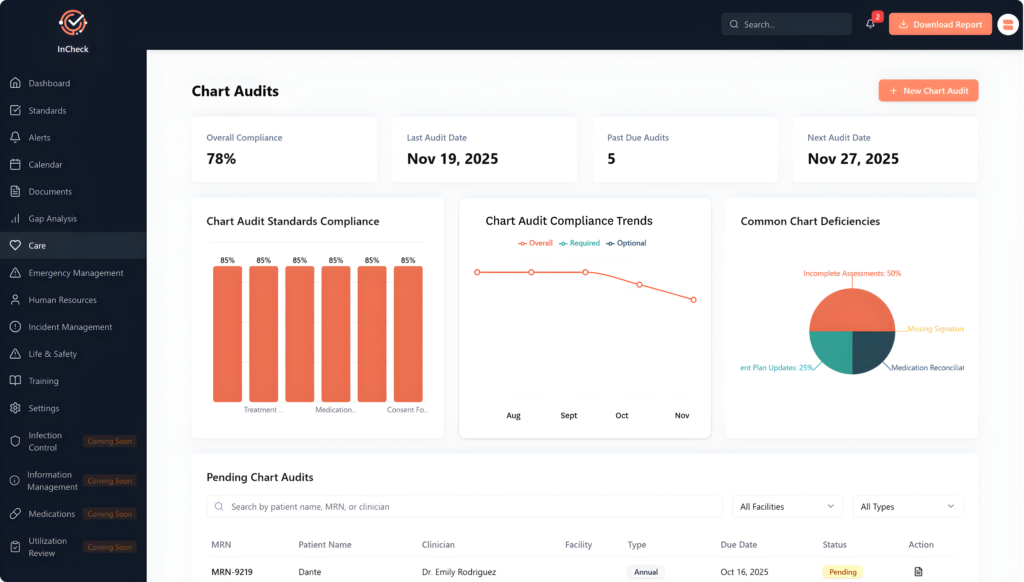
Alleva is a behavioral health EMR that combines clinical charting, billing, and accreditation tracking on one platform. It is built specifically for addiction and mental health treatment programs rather than general medical practices.
Alleva works well for operators who want compliance gap analysis and chart audits living in the same system as the clinical record.
ALLEVA FEATURES
- Ambient AI session transcription with SOAP/DAP notes
- Built-in revenue cycle management and claim scrubbing
- InCheck compliance module tracking accreditation standards
Pros
- Purpose-built for SUD levels of care
- Compliance and clinical in one system
- Native billing, not bolted on
Cons
- No published pricing or tiers
- No standardized outcomes instruments named
- No lab or pharmacy interface documented
Ask for a residential treatment software demo from Alleva, which combines EMR/EHR, billing, AI, intelligence, GRC, and a family portal all-in-one.
EHRYOURWAY — Best for residential and inpatient programs needing real bed management
EHRYourWay is a behavioral health EHR built to span outpatient clinics and inpatient or residential facilities in one platform. It covers admissions through revenue cycle with modules configured to each organization’s workflow.
EHRYourWay works well for facilities that need live bed status, bed checks, and nursing shift assignments alongside charting.
EHRYOURWAY FEATURES
- Real-time bed management and census dashboard
- eMAR with EPCS and PDMP checking
- FHIR R4 and SMART on FHIR APIs
Pros
- Verifiable ONC certification with listed version
- Genuine inpatient and residential workflow depth
- Clinical flowsheets and shift note support
Cons
- Configuration-heavy setup, not out-of-box
- No accreditation or GRC module
- No named clearinghouse or lab partner
QUALIFACTS INSYNC — Best for small behavioral health practices wanting an enterprise vendor’s platform
Qualifacts InSync is a configurable behavioral health EHR aimed at solo, small, and mid-sized practices. It sits inside a larger portfolio alongside two enterprise-scale EHRs, so organizations can move up-market without changing vendors.
InSync works well for practices that want measurement-based care and state reporting handled inside the same EHR.
QUALIFACTS INSYNC FEATURES
- Configurable clinical workflows and treatment planning
- Integrated billing and revenue cycle management
- Compliance and state reporting capability
Pros
- ONC certified across the product family
- Measurement-based care built into workflow
- Clear upgrade path to enterprise products
Cons
- Telehealth sold as separate product
- No CRM or admissions module named
- Three-EHR portfolio complicates product selection
NEXTGEN BEHAVIORAL HEALTH — Best for organizations integrating medical and behavioral records
NextGen Behavioral Health is a behavioral health suite layered onto NextGen’s general ambulatory EHR. It is designed for whole-person care settings where medical, dental, and behavioral data need to share one chart.
NextGen works well for CCBHCs and integrated clinics that report to CMS and UDS+ alongside clinical work.
NEXTGEN BEHAVIORAL HEALTH FEATURES
- Shared record across medical and behavioral care
- Ambient clinical AI documentation assistance
- Built-in UDS+, CMS, and MIPS reporting
Pros
- Strong regulatory reporting coverage
- Medical and behavioral in one record
- Mobile documentation for field clinicians
Cons
- Behavioral health is one specialty among many
- No PHP, IOP, or detox workflows named
- No admissions CRM or census management
SIMPLEPRACTICE — Best for solo and small private practices that want to self-serve
SimplePractice is a practice management and EHR platform for independent clinicians. Sign-up, scheduling, notes, telehealth, and client billing all run without a sales process or implementation project.
SimplePractice works well for a new practice that needs a client portal and telehealth live the same week.
SIMPLEPRACTICE FEATURES
- Integrated telehealth and secure client portal
- Template library with treatment plan support
- Self-serve onboarding with published pricing
Pros
- Fastest path to a working practice
- Transparent, published pricing tiers
- HITRUST certified and PCI compliant
Cons
- No residential or facility operations
- ePrescribe and AI notes cost extra
- No integrations or API documented
THERAPYNOTES — Best for outpatient therapy practices that bill insurance themselves
TherapyNotes is behavioral-health-only practice management software covering notes, scheduling, and insurance billing. The clearinghouse is included in the account rather than contracted separately.
TherapyNotes works well for group practices that want auto-scored outcome measures without buying a separate assessment tool.
THERAPYNOTES FEATURES
- Included clearinghouse with proprietary claim scrubbing
- Auto-scored built-in outcome measures
- ePrescribe with EPCS and drug interaction alerts
Pros
- Behavioral health only, no specialty dilution
- Real-time eligibility across many payers
- HITRUST certified including AI certification
Cons
- No residential census or bed management
- No admissions CRM or referral pipeline
- No ONC certification claim published
ENSORA MENTAL HEALTH — Best for small practices that want billing handled for them
Ensora Mental Health, formerly TheraNest, is an outpatient mental health EHR with an optional managed revenue cycle service. Practices can start with software alone and hand billing to Ensora specialists as they grow.
Ensora works well for a solo therapist who wants aging A/R cleanup without hiring a biller.
ENSORA MENTAL HEALTH FEATURES
- Managed RCM with dedicated billing specialists
- Ensai AI session recording and note drafting
- Dynamic form builder for custom intake
Pros
- Software and managed billing from one vendor
- Client PHI never trains AI models
- Tiered plans suit very small practices
Cons
- Most capabilities are priced add-ons
- No outcomes measurement module named
- No residential or multi-location org management
JANE — Best for multi-discipline clinics where mental health sits beside other services
Jane is practice management and EMR software for health and wellness clinics. Mental health is one supported discipline alongside physiotherapy, chiropractic, massage, and acupuncture.
Jane works well for a clinic running counselling and physical therapy off one schedule and one front desk.
JANE FEATURES
- Online booking with customizable multi-discipline scheduling
- Insurance billing with claim scrubbing and ERAs
- Built-in websites, SEO, and reviews tools
Pros
- Genuinely strong multi-discipline scheduling
- Marketing tools included in platform
- Patient mobile app and group telehealth
Cons
- Not behavioral health specific
- No e-prescribing or medication management
- No free trial offered
ADVANCEDMD — Best for multi-specialty groups adding behavioral health providers
AdvancedMD is a general ambulatory EHR and practice management platform with a behavioral health template layer. Mental health is one of more than ten supported specialties.
AdvancedMD works well for practices that need a bidirectional lab interface and DSM-5 structured notes in the same chart.
ADVANCEDMD FEATURES
- DSM-5 configured notes and risk assessments
- Bidirectional lab interface and eMAR
- Open API, HIE connectivity, and data warehouse
Pros
- Deepest interoperability of the practice-management group
- Group scheduling and group notes supported
- Optional managed RCM and billing services
Cons
- Behavioral health is a configured layer
- No residential or level-of-care workflows
- Setup fees and pricing vary by complexity
WELLIGENT — Best for human services agencies running many program types
Welligent is a cloud behavioral health EHR built for community and human services organizations. It supports agencies delivering mental health, substance use, I/DD, foster care, and school-based services from one record.
Welligent works well for agencies documenting in the community, where mobile charting and caseload management matter more than a front desk.
WELLIGENT FEATURES
- Caseload management across multiple program types
- Mobile EHR for field documentation
- Medication administration and integrated claims
Pros
- Broadest program-type coverage reviewed
- ONC certified with SOC attestation
- Behavioral health and human services focus only
Cons
- No published pricing, RFP-driven sales
- Engagement and workforce are separate products
- Live integrations page currently returns errors
TRAC9 — Best for weekly psychometric tracking and early AMA warning
Trac9 is an outcomes analytics layer that sits on top of a treatment program’s existing systems. It administers a weekly assessment battery and flags clients whose scores predict early departure or relapse.
Trac9 works well for clinical supervisors who want therapist-level dashboards and best-fit therapist recommendations from the same data.
TRAC9 FEATURES
- Weekly nine-factor assessment battery with scoring
- Predictive AMA and relapse risk alerts
- Twelve-month automated post-discharge monitoring
Pros
- Genuine clinical supervision use case
- Program benchmarking against outside cohorts
- Therapist training included with platform
Cons
- Not an EHR, requires existing system
- No integrations named on site
- No HIPAA statement published on site
VISTA RESEARCH GROUP — Best for post-discharge outcomes research with live phone follow-up
Vista Research Group monitors patients during treatment and follows up by phone after discharge. Its researchers call former patients at set intervals rather than relying on email surveys.
Vista works well for utilization review teams that need patient-reported progress documented to justify additional treatment days.
VISTA RESEARCH GROUP FEATURES
- Live phone follow-up at three post-discharge intervals
- Patient summary reports for utilization review
- Instant alerts for dangerous thoughts and AMA risk
Pros
- Human follow-up beats survey-only methods
- Payer-facing reports support medical necessity
- Kipu integration imports dashboards automatically
Cons
- Not an EHR or operations platform
- Only one EHR integration named
- No IRB or research validation published
CAREDFOR — Best for alumni and family engagement after discharge
CaredFor is a patient engagement app for addiction and mental health programs. It gives alumni, current clients, and families a moderated community, content, and direct messaging with staff.
CaredFor works well for alumni coordinators who need a relapse indicator and virtual events engine in one place.
CAREDFOR FEATURES
- Moderated peer support community with messaging
- Potential relapse indicator and personalized care journeys
- Virtual and in-person events engine
Pros
- Integrates with several competing EHRs
- Contingency management and digital interventions included
- Serves alumni, admissions, and family programs
Cons
- Engagement only, no clinical documentation
- Sold within a broader product suite
- No published pricing structure
SOBRIETY HUB — Best for sober living operators managing residents and property together
Sobriety Hub is management software built specifically for recovery residences and sober living homes. It handles resident tracking, bed assignments, rent collection, and outcome reporting in one system.
Sobriety Hub works well for operators who need occupancy and length-of-stay reports formatted for state agencies and grant committees.
SOBRIETY HUB FEATURES
- Bed management with room assignment tracking
- Drug test logging, infractions, and passes
- Outcome reports covering length of stay
Pros
- Purpose-built for recovery residences
- Free resident mobile app included
- Staff-seat licensing, not per-bed
Cons
- Not a licensed treatment EHR
- No integrations or API available
- No NARR or state certification claim
ONE STEP — Best for randomized drug testing and client accountability tracking
One Step is accountability software for sober living homes, drug courts, and recovery coaches. It randomizes drug tests, logs results by phone, and tracks client check-ins and goals.
One Step works well for programs serving justice-involved clients, where probation officers and coordinators need shared dashboard access.
ONE STEP FEATURES
- Computer-generated randomized drug test scheduling
- Geo-location and meeting check-ins
- Shared dashboards for coordinators and officers
Pros
- Randomization is a rare capability
- Serves drug court and peer support
- Client-facing app drives accountability
Cons
- Not a clinical EHR
- Main product pages currently unreachable
- No pricing or integrations published
How residential treatment software differs from a general EHR
Residential platforms treat program operations as first-class objects. General EHRs emphasize encounter-level clinical documentation and broad clinical interoperability. The practical difference is scope versus record focus — and it shows up in how much configuration work you inherit.
| Capability | What a behavioral-health residential platform typically handles | What a general EHR typically handles | What to verify in the demo |
|---|---|---|---|
| Admissions and bed tracking | Native intake, waitlist rules, bed assignment, live census | Patient scheduling and encounter flags; program-style bed pools are often configured, not native | Ask them to admit a client and reassign a bed in front of you, without leaving the record |
| Group therapy and census | Recurring group sessions, group notes, attendance rosters linked to treatment plans | Session scheduling plus individual notes; group documentation often needs a workaround | Have a facilitator document a real group, roster included, and time it |
| Accreditation documentation | Templates and evidence tagging mapped to CARF and Joint Commission expectations | Generic audit trails; few behavioral-health-specific templates | Request a survey-style evidence export while you watch |
| Billing and revenue cycle | Eligibility, VOB, claims, and posting tied to the clinical record | Frequently relies on a separate billing system or third party | Trace one claim from note to submission with no re-keying |
| Interoperability and state ADT | ADT feeds and state behavioral-health reporting fields | Strong interoperability, usually optimized for hospital and primary care exchange | Name your state’s feeds and ask which are in production today |
| Outcomes and PROMs | PROMs (patient-reported outcome measures), cohort reports, length-of-stay and readmission views | PROMs supported, but not always inside program workflows | Ask for a length-of-stay report broken out by level of care |
If your priority is hospital-grade clinical exchange or specialty medical documentation, a general EHR may fit better. Our explainer on the difference between an EMR and an EHR covers where the two categories genuinely diverge.
What to require in a residential platform
These are the capabilities we’d treat as non-negotiable for a residential program, and what each one does for your team:
- Admissions and bed census — tracks inquiries, waitlists, and live bed status so two admissions staff can’t promise the same bed.
- Group therapy scheduling and documentation — manages recurring groups, attendance, and room assignments, and produces a group note without re-entering the roster.
- Incident reporting — captures safety events, assigns follow-ups, and time-stamps the record for investigation and survey review.
- Treatment planning with measurable goals — lets clinicians set, score, and review goals inside the chart, linked to progress notes and discharge criteria.
- Medication management and MAT workflows — handles orders, MARs, counseling notes, and controlled-substance workflows for opioid use disorder.
- Family communication and telehealth — secure messaging and video with consent tracking and structured family-session notes.
- Outcomes measurement — standardized scales with trend reporting at the program and client level.
- Integrated billing — eligibility checks, claims, and denial workflows tied to the clinical episode. Our EMR feature checklist goes deeper on integration requirements.
- Reporting and audit trails — user activity logs, consent history, and exportable reports for surveys and payer reviews.
- HL7 and FHIR interoperability — data exchange with labs, pharmacies, and hospital partners. If the standards are unfamiliar, start with what HL7 is and why it matters.
How residential software changes admissions, bed use, and the revenue cycle
Connecting intake to billing removes the manual handoffs that stall an offer of care. The sequence that matters looks like this:
- Intake inquiry captured with referral source and clinical flags.
- Verification of benefits and eligibility checks run against payer rules.
- Authorization prompts and required documents surface to admissions staff.
- Scheduled ADT events reserve the bed and trigger clinical onboarding.
Each removed handoff is a place a referral currently waits. Programs that close those gaps generally shorten the distance between inquiry and admission, though how much depends on payer mix, staffing, and how consistently the workflow is used.
On the census side, a shared record makes capacity measurable rather than estimated. Bed dashboards showing pending admits, expected discharges, and hold status let you prioritize holds by clinical urgency, flag expected discharges early, and match group capacity to census trends. Track bed turn — beds freed and refilled per week — and look for steady gains rather than a step change.
Watch four numbers through the transition: time-to-admit, bed turn rate, first-pass denial rate, and A/R days.
A documented example
Alleva’s Warriors Heart case study is the clearest documented result we can point to. After adopting Echo, Alleva’s ambient AI documentation tool, the program reported a 30% reduction in documentation time, a 15% improvement in claim accuracy, and a 25% improvement in medical-necessity documentation. Those figures belong to that program and that deployment — treat them as one documented example rather than a projection for yours. The tool sits inside Alleva Intelligence, and the full case study is linked there.
Software supports audit readiness. It doesn’t replace your policies, your corrective-action process, or your accountability for either.
How to run a scored vendor evaluation
Score demos against a weighted rubric with role-specific scripts, and treat anything promised for after signature as unbuilt.
Role-based demo scripts
Give each stakeholder a short, timed script so every demo is comparable, and assign who asks what:
- Operations (5–8 minutes): intake-to-admission workflow, scheduling, task automation, report export, multi-site visibility.
- Clinical (5–8 minutes): note templates, progress notes, group documentation, treatment plan editing, clinical handoffs.
- Billing (5–8 minutes): claims flow, payer rules, VOB, batch claims, A/R reporting, denial management.
- Compliance (5–8 minutes): audit trails, role-based access, GRC features, accreditation reporting, data retention.
Have each role score live in the same sheet, add one line of evidence per score, and mark every feature the vendor only promises post-contract. Record the session and request a sandbox login for anything ambiguous.
Weighted scoring matrix
| Attribute | What to look for | Weight | Scoring guide (1–5) | Why it’s weighted here |
|---|---|---|---|---|
| Usability | Task-flow speed, mobile access, clicks per note | 20% | 1 unusable, 5 frictionless | Adoption failure wastes the whole purchase; features nobody uses score zero in practice |
| Workflow fit | Behavioral-health flows, group notes, treatment plans | 20% | 1 generic, 5 purpose-built | Configuration debt on a general system is paid every day, by clinicians |
| Integrations | API, HL7/ADT, lab, telehealth, SSO | 15% | 1 none, 5 bi-directional APIs | Every missing integration becomes recurring manual work |
| Revenue cycle | Claims automation, ERA, payer rules | 15% | 1 manual, 5 end-to-end | Billing that sits outside the chart reintroduces the errors you’re buying to remove |
| Compliance and audit readiness | Audit trails, policy templates, accreditation support | 10% | 1 missing, 5 audit-ready | Survey prep is a year-round cost, not an event |
| Security | Encryption, SOC reports, breach process | 10% | 1 weak, 5 documented and current | Ask for evidence, not assurances; request the reports by name |
| Total cost of ownership | Implementation, integrations, add-ons | 5% | 1 opaque, 5 transparent | A low license price often relocates cost into integration work |
| Support and SLA | Response times, named success manager | 5% | 1 none, 5 proactive | Support speed during the pilot predicts support speed at go-live |
Weight these to your own program. A single-site program with a working biller should move weight from revenue cycle to workflow fit; a multi-site group should move it toward integrations and reporting.
Questions worth asking, and the answers that should worry you
| Question | Acceptable answer | Red flag |
|---|---|---|
| How do you support behavioral-health treatment plans and group notes? | Built-in editable templates, multi-provider signatures | A generic note builder |
| Can we test in a sandbox that mirrors our data volume? | Full sandbox with sample data and test payer rules | Demo environment only |
| How do you handle integrations? | REST APIs, HL7, named prebuilt connectors | CSV-only or one-off imports |
| Describe your denial workflow. | Integrated billing, denial tracking, appeal support | Third-party billing required |
| What are your uptime and support commitments? | Written SLA tiers with a named escalation path | No documented SLA |
| What security certifications do you hold, and who audited them? | Named current reports you can review | Certifications described but not produced |
| What’s the implementation timeline and what do you need from us? | Phased plan with named roles and training hours | A timeline with no client-side resourcing |
| How do you price modules, integrations, and user tiers? | Transparent model with worked examples | “Custom” with no example |
| Can we export complete client and financial data on demand? | Full export in standard formats, in writing | Hesitation, or export as a paid service |
| Describe rollback and disaster recovery. | Documented plan with RTO and RPO | No documented plan |
How to design the pilot
Run a 60–90 day pilot on a narrow cohort. The length isn’t arbitrary: a pilot that ends before claims adjudicate can’t tell you whether the revenue cycle works, and the revenue cycle is where switching costs concentrate.
Scope it tight. One site or one program cohort — a single unit, or roughly 20–30 active clients. Two staff champions and one revenue contact. Real caseloads, not a training sandbox.
Cover six workflows, no more:
- Inquiry through time-to-admit.
- Bed management and occupancy.
- Intake and treatment plan creation.
- Clinician documentation and note completion.
- Claims submission and denial handling.
- A/R follow-up and collections.
Instrument it. Collect baseline metrics for two weeks before the pilot starts, hold weekly checkpoints, freeze configuration changes during measurement windows, and reserve the final two weeks for data review and structured user feedback. Lock the scope and the end date in writing on day one — scope creep is the most common reason pilots produce no decision.
Staff it small: an operations lead as project manager, a clinician, a billing specialist, an admissions user, an IT or security contact, and an executive sponsor who can approve a scope or budget change without a committee.
Implementation and data migration
Plan implementation in six phases. Timelines below are planning ranges to scope against, not commitments — get your vendor’s numbers in writing and tied to named client-side resourcing.
- Discovery and kickoff. Assign a clinical champion who owns workflows, an IT and data owner for feeds and security, and a revenue-cycle lead for billing and payer rules. Document current systems, integrations, ADT feeds, and payer-specific billing quirks.
- Data mapping and export readiness. Map every source field to its target and agree formats up front — prioritize intake, progress notes, medications, authorizations, and claims history. Sign a data map and an export SLA with timelines and formats (CCD, CSV, HL7). Our EMR migration guidance covers the governance side.
- ETL and notes migration. Migrate structured data first, free-text notes second. Validate small batches with clinicians, preserve original timestamps and author metadata so audit trails survive, and log every discrepancy with a named owner.
- Dual-running and validation. Run both systems in parallel for a defined window with an explicit end date. Clinicians document in the new system while finance validates billing from the source until claims parity is proven. Use side-by-side chart comparisons and daily reconciliation.
- Cutover. Script it, with sign-off per task. Freeze source changes, run the final delta extraction, enable interfaces including ADT, and validate admissions, medication administration, and daily billing runs. Schedule it during low census.
- Hypercare and handover. Concentrated support for the first several weeks post-go-live, daily data-integrity dashboards, migration tickets converted into workflow fixes, then transition to steady-state support.
Map these fields, at minimum: demographics and emergency contacts; clinical notes with type, timestamp, author, signatures, and encounter linkage; medications with dose, route, frequency, dates, and prescriber; allergies with reaction and severity; authorizations with payer, auth number, service dates, and approved units; claims history with adjudication status; and appointment and ADT records with location codes and provider assignments.
Four red flags, and what to do about each:
| Red flag | Mitigation |
|---|---|
| No written export rights | Get an export SLA before signing, not at renewal |
| Unreliable or roadmap-stage ADT feeds | Require test feeds and end-to-end validation before cutover |
| No clinician validation in the test plan | Build clinician-led acceptance tests and sample audits |
| Revenue-cycle gaps | Run parallel billing validation and reconcile A/R before final cutover |
What to budget
Residential treatment software costs fall into three buckets: licensing, implementation and training, and revenue-cycle or support operations. Vendors price these separately, so compare them separately.
Annual TCO: annual license + amortized implementation fees + annual RCM and support fees.
Model the offset as: hours saved × loaded clinician hourly rate + incremental collections recovered. Use your own numbers, and be conservative — finance will discount them anyway.
| Cost item | Typical billing model | Drivers | Watch for |
|---|---|---|---|
| License | Per FTE, per location, or enterprise | Core platform plus optional modules | Which modules are actually included at the quoted price |
| Implementation and training | One-time project fee | PM, configuration, workflow mapping, training, go-live support | Change-order rates, and whether training hours are capped |
| Data conversion | One-time or per record | Mapping, cleanup, import, validation | Multi-system source data; budget contingency |
| Integrations | One-time plus maintenance | Labs, state feeds, telehealth, payroll, HL7/FHIR | Custom engineering priced after signature |
| Billing operations | Percentage of collections or flat monthly | Claims, denials, appeals, statements | How the percentage is calculated, and on what base |
| Support and upgrades | Monthly or annual | SLA tier, helpdesk, new features | Which tier the quoted price assumes |
The costs that break first-year budgets are usually custom integrations, state reporting feeds, complex data conversion, and third-party add-ons for labs or telehealth. Ask for each to be priced explicitly in the proposal.
Frequently asked questions
How disruptive is switching systems?
Manageable with a plan, disruptive without one. Map workflows first, inventory your data exports, assign a single migration lead, and stage the rollout with training built in. The two failure points are unvalidated data and clinicians who first see the new system on go-live day.
What should we budget for residential treatment software?
Cost varies widely by modules, user count, and implementation scope, so a single figure would mislead you. Build a budget covering licenses, onboarding, staff training time, integrations, and third-party services, and ask each vendor for a worked 12-month total cost of ownership plus references from programs your size.
How does the software help with HIPAA and accreditation readiness?
It supports both without replacing your policies or your legal obligations. Look for access logging, encrypted records, and enforced role-based permissions, which make audits far less manual. Accountability for compliance stays with your program.
Which features matter most for a residential program?
Bed and roster tracking, group documentation, multidisciplinary care coordination, and medication management, with admissions CRM, integrated billing, and outcome reporting to close the loop between care and finance. Programs treating addiction should add ASAM-aligned assessment support.
How different is software for single-site versus multi-site programs?
Multi-site deployments need centralized configuration, cross-site reporting, and granular permissions — plus consolidated billing, referral routing, and a way to push policy changes without editing every record. Ask specifically about multi-entity ledgers, shared clinician licensing, and phased rollout.
What integrations should we require?
Labs, payers, state prescription monitoring programs, and billing clearinghouses at minimum. Support for HL7 and real-time eligibility checks removes manual work; confirm which connectors exist in production today versus which would be custom engineering billed to you.
Can residential treatment software support telehealth and family sessions?
Most platforms include telehealth or integrate it so sessions log to the clinical record. Verify scheduling, consent capture, secure video tied to session notes, and group workflows that don’t make clinicians re-enter attendance.
Will software prepare us for a CARF survey?
It can make readiness substantially less manual, but it cannot deliver accreditation. Look for centralized policies, outcome measurement, audit-ready records, and corrective-action task management — then confirm your own processes match what the system documents.
How should we prioritize vendors after demos?
Rank by weighted total, document open questions in writing, and require a pilot before signature. Bring clinical leads, billing, and compliance to every demo; a platform that scores well with operations and badly with clinicians will not survive contact with your census.
Ready to see it in a residential workflow?
If you’d like to walk your own admissions, group documentation, and billing paths through the platform, book a demo and we’ll run it against your program’s workflows rather than a generic script. Existing customers who need help with something specific can contact our support team.

Kayla Briones is Sr. Product Marketing Manager at Alleva.