

You can implement substance abuse billing software through EHR‑bundled vendors (EHR = Electronic Health Record, the clinic’s digital clinical record), standalone RCM providers (RCM = revenue‑cycle management, claims, payment posting, denials, collections), or managed billing services. Here are the vendors you should consider and how to impliment your new substance abuse billing software solution with minimal downtime.
Key Takeaways
- Deployment options: Choose among 3 paths, EHR-bundled, standalone RCM, or managed billing, mapped to clinic size and complexity.
- Implementation timeline: Plan a 90-day staged rollout: 0–30 days payer setup, 31–60 days pilot/training, 61–90 days cutover.
- Cost components: Budget for 6 common items: license, implementation/migration, per-claim fees, clearinghouse/ERA, training/support, and custom integrations.
- Vendor demo checklist: Require vendors to run 5 payer test claims, show ERA (electronic remittance advice) / EFT (electronic funds transfer) receipts, and demonstrate 42 CFR Part 2 claim masking.
If you need a billing module built for behavioral health workflows, compare how vendors handle mixed funding and documentation with a dedicated Alleva Billing demo today.
What is substance abuse billing software?
Substance abuse billing software automates claims, payments, and revenue-cycle workflows for addiction treatment and behavioral health programs. It links clinical documentation to payer rules, eligibility checks, and electronic remittance advice so you get paid faster and with fewer denials.
If a vendor offers standalone billing, plan for robust HL7 (Health Level Seven, healthcare data messaging standard) or API integrations and clear reconciliation processes. Learn why built-in billing inside an EMR reduces double entry and speeds collections in our deeper guide (why built-in billing is a game-changer).
Core jobs substance abuse billing software replaces
Below are common manual tasks a purpose-built system takes off your plate.
- Intake-to-claims mapping and insurance eligibility checks
- ERA (electronic remittance advice) and EFT reconciliation
- Denial management workflows and automated appeals routing
- Payer rules engine for CPT (Current Procedural Terminology) / HCPCS (Healthcare Common Procedure Coding System) modifiers, place-of-service, and prior authorization logic
- Mixed-funding splits (commercial, Medicaid, grants, self-pay) and patient balances
- Accounts receivable follow-up and aged AR reporting
Best Substance Abuse Billing Software (2026): Top Picks by Program Type
This section ranks the best substance abuse billing software by program type. Choose based on needs like integrated EHR, state reporting, or Medication-Assisted Treatment (MAT) billing.
| Product | Best for | Starting price | Deployment / Model | Context | Our take |
| Alleva Billing | Multi-site addiction treatment centers | Custom quote | Cloud SaaS, platform bundle | End-to-end billing inside a behavioral-health OS | Best when you want one connected system for admissions, clinical, and RCM |
| TheraNest | Solo therapists & small groups | $39/month per clinician | Cloud SaaS | Simple therapy billing and telehealth | Cost-effective, fast setup for small practices |
| Valant | Outpatient behavioral health clinics | Custom quote | Cloud SaaS | EHR with integrated billing | For billing agencies who work with behavioral health customers |
| Waystar | Large clinics, hospital partners | Custom quote | Cloud SaaS / enterprise RCM | Enterprise claims and payer connectivity | Scales for complex payer mixes |
| AdvancedMD | Multi-specialty groups | Custom quote | Cloud SaaS | Practice management plus billing | Useful when behavioral health sits inside larger groups |
| Kareo | Independent practices | Custom quote | Cloud SaaS | Clearinghouse, statements, basic billing | Low-friction billing for independent clinicians |
Alleva Billing — Best overall for multi-site treatment centers
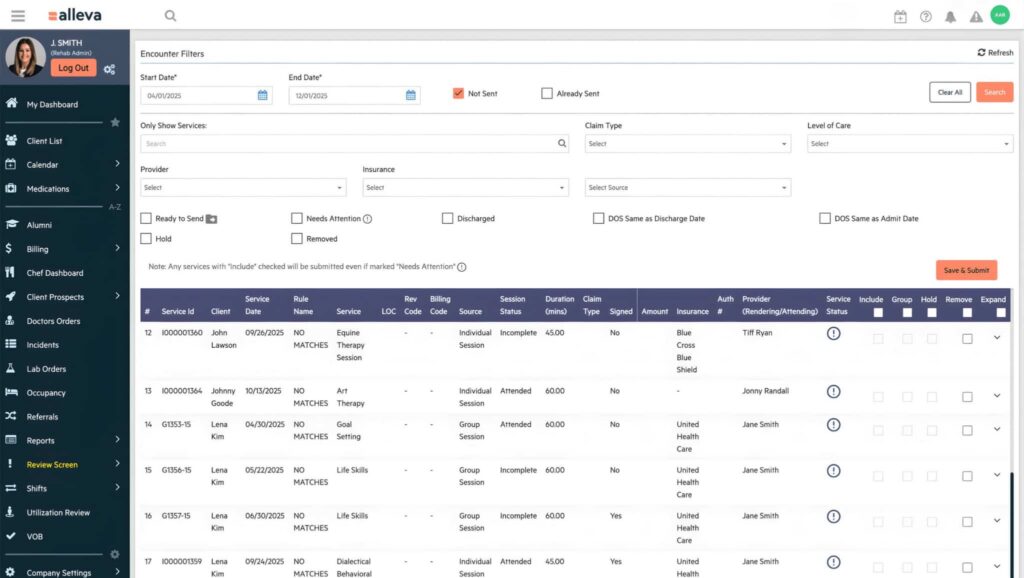
Alleva Billing is the revenue-cycle module inside the Alleva behavioral-health operating system, tying admissions, clinical documentation, compliance, and billing into one record.
It’s built for multi-site treatment centers that need behavioral-health workflows, payer-rule flexibility, and audit-ready documentation, with the biggest impact in reducing revenue leakage across intake-to-claim handoffs. Pricing: Custom quote, demo-led sales.
Key features:
- Integrated RCM, claims submission and remittance posting
- Behavioral-health coding and payer rules
- GRC (governance, risk, and compliance) / compliance tools for audit readiness
- Claims scrubbing and denial management
- Patient statements and collections workflows
- Cross-site consolidation for multi-location reporting
- EHR + billing shared client record
Pros:
- Purpose-built for behavioral health workflows
- Reduces manual handoffs between admissions and billing
- Strong compliance and reporting support
Cons:
- Demo required to see pricing and module mix
Learn more about Alleva Billing or schedule a demo with Alleva’s team today.
TheraNest — best for solo therapists and small groups
TheraNest is a lightweight platform with client notes, scheduling, telehealth, and billing, aimed at small counseling and outpatient addiction practices.
It fits clinicians who want fast setup, predictable per-clinician pricing, and simple claims and invoicing without heavy RCM overhead.
Pricing: $39/month per clinician (public).
Key features:
- Client notes and treatment plans
- Insurance claims and tracking
- Patient invoicing and credit card payments
- Telehealth and appointment reminders
- Simple revenue and productivity reporting
Pros:
- Transparent pricing, easy setup
- Mobile-friendly for solo clinicians
Cons:
- Not designed for complex payer rules or multi-site consolidations
Valant — best for specialized billing agencies
Valant pairs a behavioral-health EHR with integrated billing and payer configurations, aimed at outpatient clinics that want clinical tools plus claims in one vendor.
It’s a good fit when clinical workflows, outcome measurement, and integrated billing matter more than multi-site consolidation.
Pricing: Custom quote, sales engagement required.
Key features:
- Behavioral-health EHR and templates
- Integrated billing and payer rules
- Outcome measurement tools
- Referral and scheduling workflows
- Denial management and AR tracking
Pros:
- Strong clinical + billing pairing
- Useful outcome tracking
Cons:
- Pricing and bundles require sales discussion
Waystar — best for large clinics and hospital partners
Waystar is an enterprise RCM platform focused on eligibility, claims scrubbing, and denial prevention for high-volume environments.
Pick Waystar when you need deep payer connectivity, advanced analytics, and enterprise-grade AR capabilities across complex payer mixes.
Pricing: Custom quote.
Key features:
- Eligibility and benefits verification
- Claims scrubbing and submission at scale
- Denial prevention analytics
- Clearinghouse integrations
- Patient payment tools
Pros:
- Scales to high claim volumes
- Deep payer connectivity and analytics
Cons:
- Higher cost, implementation-heavy
AdvancedMD — best for multi-specialty groups including behavioral health
AdvancedMD provides practice management, EHR, and billing that work well when behavioral health sits inside a larger medical group.
Choose it to consolidate scheduling and billing across specialties while keeping a single practice management system.
Pricing: Custom quote.
Key features:
- Practice management and scheduling
- EHR with templates
- Billing and claims processing
- Patient portal and statements
- Cross-specialty reporting
Pros:
- Good for consolidated multi-specialty operations
Cons:
- Behavioral-health workflows may be less specialized
Kareo — best for independent practices and small groups
Kareo offers a basic billing stack with a clearinghouse, patient statements, and simple practice billing workflows for independent clinicians.
It’s best for providers who want low-friction billing, simple claim submission, and easy patient invoicing.
Pricing: Custom quote.
Key features:
- Clearinghouse and claims submission
- Patient statements and payment posting
- Basic practice reporting
- Simple implementation for small teams
Pros:
- Low barrier to entry, straightforward billing
Cons:
- Limited behavioral-health-specific features
How We Evaluated These Substance Abuse Billing Tools
We disclose that Alleva is the publisher and a competitor, and we evaluated vendors with that transparency in mind. We scored products on behavioral-health fit, compliance support, and real-world operational needs, then validated assumptions against federal guidance.
Evaluation criteria and weightings:
- Compliance & payer support: 25% (state reporting, MAT, Medicaid workflows)
- Behavioral-health-specific features: 20% (ASAM (American Society of Addiction Medicine), group therapy, level-of-care)
- Revenue-cycle performance: 20% (denial reduction, AR days)
- Integration & EMR fit: 15% (shared client record, referrals)
- Usability & implementation: 10% (training, support)
- Pricing & deployment flexibility: 10% (SaaS, bundling)
What features to look for in substance abuse billing software
At Alleva, we view substance abuse billing software as a specialist tool that must handle payer logic, billing complexity, and strict confidentiality rules for behavioral health.
1. Denials & appeals workflow (with ticket templates)
Design your denials workflow to assign responsibility, track deadlines, and reuse appeal content.
Use automated triage to tag denials by reason, payer, and clinician and escalate high-value cases immediately. Sample ticket templates you can adapt:
- Payment posting error: “Claim ID, patient, date of service, received remit, expected payment, variance, requested next step.”
- Medical necessity denial: “Attach clinical note, prior authorization, documentation gaps, recommended appeal language, deadline.”
- Part 2 confidentiality hold: “Consent status, requested release language, payer contact, action owner, follow-up date.”
Include required attachments and an auditable trail on each ticket to support appeals.
2. Payor rules & state Medicaid quirks
Inventory Medicaid rules for each state you bill and map them into vendor-configurable rule sets.
Test the vendor’s engine with live scenarios such as split billing, bundle/unbundle edits, and place-of-service exceptions. For practical billing tips, review our article on how to bill insurance like a pro.
3. Mixed-payor/grants handling
Confirm support for prioritized payment application, fund-restriction flags, and grant reporting exports.
Request a walkthrough that shows posting a partial commercial payment, applying grant funds, and producing a clean fund-source audit report. Ask for sample client reports that demonstrate correct grant burn rates and payer reconciliation.
4. Provider credentialing & roster management
Require roster synchronization and automated alerts for expiring enrollments.
Verify the vendor can produce payer-specific enrollment packets and a dashboard of credential status by clinician. Also validate VOB workflows and pre-bill eligibility checks; see our primer on what is VOB in medical billing.
5. Clearinghouse/ERA integrations
Ask for a list of live clearinghouse and payer connections and run a test claim to measure turnaround time.
Confirm auto-posting, remittance mapping, and exception queues so your revenue team only touches true exceptions. If you use an EMR, require a demo of the end-to-end EHR claim flow to ensure clean handoffs. See our guide on EHR integration for what to verify.
How much does substance abuse billing software cost? Pricing models and what buyers underestimate
Most vendors price behavioral health billing software with a mix of per-user/month subscriptions, per-claim or transaction fees, percent-of-collections, and modular add-ons. These models map vendor effort and risk to your volume and scope, but the sticker price often understates real cost once implementation and integrations enter the picture.
Why vendors favor these models and what that means for you
Vendors tie price to volume and scope because their support and revenue risk grow as you add users, claims, or modules. That is also why Alleva and many behavioral-health vendors sell solution-led packages rather than public self-serve tiers, you’re buying a configured operating system, not a single tool. See Alleva’s billing product for an example: Alleva Billing.
Cost components buyers routinely miss
First, learn the common contract line items you’ll see:
- Implementation & data migration, moving legacy client and financial data into the new system, often billed as professional services.
- Clearinghouse / ERA (Electronic Remittance Advice) costs, fees for claim routing and 835 processing.
- Per-claim / transaction fees, small cents-per-claim that add up at scale.
- Training & ongoing support, which may sit outside the base subscription.
- Custom integrations, API work or one-off connectors to state systems, labs, or partners.
Each item is negotiable, so request line-item pricing and SLA commitments up front.
Pricing and Cost Components: Summary
| Cost component | Typical pricing model | Notes/Context | Our take |
| License / subscription | Per-user/per-month or per-site | Covers core EMR/RCM; modules may be gated | Prefer vendors that include core billing in the EMR to avoid duplicate fees |
| Implementation & data migration | Fixed professional fee or T&M | Includes mapping, import, and testing | Negotiate milestones, migration caps, and a rollback plan |
| Per-claim / transaction fees | Per-claim or tiered volume pricing | Cents per claim can balloon for high-volume centers | Push for volume discounts or a blended rate |
| Clearinghouse / ERA costs | Monthly fee, per-ERA, or bundled | Some clearinghouses charge per transaction | Confirm remits and eligibility checks are included or billed separately |
| Training & ongoing support | Included hours, or billed hourly / support tier | Onboarding often has set training hours; support may be tiered | Insist on a defined training plan and adoption checkpoints |
| Custom integrations | T&M or fixed project fee | API work and state interfaces usually cost extra | Ask for reusable connectors and source-code escrow on critical builds |
Documentation best practices and 42 CFR Part 2 confidentiality
Document clinically relevant facts that support medical necessity: presenting problem, time spent, interventions, clinical decision making, and follow-up plans.
Bold principle: 42 CFR Part 2 protects SUD treatment records and limits disclosure without written consent.
Avoid placing therapy content, patient statements about substance use, or counseling narratives on claims when Part 2 protections apply. On claims, use diagnosis codes and brief clinical descriptors only as needed for payment; never include session notes or sensitive narrative text.
Verify codes, cite authoritative sources, and keep audit trails
Require staff to verify every CPT and HCPCS entry against official sources and to document the verification (date, source page, staff initials).
Link the cheat sheet to payer-specific CMS guidance for coverage rules and updates: CMS coverage guidance. Maintain a versioned audit trail for the PDF so auditors can see when and why code or modifier changes were made.
10-question demo checklist vendors must answer
- Can you describe your API and how real‑time claims/status sync is?
- Which clearinghouse partners do you use and who handles payer enrollment?
- Do you support the specific payers and plan types our organization bills?
- What is your denial‑management process and average first‑pass acceptance rate?
- How do you handle credentialing and payer credential updates?
- What SLAs cover claim submission, adjudication mapping, and escalations?
- How is PHI protected in transit and at rest (HIPAA controls and audits)?
- What training and go‑live support are included, and what is typical onboarding time?
- How do you export or migrate billing data if we change vendors?
- What pricing options and success metrics do you provide (for example, % of denials recovered)?
If you want a deeper checklist to match your EMR decision, see our guide on Choosing the right EMR.
How to implement substance abuse billing software (multi‑site rollout checklist & 90‑day timeline)
This 90-day rollout for implementing substance abuse billing software breaks into three stages: Prepare and payer setup, Pilot and training, and Cutover with stabilization.
At Alleva, we recommend a phased checklist that assigns CFO, billing lead, IT, and clinical lead responsibilities, runs payer test claims and ERA validations, verifies migrated data, and uses strict go/no‑go gates at days 30, 60, and 90.
1. Prepare and payer setup (Days 0–30)
- Core objective: enroll payers, finalize fee schedules, configure payer rules, and map billing logic across locations.
- Checklist:
- Establish governance and roles: CFO (budget/approval), billing lead (workflow design), IT (connectivity/security), clinical lead (coding/authorization rules).
- Collect payer IDs, NPI (National Provider Identifier) / TIN (Tax Identification Number) confirmations, preferred claim formats (ANSI 837), payer-specific edits, and set up ERA delivery.
- Build and schedule a payer test claim plan, prioritizing your top 10 primary payers.
- Configure telehealth place-of-service, confirm modifiers, and validate state telehealth parity and behavioral-health-specific billing rules.
- Test cases: payer enrollment confirmation, single-claim submit, ERA delivery and posting, and denied-claim remediation.
- Go/no‑go gate (Day 30): at least 80% of primary payers return clean test claims, ERA channels are secure and functional, and data‑sharing agreements are signed.
2. Pilot and training (Days 31–60)
- Core objective: validate workflows at representative sites, train staff, and refine mappings before enterprise cutover.
- Checklist:
- Choose pilot sites that reflect high and low volume, and include at least one specialty program when relevant.
- Train billers and clinicians on charge capture, modifiers, and claims submission; lock down coding rules for addiction and mental health services.
- Run end-to-end tests: telehealth claims, ERA posting, AR adjustments, and open/refund flows.
- Reconcile test remits to expected payments and tweak adjudication and payer rules.
- Test cases: batch claims submission, ERA posting to the AR ledger, claim re-submission, and coordination-of-benefits scenarios.
- Data checks: sample patient record migration, claim-history reconciliation, and demographic matching review, aligning identifiers and HL7/FTPS settings per your migration plan.
- Go/no‑go gate (Day 60): pilot shows stable acceptance (>90% clean), staff demonstrate competency, and test remits reconcile.
3. Cutover and stabilize (Days 61–90)
- Core objective: run full-site cutover, monitor live claims, and stabilize revenue operations.
- Checklist:
- Execute phased cutover by region or program to limit claim-volume spikes.
- Monitor live claims daily for the first two weeks, then weekly through day 90.
- Stand up a rapid-response queue where billing lead and IT triage denials and connectivity issues inside SLA windows.
- Document exceptions, update the payer rulebook, and publish clinician tip sheets for charge capture.
- Post-cutover tests: high-volume claim batch, multi-payer coordination, and a prior-auth retrospective audit.
- Go/no‑go gate (Day 90): AR days outstanding improve or stabilize, denial rates hit target thresholds, and clinicians maintain documentation timeliness.
4. KPIs to monitor at 7 / 30 / 90 days
- Day 7 (early signal): claims submitted, submission errors per 100 claims, and system uptime.
- Day 30 (operational health): clean claim rate, first-pass payment rate, ERA posting accuracy, and average days to payment.
- Day 90 (business outcome): net AR days, denial-rate delta vs baseline, and revenue realization vs a pre-rollout month.
Track these weekly for the first 30 days, then move to a biweekly cadence until stabilization.
Implementation tips: keep decision gates strict, document every payer exception, and maintain a single source of truth for clinician charge-capture rules so billing and clinical teams stay aligned.
What to put in vendor contracts and RFPs
Add explicit terms that map regulatory signals to vendor responsibilities. Make these measurable in your RFP and acceptance tests.
- Consent‑coded claims, claims flagged to reflect patient consent and sharing limits.
- Minimum‑necessary claim payloads, ability to send only payer-required fields.
- Field‑level masking, configurable redaction for specific data elements.
- Attachment control, ability to strip or redact sensitive attachments before transmission.
- Auditable export logs, immutable logs showing what was masked or transmitted.
- Testable acceptance criteria, e.g., prove the system can drop or redact a field during a mock claim send.
For background on compliance expectations, see Alleva’s behavioral health compliance overview: Behavioral health compliance.
Which claim fields you’ll likely need to mask or control
Focus masking on anything that reveals SUD care details or treatment programs. Prioritize these elements.
- Free‑text narratives, including HPI and progress note snippets.
- Attachment contents, PDFs or clinical documents that name substances or programs.
- Claim‑level notes, any free text fields that reference specific substances or treatment pathways.
- Nonessential diagnosis details, exclude codes or text not required by the payer.
- Provider or program identifiers that could link a claim to an SUD program.
Vendor systems should let you toggle these rules per payer and per state, and log every masked element for audit readiness.
How telehealth parity changes place‑of‑service and reimbursement for IOP/PHP
Telehealth parity affects whether remote IOP and PHP services get equivalent reimbursement and which billing fields to use. CMS and state Medicaid actions have shifted many payers toward parity, but rules vary by program and state. See the CMS Medicare telemedicine fact sheet for policy context.
Operational checklist:
- Confirm the correct place‑of‑service (POS) code for each payer and program.
- Verify any required modifiers to signal telehealth delivery.
- Define how blended sessions (in‑person + virtual) should be aggregated for billing.
- Require dynamic POS mapping and configurable rate tables so claims reflect payer/state parity rules.
How payer prior‑auth pilots change your workflows
Payer pilots push prior authorization toward real‑time decisioning and structured clinical data. Expect requests for richer, machine-readable data and API exchanges.
RFP capabilities to test:
- Auto‑generate structured prior‑auth packets from the chart.
- Support 278‑style or API-based prior‑auth exchanges.
- Ingest and reconcile payer responses automatically.
- Reconcile denials against the original consent‑coded claim to avoid unnecessary disclosures.
- Reduce manual follow‑up and protect confidentiality when payers request more clinical detail.
New buyer questions this section should unlock
This should change what you ask vendors during procurement and testing. Add acceptance tests and operational checks.
- Can the vendor create and send consent‑coded claims on demand?
- Does the system support field‑level masking and redaction by payer/state?
- Can the vendor map telehealth POS and apply payer/state rate rules automatically?
- Does the platform automate prior‑auth packet creation and reconcile payer responses?
- Are all masking and transmission events captured in auditable logs?
To align these technical requirements with regulatory practice, review Alleva’s primer on what compliance means in healthcare: What is compliance in healthcare.
Frequently Asked Questions
How should I code substance abuse treatment sessions?
Short answer: Use the correct CPT/HCPCS codes for the service and document clinical intent, minutes, modality, and clinician credentials.
Good coding links the billed code to recorded minutes, modality, and provider credentials so claims withstand audits. See practical billing and coding tips in our guide on how to bill insurance like a pro.
Will my billing software integrate with our EHR or EMR?
Short answer: Yes, most modern systems support integrations with your EHR/EMR.
Tighter integration reduces duplicate entry, speeds claim submission, and preserves documentation trails for audits. Read about common EHR integration patterns and requirements on our EHR integration page.
How much does substance abuse billing software cost?
Short answer: Pricing varies by features, user count, and whether RCM (revenue cycle management) services are included.
Expect SaaS licensing plus implementation and training; outsourced RCM usually adds per-claim or percentage fees. See how behavioral-health billing tools compare and what to budget on our Alleva billing overview.
Can software help cut claim denials?
Short answer: Yes, by automating edits, eligibility checks, and clean-claim submission rules.
Denials fall when software runs payer rules before submission and surfaces missing documentation quickly. Learn operational strategies for scaling billing and reducing denials in our piece on scale billing operations.
How do 42 CFR Part 2 confidentiality rules affect billing?
Short answer: 42 CFR Part 2 restricts disclosure of substance use records and can limit what you include on claims, depending on payer and state rules.
You may need to send limited data on claims or use secure attachments and role-based privacy controls. See how privacy and EMR design intersect in our article on confidentiality and privacy in behavioral health EMRs.
How do I handle mixed payors and self-pay patients?
Short answer: Use flexible billing rules and split-billing workflows so each payer and self-pay balance is tracked separately.
Software that supports balance-billing logic and payment plans reduces write-offs and patient confusion. Our guide on balance billing in healthcare explains common approaches.
Does telehealth or MAT (Medication-Assisted Treatment) change billing practices?
Short answer: Yes, telehealth and MAT often require different codes, modifiers, and payer rules.
Confirm telehealth parity and MAT billing policies with each payer, and document virtual visit consent and patient location. For tips on virtual programs and billing, see going virtual: how to open an online IOP.
Can software automate verification of benefits (VOB)?
Short answer: Many systems automate verification of benefits (VOB) so you see coverage limits before services.
Automated VOB reduces unexpected denials and helps set patient financial responsibility up front. Learn the role of VOB in medical billing on our what is VOB in medical billing page.
Will a behavioral-health-specific billing system help with audits and compliance?
Short answer: Yes, purpose-built systems preserve audit trails, enforce privacy, and align documentation to behavioral-health payor rules.
Choose software that supports CARF/Joint Commission readiness, role-based access, and clear documentation workflows. Read more about compliance best practices in our behavioral health compliance overview.
Next steps: choose a vendor, test integrations and workflows, and request a demo to validate billing, privacy, and audit-readiness features.
Recommendation and next steps
For most behavioral‑health and substance use disorder programs, Alleva Billing is the recommended pick: it’s built for behavioral‑health workflows and links clinical documentation to billing in a single platform.
Prefer a guided walkthrough? Schedule a live demo. Disclosure: Alleva is the publisher of this guide and is included in the ranked list.

Nick Leija is a Product Manager at Alleva specializing in revenue cycle management, billing operations, and financial technology for behavioral health organizations. With more than 15 years of healthcare experience, Nick works closely with providers to develop solutions that improve reimbursement performance, streamline workflows, and strengthen financial operations. His expertise helps ensure behavioral health organizations can focus more on care delivery and less on administrative complexity.