

Kipu alternatives are behavioral health EMR platforms that can replace the Kipu modules you use today: admissions CRM, clinical documentation, billing, and compliance. The right pick depends on your program mix, so start by comparing a behavioral health EMR for treatment programs against outpatient-only and enterprise options.
The guide below is for U.S. addiction treatment and mental health organizations replacing Kipu or evaluating it at renewal. Alleva publishes this guide and sells one of the platforms listed, so we’ve stuck to criteria you can test yourself.
TL;DR: Pick the Kipu alternative that fits your levels of care, not the one with the longest feature list. Then prove it with your own workflows and confirm you can get your data out of Kipu before you sign.
Key Takeaways
- Full-platform replacements: Alleva and Behave Health cover admissions, clinical documentation, and billing in one system, the closest match to Kipu’s scope.
- Large agencies and CCBHCs: Netsmart myAvatar and Qualifacts Credible are built for multi-program organizations with state reporting needs.
- Outpatient-only practices: Valant fits psychiatry groups, and TherapyNotes fits small therapy practices; neither is built for residential care.
- Published pricing: BestNotes and TherapyNotes publish their plans and PIMSY’s entry tier has a listed price; the rest quote by scope.
- Decision rule: Shortlist three or four, run scripted demos and at least three hands-on tests on de-identified data, and drop any vendor that can’t pass them.
Want to see how a platform built only for behavioral health compares with what you run today?
Best Kipu Alternatives at a Glance
Table 1: Kipu alternatives compared by fit and pricing model
| Platform | Best for | Care settings | Pricing model |
|---|---|---|---|
| Alleva | Multi-program organizations wanting EMR, billing, compliance, CRM, and AI in one system | Detox, residential, PHP, IOP, outpatient | Custom quote |
| Behave Health | Admissions-driven programs wanting EHR, CRM, billing, and operations tools together | Inpatient, residential, PHP, IOP, recovery residences | Quote-based, per feature |
| PIMSY | Small to mid-sized practices that want a straightforward behavioral health EHR | Outpatient, IOP, PHP, residential | Listed from $99 per user per month (entry tier) |
| Netsmart myAvatar | Large provider networks and state or county agencies | Outpatient, residential, inpatient | Custom quote |
| Valant | Outpatient psychiatry and therapy group practices | Outpatient | Custom quote |
| Qualifacts Credible | Community behavioral health agencies and CCBHCs with field-based staff | BH, SUD, IDD, residential, integrated care | Custom quote |
| BestNotes | Programs that want transparent pricing and eMAR for med passes | Outpatient, IOP, residential | Published per-user pricing |
| TherapyNotes | Solo clinicians and small outpatient therapy groups | Outpatient | Published monthly plans |
Pricing models were checked against vendor sites and public software directories in October 2026. Confirm current terms with each vendor.
What Kipu Offers Today
Kipu describes its platform as an operating system for behavioral health with five product lines: a CRM for leads, referrals, and admissions; an EMR; revenue cycle management (RCM); governance, risk, and compliance (GRC) tools for state, Joint Commission, and CARF requirements; and Kipu Intelligence, its AI layer. It serves substance use, behavioral health, eating disorder, and medication-assisted treatment (MAT) programs.
List the Kipu modules your team actually uses before you look at alternatives. Any replacement has to cover each of them, or you’ll need a second vendor to fill the gap.
1. Alleva: Best for Multi-Program Behavioral Health Organizations
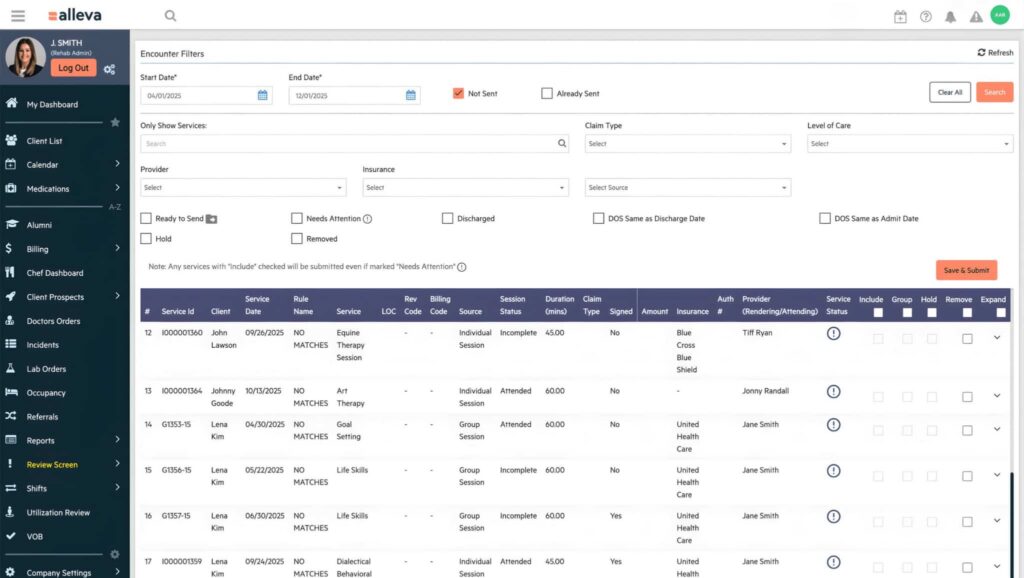
Alleva is an all-in-one operations platform built only for behavioral health. It connects admissions, clinical care, billing, and compliance in one system, so data entered at intake follows the client through discharge and the claim.
Table 2: Kipu and Alleva compared module by module
| Module | Kipu (as Kipu describes it) | Alleva |
|---|---|---|
| Admissions CRM | Lead, referral, and admissions tracking; alumni engagement | Admissions CRM and referral tracking inside the platform |
| Clinical record | EMR with documentation, care coordination, and messaging | Both EMR and EHR for multidisciplinary teams |
| Billing and RCM | Eligibility checks, claims, and collections | Alleva Billing with encounter-to-claim review, instant in-platform eligibility checks, and Waystar clearinghouse integration |
| Compliance | GRC for state, Joint Commission, and CARF tracking and training records | InCheck, built by a behavioral health compliance insider around CARF, Joint Commission, and state requirements |
| AI | Kipu Intelligence for note drafting and routine tasks | Alleva Intelligence, including Echo, a HIPAA-compliant ambient AI for documentation |
| Switching support | Not applicable | Hands-on data migration, workflow configuration, and onboarding |
Pricing: Custom quote.
Key features:
- Alleva Billing for behavioral health RCM, with pre-submission review of each encounter before it becomes a claim
- InCheck compliance management software for continuous CARF, Joint Commission, and state readiness
- Echo, Alleva’s HIPAA-compliant ambient AI; in Alleva’s published Warriors Heart case study, the organization reported a 30% reduction in documentation time
- Admissions CRM, referral tracking, telehealth, medication management, and client and family portal
- SOC 2 Type 2, HIPAA compliant, and ONC certified, with documentation at the Alleva trust center; a BAA is available on request
Pros:
- One system across admissions, clinical, billing, and compliance
- Built only for behavioral health, with both EMR and EHR coverage
- Hands-on migration support for organizations switching platforms
Cons:
- More platform than a solo clinician needs
- A full-platform rollout is a larger project than swapping a single-module EHR
2. Behave Health: Best for Admissions-Driven Programs
Behave Health combines an EHR, CRM, RCM, and operations tools for behavioral health and addiction treatment providers. Its operations module adds staff, scheduling, and property management, which suits programs that also run recovery residences.
Pricing: Quote-based, priced per feature, with nonprofit and volume discounts.
Key features:
- Admissions CRM with lead, referral source, and alumni tracking
- EHR with treatment planning, therapy notes, e-prescribing, and telehealth
- RCM with claims, insurance verification, and denial and appeal management
- Operations tools for staff scheduling, tasks, and property management
Pros:
- Covers admissions, clinical, and billing in one cloud platform
- Property and staff tools fit organizations with recovery residences
- Supports inpatient through outpatient levels of care
Cons:
- Per-feature pricing makes side-by-side cost comparison harder; ask for a quote on your exact module list
- Confirm reporting depth for multi-site rollups during the demo
3. PIMSY: Best for Small to Mid-Sized Practices
PIMSY is a behavioral health EHR used by practices from solo therapists to larger organizations, including IOP, PHP, residential, and substance use programs. It focuses on documentation, treatment planning, and billing in a single system.
Pricing: Listed from $99 per user per month for the entry tier on Capterra; higher tiers are quote-based.
Key features:
- Treatment planning and care plan management
- Charting, assessments, and customizable forms
- Billing, coding assistance, and electronic payments
- E-prescribing, telehealth, and a patient portal
Pros:
- Entry-tier pricing is published
- Covers outpatient through residential settings
- Training and support included across plans
Cons:
- eMAR isn’t listed among its directory features; confirm medication administration workflows for residential programs
- Confirm group note and group billing workflows in the demo
4. Netsmart myAvatar: Best for Large Provider Networks
Netsmart’s myAvatar brings clinical, financial, and operational workflows into one platform for community-based, residential, and inpatient behavioral health care. It’s positioned for large organizations, including state and county behavioral health agencies and Certified Community Behavioral Health Clinics (CCBHCs).
Pricing: Custom quote.
Key features:
- Scheduling, documentation, and closed-loop inpatient medication management
- Billing, denial management, and value-based and grant-funded billing
- CCBHC reporting and compliance support
- KPI dashboards and interoperability tools within Netsmart’s CareFabric platform
Pros:
- Covers outpatient, residential, and inpatient care in one record
- Built for state and county reporting and complex funding models
- Broad program coverage, including IDD and child and family services
Cons:
- Scope and contracting are geared to larger organizations
- Confirm implementation timeline and internal IT staffing needs before you commit
5. Valant: Best for Outpatient Psychiatry Practices
Valant is a behavioral health EHR for outpatient psychiatry and therapy group practices. Its feature set centers on prescriber workflows and measurement-based care.
Pricing: Custom quote.
Key features:
- E-prescribing and medication management for prescribers
- Measurement-based care with outcome measures delivered through the patient portal
- Patient portal for intake, consents, scheduling, payments, and telehealth
- Billing tools with claim checks, electronic claims, and eligibility verification
Pros:
- Strong fit for psychiatrists and psychiatric nurse practitioners
- Built-in outcome measurement
- Patient-facing portal and mobile app
Cons:
- Built for outpatient care; no residential or detox workflows are described
- May be more than a practice needs if it only wants notes and billing
6. Qualifacts Credible: Best for Community Agencies and CCBHCs
Credible is Qualifacts’ EHR for behavioral health agencies serving behavioral health, substance use, IDD, CCBHC, residential, and integrated care programs. Its mobile app works offline, which helps staff who document in the field.
Pricing: Custom quote.
Key features:
- Clinical documentation and treatment planning
- E-prescribing and electronic lab orders
- Billing and RCM with state-specific reporting
- Mobile access with offline mode
- Self-service configuration of forms, workflows, and reports
Pros:
- Fits agencies with field-based and community staff
- State reporting support for publicly funded programs
- Configuration doesn’t require vendor development for every change
Cons:
- The 2026 fact sheet doesn’t describe eMAR or MAT dispensing; confirm medication workflows if you run residential or opioid treatment programs
- No admissions CRM is described in the fact sheet; confirm how you’d manage referrals
7. BestNotes: Best for Transparent Pricing and Residential eMAR
BestNotes is a behavioral health EHR for therapy, mental health, and addiction treatment providers. Its eMAR supports group med passes and inventory tracking, and it publishes per-user pricing on a month-to-month contract.
Pricing: Published at $59 per user per month for the first 10 users, with lower per-user rates at higher volumes and a $100 setup fee.
Key features:
- Documentation templates aligned to Joint Commission and CARF standards
- eMAR with group med passes, inventory, and signature capture
- Online intake and admissions checklists through a patient portal
- CRM with referral source tracking and conversion reporting
Pros:
- Transparent pricing with no long-term contract
- Medication administration built in for residential programs
- Unlimited training and support included
Cons:
- Billing is described in less depth than other modules; test your full claim workflow
- Confirm ASAM level-of-care documentation support for your programs
8. TherapyNotes: Best for Small Outpatient Practices
TherapyNotes is an outpatient practice management and EHR system for solo clinicians and small therapy groups. It covers scheduling, notes, and billing with published monthly plans.
Pricing: Published plans. Under pricing TherapyNotes lists as effective December 1, 2026, Solo is $69 per month and Group starts at $89 per month for the first clinician; e-prescribing is a paid add-on.
Key features:
- Scheduling and appointment reminders
- Progress notes, treatment plans, and note templates
- Electronic billing and claims
- Telehealth and e-prescribing add-ons
Pros:
- Simple setup for small outpatient practices
- Predictable published pricing
- Unlimited non-clinical users on Group plans
Cons:
- Not built for residential, detox, or MAT programs
- No admissions CRM or eMAR is listed
How We Evaluated Kipu Alternatives
We compared each platform using vendor product pages, vendor fact sheets, and public software directory listings reviewed in October 2026. Alleva publishes this guide and is listed first; every other entry is described from vendor materials and public software directory listings.
Table 3: Evaluation criteria and weighting
| Criterion | Weight | What we looked for |
|---|---|---|
| Behavioral health workflow fit | 30% | Levels of care supported, group and IOP workflows, treatment planning |
| Billing and RCM | 20% | Claims, denials, eligibility, and behavioral health payer rules |
| Integrations and portability | 15% | Standards-based exchange, APIs, and documented data export |
| Implementation and switching support | 15% | Migration help, configuration effort, onboarding |
| Accreditation and compliance support | 10% | CARF, Joint Commission, state reporting, audit trails |
| Pricing transparency | 10% | Published pricing or clear pricing model |
If you’d rather compare a wider set of platforms beyond Kipu replacements, see our behavioral health EMR software buying guide. Residential-heavy organizations can also use our guide to residential treatment software options.
What to Look For in a Kipu Replacement
Evaluate each alternative on behavioral health fit, billing depth, interoperability, and how cleanly you could leave it later. Ask every vendor the same questions so the answers are comparable.
- Admissions and CRM: “Show a referral moving from inquiry to admission, including the eligibility check, and point out every place staff re-enter data.”
- Group and IOP billing: “Build one of our real intensive outpatient program (IOP) schedules, record attendance, and show the claims it produces.”
- Treatment planning: “Do your templates support American Society of Addiction Medicine (ASAM) Criteria dimensions, and can our clinical team edit them without developer support?”
- Medication workflows: “Which e-prescribing and electronic medication administration record (eMAR) tools do you support, and where does the prescription drug monitoring program (PDMP) check sit?”
- Denials: “Show a behavioral health denial from posting through appeal, and the report that explains why denials happen.”
- Accreditation: “Generate the reports and audit-trail exports our last CARF or Joint Commission survey asked for.”
- Integrations: “Which interfaces are live with customers today, and can we test in a sandbox?” Our EHR integration planning guide covers what to test.
- Exit terms: “If we leave in five years, what data do we get, in what format, and at what cost?”
What a Kipu Replacement Costs
Most platforms in this category quote by scope, so compare total cost over the contract term rather than the license line. Ask every vendor to price the same modules, users, and locations.
Table 4: Cost components of a Kipu replacement
| Cost component | What drives it | What to ask |
|---|---|---|
| Subscription or license | Users, locations, or enterprise pricing; module mix | “Which modules are included, and what triggers a price change?” |
| Implementation | Scope, configuration depth, number of programs | “What’s fixed fee versus hourly, and what’s excluded?” |
| Data migration | Volume, years of history, data quality, export format | “How much Kipu history is included, and who cleans the data?” |
| Interfaces | Number of connections, standard versus custom | “Is each interface priced separately, and what’s the annual upkeep?” |
| Training and backfill | Headcount, shifts, super-user time | “How many training hours are included, and in what format?” |
| RCM fees, if bundled | Percent of collections versus per-claim pricing | “How are fees calculated, and what reporting do we get?” |
| Exit costs from Kipu | Export fees, read-only access, notice period | “What does our current contract say about termination and data return?” |
For a three-to-five-year cost view and contract terms worth negotiating, see our EHR review and evaluation guide.
How to Switch From Kipu: Five Phases
A switch from Kipu runs in five overlapping phases: requirements, vendor selection, data export and mapping, configuration and testing, and cutover. Timelines depend on your size, data volume, and integrations, so set exit criteria for each phase rather than fixed dates.
Table 5: Phases, owners, and exit criteria for a Kipu switch
| Phase | Primary tasks | Owner | Exit criteria |
|---|---|---|---|
| 1. Requirements | List the Kipu modules, workflows, reports, and integrations you rely on | Executive sponsor, project manager | Signed requirements list |
| 2. Vendor selection | Scripted demos, hands-on tests, reference calls, contract review | Clinical, billing, compliance, and IT leads | Vendor passes tests; export rights and BAA terms agreed |
| 3. Data export and mapping | Request a full Kipu export; map fields, encounters, claims, medications, and consents | IT lead with both vendors | Mapping log approved by clinical and billing leads |
| 4. Configuration and testing | Templates, payer setup, user roles, interfaces, test claims | Clinical champions, billing lead, super-users | Test claims accepted; clinician sign-off on sampled charts |
| 5. Cutover and hypercare | Go-live, read-only Kipu access, daily denial and documentation checks | IT, billing, operations | Metrics back near your pre-switch baseline |
Our step-by-step EMR migration guide covers data mapping, validation, and rollback planning in depth. For go-live readiness by department, use the EHR implementation checklist for behavioral health.
Getting Your Data Out of Kipu
Before you sign with anyone new, confirm exactly what your current vendor will hand over on exit. Two federal developments help.
ONC-certified health IT developers had to make a full electronic health information (EHI) export available by December 31, 2023, under 45 CFR 170.315(b)(10). Per the ONC guide to EHI export, certified products must export all the EHI they store, for a single patient and for a whole patient population, in a publicly documented format.
The requirement applies only to certified health IT, so check your current system’s status on ONC’s Certified Health IT Product List. In September 2025, HHS also announced stepped-up enforcement against information blocking; the HHS information blocking crackdown announcement notes civil monetary penalties of up to $1 million per violation for certified developers.
Ask for your export process, timeline, and fees in writing, and keep the correspondence. If a request stalls, talk with counsel; whether a specific practice counts as information blocking is a legal question.
If you run a 42 CFR Part 2 program, substance use disorder (SUD) records keep their consent and disclosure obligations through the move. HHS’s 2024 final rule doesn’t require segmenting Part 2 records, but your new system still needs to identify them, enforce consent, restrict SUD counseling notes, and log disclosures.
For contract terms that keep you in control from day one, see our guide to EHR data ownership and control.
Demo and Proof-of-Concept Playbook for Kipu Alternatives
A scripted demo makes vendors show your workflows instead of their best screens. A proof of concept (POC) then tests the system with your data and your people.
12 Demo Requests
- Import a sample Kipu export and walk through the field mapping.
- Build an IOP group schedule from one of your real programs and record attendance.
- Run a group billing cycle for that schedule and show the resulting claims.
- Work a payer denial through to appeal.
- Produce a CARF or Joint Commission evidence package.
- Show role-based access, PHI restrictions, and Part 2 consent and disclosure logging.
- Run a multi-site rollup report.
- Complete a clinical note with auto-populated fields.
- Enter a MAT order and show the controlled-substance audit trail.
- Follow one client from intake to admission to discharge.
- Show live integrations with labs, the clearinghouse, e-prescribing, and telehealth.
- Show how support tickets are handled and how service level agreement (SLA) performance is reported.
12 Hands-On POC Tasks
Run at least three of these on de-identified or synthetic data. If any protected health information (PHI) is shared, sign a business associate agreement (BAA) first, and confirm Part 2 consent before sharing SUD records.
- Import a Consolidated Clinical Document Architecture (C-CDA) file and map the clinical fields.
- Load 50 de-identified client records by CSV and validate them.
- Run one week of IOP group billing and produce claims.
- Post an electronic remittance advice (ERA, the X12 835 file) and reconcile it to claims.
- Build an appeal packet for a denied claim.
- Export a multi-site financial rollup.
- Pull audit-log entries for five user actions, with timestamps.
- Generate a 30-day utilization and outcomes report in your accreditor’s format.
- Configure a referral-to-admission funnel and report conversion.
- Restore a prior version of a clinical document.
- Run a telehealth session and attach the note.
- Trigger an automated admissions follow-up task.
Score each task pass or fail, backed by an export, a recording, or a timestamped screenshot. Escalate any failure that touches accreditation, billing, or client safety.
FAQs About Kipu Alternatives
Which Kipu alternative is closest to Kipu’s scope?
Alleva and Behave Health cover admissions CRM, clinical documentation, and billing in one platform, which is the closest match. Netsmart myAvatar and Qualifacts Credible cover similar ground for larger agencies and CCBHCs.
Can I export my data from Kipu?
Ask Kipu for its full export process, format, timeline, and any fees in writing. If your system is ONC-certified, the EHI export criterion requires a full single-patient and population export in a publicly documented format.
How long does it take to switch from Kipu?
It depends on your size, data volume, years of history, and integrations. A single-site outpatient program usually moves faster than a multi-site residential and IOP organization. Ask each vendor for a phase-by-phase plan with named owners.
Which Kipu alternatives publish their pricing?
BestNotes and TherapyNotes publish their plans, and PIMSY lists an entry-tier price. Alleva, Behave Health, Netsmart, Valant, and Qualifacts quote by scope.
Is there a Kipu alternative for outpatient-only practices?
Yes. Valant fits outpatient psychiatry groups, and TherapyNotes fits solo clinicians and small therapy practices. Neither is built for residential or detox care.
Do Kipu alternatives support 42 CFR Part 2?
Ask each vendor to demo how it identifies Part 2 records, enforces consent, restricts SUD counseling notes, and logs disclosures. Segmentation isn’t required under the 2024 rule, but those controls are.
Should we start looking before our Kipu contract renews?
Yes. Check your notice period, auto-renewal terms, and data return clauses first, then build your evaluation timeline backward from the renewal date.
Can we keep Kipu read-only after go-live?
Keep read-only access for lookups, audits, and records requests, and confirm how long that access lasts and what it costs. Avoid long stretches of dual charting, which doubles clinician workload.
Do we need a BAA before a vendor demo?
Not for a standard demo on the vendor’s sample data. You need one before sharing any PHI, and Part 2 records also need appropriate consent.
Choosing Your Kipu Alternative
If you run multiple programs and want admissions, clinical, billing, and compliance in one system, start with Alleva or Behave Health. Large agencies and CCBHCs should look at Netsmart myAvatar and Qualifacts Credible. Outpatient practices fit Valant or TherapyNotes, and budget-conscious residential programs should price out BestNotes and PIMSY.
Bring your Kipu module list and demo script, and we’ll show you what a move to Alleva would look like.
This guide is for general informational purposes and isn’t legal, compliance, or billing advice. Product details and pricing come from vendor materials and public listings reviewed in October 2026 and may change; confirm current terms with each vendor. Requirements under HIPAA and 42 CFR Part 2 vary by organization; confirm your obligations with qualified counsel.

Les Wilson is VP of Product at Alleva.