

The best IOP software (intensive outpatient program support soplutions) succeeds or fails on one thing: whether attendance, documentation, authorization, and billing share a single source of truth. This guide helps United States behavioral health operators evaluate IOP and partial hospitalization program (PHP) software.
It is written for the people choosing the system—program directors, billing leaders, and clinical and operations executives. The goal is to help you run group-based care, protect compliance, and get paid accurately.
You will learn which operational outcomes matter, which actions the software should automate, and how implementation and integration constraints affect timelines and cost. For the full comparison, see our behavioral health EMR buying guide.
If your priorities are reducing denials, improving census and retention, and streamlining authorization tracking, the checklist items that follow make it easier to compare vendors and plan an IOP software demo.
Key Takeaways
- Connection is the real test: The platforms that reduce denials are the ones where attendance, documentation, authorization, and claims share one data layer — not four disconnected tools.
- IOP and PHP are defined by hours: Under the ASAM Criteria, Fourth Edition, adult IOP (Level 2.1) delivers 9–19 hours of clinical services per week; PHP (Level 2.5) delivers 20 or more hours per week.
- Audit readiness lives in the attendance log: Time-stamped, immutable attendance and utilization records are what defend a claim during a CARF or Joint Commission review.
- Match features to roles: The right mix depends on your program’s levels of care, group intensity, and the daily workflows of admissions, clinical, and billing teams.
Ready to see how a connected behavioral health platform like Alleva handles these workflows end to end? Request a personalized demo.
What is IOP (Intensive Outpatient Program) software?
IOP software is a purpose-built clinical and operational system that manages care, scheduling, documentation, and billing for intensive outpatient and partial hospitalization programs. Because these claims are roster-driven, a platform with integrated revenue cycle management and built-in billing keeps the schedule, the note, and the claim aligned.
It supports multimodal group and day-program workflows and maps to care levels described by the Substance Abuse and Mental Health Services Administration (SAMHSA). Use this kind of platform to coordinate group therapy, stepped-care transitions, and claims batching across multidisciplinary teams. That alignment saves time and keeps audits calmer.
Key users of IOP software
Program directors, clinicians, admissions staff, and billing and revenue teams rely on IOP software to reduce manual coordination and improve audit readiness. Each role touches the same client record from a different angle, so shared data matters more than any single feature.
Common use cases of IOP software
- Group therapy scheduling and day-treatment rosters
- Step-down care coordination and multidisciplinary treatment plans
- Group notes and program-level outcomes tracking
- Claims batching and program-focused revenue workflows
Best Intensive Outpatient Program Software (IOP software) for Behavioral Health Facilities
Here are the best IOP and PHP software options for running a behavioral health clinics acorss medical record organization throught to therapy notes, billing, AI assistance, and beyond.
1. Alleva – Best All-in-One Solution for Behavioral Health Treatment Centers
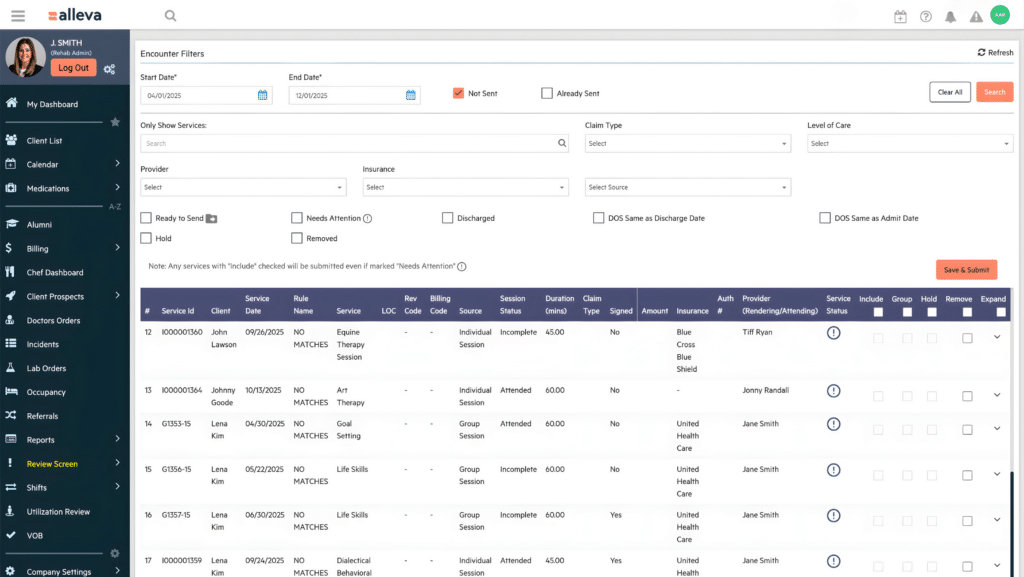
Alleva isn’t a general-purpose EHR with a behavioral health setting bolted on, it’s a platform built exclusively for treatment centers, and that focus shows up in every corner of the product. Where most EHRs ask clinicians to bend their workflow around software designed for primary care or hospitals, Alleva is shaped around the realities of addiction and mental health treatment: the documentation demands, the ever-shifting insurance requirements, the coordination across multidisciplinary teams, and the simple fact that the people doing this work would rather spend their time with clients than buried in paperwork.
At its heart, Alleva is a full EMR platform that spans the entire continuum of care, from treatment planning through progress notes, e-prescribing, outcomes tracking, billing, and discharge. It scales cleanly across levels of care, with purpose-built support for Intensive Outpatient and Outpatient (IOP/OP), Partial Hospitalization (PHP), Residential (RTC), and Detox/medically monitored withdrawal—each with workflows that match how those programs actually run, whether that’s flexible outpatient scheduling, structured daily PHP programming, 24/7 residential shift handoffs, or vitals tracking and protocol management for detox. Programs weighted toward inpatient care can start with our residential treatment platform comparison before shortlisting vendors.
Where Alleva really stands apart is its AI layer. Echo, its HIPAA-compliant ambient AI, listens during sessions and generates structured, audit-ready notes in real time: supporting DAP, SOAP, UR, and more, and, importantly, never saves the recordings, so only the compliant note remains. TravisAI rides alongside as an in-app assistant, answering questions and guiding staff through the platform on the spot. The result is the thing clinicians actually care about: dramatically less time spent wrestling with note phrasing and insurance language, and more time delivering care.
ALLEVA EMR FEATURES
- Ambient AI notes with Echo and TravisAI
- Built-in revenue cycle management and billing
- Medication management with ePrescribe and safety alerts
- Client and family portal with telehealth
- Real-time analytics and custom dashboards
Pros
- Purpose-built for behavioral health
- Ambient AI generates insurance-ready notes
- Covers full continuum of care
- Responsive, dedicated support model
- Hands-on onboarding and data migration
Cons
- Niche focus, not general medical
- Feture packed, may overwhelm solos
See why behavioral health teams are switching to Alleva—book a personalized demo and discover how ambient AI notes, integrated billing, and a platform built only for treatment centers can give your clinicians their time back and your organization clearer insight into care.
2. OWL PRACTICE – Best for Canadian Mental Health Practices
Owl Practice is an all-in-one practice management and EHR platform built specifically for Canadian privacy laws and clinical workflows. It helps therapists, psychologists, and social workers automate scheduling, intake, notes, billing, and payments in one place.
Owl Practice works well for Canadian clinicians who need PHIPA-compliant tools and data stored in-country.
OWL PRACTICE FEATURES
- Integrated video therapy and telehealth
- Online booking and paperless intake
- Secure messaging and client portal
Pros
- Built for Canadian compliance
- Scales from solo to group
- Clean, easy-to-learn interface
Cons
- Canada-focused, limited US fit
- AI notes cost extra
- Add-ons raise total price
- Fewer medical-specialty workflows
3. JANE – Best for Multidisciplinary Health and Wellness Clinics
Jane is a web-based practice management platform for health and wellness practitioners that handles booking, charting, scheduling, billing, and payments. It is built for interdisciplinary clinics, serving everyone from physios and massage therapists to counsellors and midwives.
Jane works well for clinics that want one beautifully designed system with pricing based on practitioner count, so it scales to any budget.
JANE FEATURES
- Online booking with automated reminders
- Integrated payments and insurance billing
- Patient mobile app and secure messaging
Pros
- Intuitive, well-loved design
- Pricing scales by practitioner
- Works on any device
Cons
- Less specialized for behavioral health
- Add-on fees for payments
- Fewer compliance-specific clinical tools
- Broad focus across disciplines
- Insurance handling varies by region
4. GREENSPACE – Best for Measurement-Based Care and Outcomes Tracking
Greenspace is a mental health software platform centered entirely on Measurement-Based Care, helping organizations collect and visualize patient-reported outcome data. It strengthens clinical decision-making across clinics, hospitals, campuses, and health systems.
Greenspace works well for organizations that want a deep library of evidence-based assessments with automatic scoring and data visualizations built in.
GREENSPACE FEATURES
- Automated outcome measure collection
- Client intake and waitlist management
- Integrations with existing EHR systems
Pros
- Strong outcome data visualizations
- Hands-on implementation partnership
- Works across many care settings
Cons
- Not a full EHR
- Specialized MBC focus only
- Needs pairing with practice software
- Best suited to organizations, not solos
5. DOXY.ME – Best for Simple, Free Telemedicine
Doxy.me is a browser-based telemedicine platform built solely for healthcare professionals to connect with patients remotely. It requires no downloads or patient logins, working instantly through a single shareable URL.
Doxy.me works well for solo practitioners and clinics wanting a HIPAA-compliant video option with no setup hassle.
DOXY.ME FEATURES
- One-URL video calls, no downloads
- Virtual waiting room and check-in
- Group calls and screen sharing
- SOAP and DAP note documentation
Pros
- Free plan available
- Extremely easy to use
- HIPAA, SOC 2, GDPR compliant
Cons
- Telehealth only, not full EHR
- Advanced features need paid plans
- Limited charting capabilities
- No scheduling or billing suite
- Relies on existing practice tools
6. DRCHRONO – Best for Multi-Specialty Practices
DrChrono is an all-in-one EHR and revenue cycle management platform that adapts to the unique workflows of many medical specialties. It brings charting, scheduling, billing, and patient engagement together on a single, customizable platform.
DrChrono works well for multi-specialty groups needing role-based permissions, unified scheduling, and flexible billing across providers under one roof.
DRCHRONO FEATURES
- Specialty-specific templates and charting shortcuts
- Built-in revenue cycle management software
- HIPAA-compliant telehealth, no downloads
Pros
- Flexible across many specialties
- Mobile-first charting and prescribing
- Strong integrations and imaging support
Cons
- Broad focus, less BH-specific
- Pricing requires a quote
- Feature depth has a learning curve
- Can be more than solos need
- Setup time for customization
7. ATHELAS AIR – Best for AI-Powered Practice Automation
Athelas Air is a modern, AI-native EHR that unifies charting, billing, and automation in one platform. It is built from the ground up to reduce administrative burden and accelerate documentation rather than just digitize paper workflows.
Athelas Air works well for practices wanting an autonomous AI receptionist that answers calls and books appointments around the clock.
ATHELAS AIR FEATURES
- Voice-powered chart and order navigation
- Autonomous AI receptionist for calls
- Self-service scheduling and patient portal
Pros
- Built-in revenue cycle automation
- Voice-driven, low-click workflows
- Modern, unified single platform
Cons
- Newer platform, less established
- AI-heavy approach may not suit all needs
- Less proven track record
- Generalist, not behavioral-health-specific
IOP Software: Complete Buyer’s Guide
IOP software centers on cohort scheduling, group documentation, and program-level outcomes rather than visit-by-visit outpatient charts. It prioritizes program workflows and revenue processes tailored to intensive programs instead of single-patient visit workflows.
This program-first approach directly affects how you configure schedules, write notes, and prepare claims. Getting it right makes it easier to run day programs, track group attendance, and report on program-level metrics.
How IOP/PHP software differs from a standard outpatient EHR
IOP and PHP platforms are built to manage multi-hour, group-focused behavioral health programs. They schedule and track repeated group sessions, attendance by hours, cohort progression, and institution-level billing rules. Standard outpatient electronic health records (EHRs) are built for one-on-one visits and visit-based coding.
Choose based on program scale, group intensity, and billing complexity. For programs with recurring multi-hour groups or complex institutional billing, specialized features reduce administrative work and improve audit readiness. Operators running several levels of care can compare rehab platforms spanning detox through outpatient before committing to an IOP-only tool.
Table 1. IOP/PHP platform vs. standard outpatient EHR
| Capability | IOP/PHP platform | Standard outpatient EHR |
| Scheduling | Group enrollment, cohort and roster management | Clinician calendars, individual visit slots |
| Attendance | Multi-hour attendance windows, progressive rules | Single check-in per encounter |
| Documentation | Group notes, attendance-linked note paths | Single-encounter templates |
| Reporting | Utilization dashboards, cohort throughput | Visit volume and individual productivity |
| Billing | Daily-rate, roster-driven institutional claims | Visit-level CPT coding and submission |
| Best fit | Day programs, PHP/IOP, complex authorizations | Solo and small-group outpatient visits |
The 2026 evaluation lens: Medicare’s IOP benefit and 42 CFR Part 2
Two recent regulatory shifts have changed what “good” IOP software looks like, and both belong on your evaluation checklist. The first expanded who pays for IOP. The second changed how you must protect substance use disorder (SUD) records.
Medicare’s distinct IOP benefit
Effective January 1, 2024, Medicare established a distinct intensive outpatient program benefit for the first time. It covers IOP services in hospital outpatient departments, community mental health centers, federally qualified health centers, rural health clinics, and opioid treatment programs, as described in the CMS CY2024 Outpatient Prospective Payment System final rule.
The benefit carries specific operational rules. Medicare IOP is for beneficiaries needing a minimum of nine hours of services per week, claims are identified with condition code 92, and coverage currently applies to in-person services rather than telehealth. If you serve or plan to serve Medicare beneficiaries, confirm the platform can apply these rules automatically. Our breakdown of Medicare IOP billing requirements walks through the condition codes, weekly hour thresholds, and per-diem logic behind those checks.
This matters for software selection because Medicare’s per-diem structure differs from commercial payer rules. A system should let you configure payer-specific hour thresholds, condition codes, and place-of-service logic without manual workarounds. Ask vendors to demonstrate a Medicare IOP claim alongside a commercial one.
42 CFR Part 2 now aligns more closely with HIPAA
The second shift concerns confidentiality. The 42 CFR Part 2 Final Rule, published in 2024, reached its compliance deadline on February 16, 2026, and the HHS fact sheet on the Part 2 Final Rule explains how it aligns Part 2 more closely with HIPAA.
Key changes permit certain uses and disclosures for treatment, payment, and health care operations based on a single prior consent, and establish patient rights consistent with the HITECH Act. The Office for Civil Rights began accepting Part 2 complaints under the rule as of the compliance date, so enforcement is now active.
For SUD programs, this is a direct software requirement, not a back-office detail. Your platform’s consent management, disclosure tracking, and segmentation of Part 2 records must support the updated standard. Ask each vendor how the system records consent, logs disclosures, and restricts Part 2 data — and request that capability in writing.
Core features to look for in IOP software
IOP software should enforce audit readiness and reduce manual work. Prioritize features that connect clinical and operational modules, because disconnection is where denials and compliance gaps hide. A useful starting point is a structured review of behavioral health EMR features across documentation, billing, and security.
The categories below map “must-have” capabilities to the teams that depend on them most. Use the table as a demo checklist.
Table 2. Core IOP/PHP feature checklist by team
| Feature area | Must-have | Nice-to-have | Primary users |
| Scheduling | Recurring group templates, waitlists, co-facilitator scheduling | Capacity forecasting | Admissions, clinical |
| Attendance & utilization | Session check-ins, census dashboards | Automated utilization reports | Clinical, billing |
| Documentation | IOP/PHP templates, measurable goals | Auto-populated progress notes | Clinical |
| Billing & RCM | Daily-rate billing, revenue codes, 837I/UB-04 | Automated claims scrubbing | Billing, finance |
| Telehealth | HIPAA-secure video and group telehealth | Embedded consent capture | Clinical, admissions |
| ePrescribing & MAT | Controlled-substance ePrescribe, MAT tracking | PDMP integration | Clinical, compliance |
| Integrations | Lab, ADT, payer, clearinghouse APIs | Single sign-on, HRIS | Operations, IT |
| Patient engagement | Patient portal, automated reminders | Two-way secure messaging | Admissions, clinical |
| Reporting | Utilization, outcomes, denial analytics | Customizable dashboards | Leadership, billing |
| Security | HIPAA controls, audit logs, role-based access | SOC 2 documentation | Compliance, IT |
Acronyms above include medication-assisted treatment (MAT), prescription drug monitoring program (PDMP), admission-discharge-transfer (ADT), and System and Organization Controls 2 (SOC 2). Match these features to your team roles so operations run cleaner and clinical staff spend more time with patients.
Group scheduling and group session management
IOP group scheduling organizes cohorts for efficient capacity management. The goal is to align scheduling, check-in, and clinician coordination so a single change updates every connected view. Programs adding virtual cohorts can review the practical steps in this guide to launching an online IOP.
Strong scheduling workflows share a few traits:
- Schedule recurring multi-day cohorts. Start cohorts with fixed curricula and repeatable times so patients and staff can predict availability. Block recurring slots and sync calendars across sites to simplify enrollment.
- Manage capacity and waitlists. Cap enrollment per cohort and track real-time census. Use automated waitlists that promote by priority and notify patients when openings appear.
- Coordinate multi-site resources and clinicians. Maintain a master calendar for clinician rosters, credentialing, and travel days. Reserve rooms and virtual links per cohort to prevent double-booking.
- Allocate rooms and equipment. Tag sessions by room type and required equipment so scheduling enforces resource availability in advance.
- Design patient check-in flows. Offer mobile pre-check-in and on-site kiosks to capture attendance, vitals, and consents quickly. Streamlined flows reduce lobby congestion and speed throughput.
- Reduce no-shows and stabilize census. Combine automated SMS and email reminders with targeted live calls for high-risk patients. Monitor weekly and adjust timing and messaging based on results.
- Run operational checks. Run daily census reports, hold brief intake-to-clinical huddles, and audit no-show reasons monthly to refine cohort sizes and reminder cadence.
Automated reminders can support attendance and reduce no-shows, so build a layered outreach cadence into your enrollment workflow.
How attendance and utilization tracking supports billing and audits
Attendance and utilization tracking supports billing and audits directly. You need accurate, time-stamped records so billed services match delivered care and audit defenses hold up. Incomplete logs can lead to denials or recoveries, while complete timestamps shorten appeals and speed reimbursement.
Recurring gaps or inconsistent records increase risk across multi-site programs. Connecting attendance data to your reporting and clinical intelligence tools helps surface those gaps before a payer or surveyor does.
Capture mechanisms and why they matter
- Use sign-in kiosks, clinician attestations, and telehealth session logs to create verifiable timestamps.
- Prefer systems that minimize manual reconciliation and keep records linked to encounters.
Rules-based utilization calculations
- Automate required-hours checks, rounding policies, and partial-attendance thresholds.
- Apply consistent rules so billing units are uniform across clinicians and sites.
Audit logs and consequences
- Maintain immutable audit trails that show who recorded what and when.
- Clear trails reduce denial risk and improve readiness for CARF or Joint Commission review.
To convert cleaner records into faster revenue, connect attendance and utilization data into your revenue-cycle workflows so billing reflects actual care.
IOP/PHP billing workflows, claims types, and reducing denials
IOP and PHP billing relies on institutional and professional claim types. Institutional programs typically bill daily rates with revenue codes using UB-04/837I formats. Individual clinicians file professional claims on CMS-1500/837P.
When the claim type, revenue code, or file format does not match payer expectations, denials and delayed payments increase. Aligning the encounter, the note, and the claim format is the single most effective way to prevent avoidable rejections, a theme explored in this look at built-in billing for behavioral health.
Table 3. IOP/PHP institutional billing quick reference
| Level of care | ASAM level | Typical clinical hours/week (adult) | Common revenue code | Per-diem HCPCS | Claim format |
| IOP — mental health | 2.1 | 9–19 | 0905 | S9480 | UB-04 / 837I |
| IOP — substance use | 2.1 | 9–19 | 0906 | H0015 | UB-04 / 837I |
| PHP | 2.5 | 20+ | 0912/0913 | Per program/payer | UB-04 / 837I |
Note: Medicare does not recognize S-codes; use the payer’s specified Medicare IOP coding. Confirm current codes against each payer’s policy before submission.
Institutional versus professional workflows
Institutional billing records encounter-level revenue codes, daily rates, and facility identifiers. Professional billing ties services to a clinician’s National Provider Identifier and uses service-line CPT codes. Align clinical encounters, progress notes, and discharge summaries to the chosen claim type to reduce underpayments.
Claims scrubbing and denial management
Automate checks before submission to cut avoidable denials:
- Real-time eligibility and benefits verification
- NPI and TIN validation and payer enrollment status
- Payer-specific code and modifier rules
- Revenue-code mapping and pre-bill edits
- Electronic remittance advice (ERA) posting and denial-trend alerts
Vendor RCM offerings and what to expect
Choose vendors that provide behavioral-health-specific rulesets, audit trails, and built-in appeals workflows. Integrated revenue cycle management inside a connected platform reduces manual handoffs and improves revenue visibility.
Utilization review and authorization tracking features
Utilization review and authorization tracking features enforce payer rules. The strongest systems capture prior authorizations at intake and show remaining authorized hours in real time, so your team sees availability without switching systems.
Payer rules vary by state and program. Many state Medicaid programs specify minimum-hour expectations for IOP and PHP, so automated hour counting and alerts help reduce claim denials and audit risk.
- Typical rules enforced: minimum weekly hours, episode-level authorization limits, and documented medical necessity. Software can block claims outside authorized windows and flag hour shortfalls.
- Prior-auth capture: centralizes payer IDs, authorization numbers, effective and expiration dates, and allowed units for quick verification.
- Documentation bundles: assemble clinical notes, attendance logs, and treatment plans into a single packet for utilization review and renewals.
Getting alerts and audit-ready bundles in place saves time and keeps revenue flowing while you tighten treatment delivery.
Clinical documentation, treatment plans, and outcome measures for IOP
IOP clinical documentation records patient progress. Reduce clinician clicks with structured templates, smart defaults, and role-based views that keep documentation accurate and timely.
Design templates around the care workflow to cut friction and improve audit readiness:
- Group progress notes. Capture session objectives, patient contributions, clinician interventions, and measurable group outcomes in one template.
- Attendance-linked notes. Trigger distinct note paths for present, partial, and missed attendance to preserve billing and compliance trails.
- Multidisciplinary care plans. Use a shared template with discipline-specific sections and a single update workflow so all team members see the same active plan.
- Discharge summaries. Auto-compile admission data, ASAM placement, treatment milestones, and follow-up needs into a final-summary template.
- Embedded assessments. Embed PHQ-9, the Generalized Anxiety Disorder-7 (GAD-7), ASAM, and the Clinical Opiate Withdrawal Scale (COWS) as form widgets to auto-score and store results longitudinally.
- Time-savers. Add macros, auto-population from intake fields, and clinician shortcuts; train teams on shortcuts and run regular audits for gaps.
Smart defaults can populate common goals and reduce typing, which frees clinicians to focus on care. That same longitudinal data then feeds outcome reports and quality reviews.
Patient engagement, retention, and telehealth support
Patient engagement supports retention and telehealth. A connected platform that centralizes reminders, portals, telehealth, and onboarding can reduce administrative friction and support completion rates.
Appointment reminders (SMS, email, push). Send timely, actionable reminders with one-tap cancel or reschedule links. Stagger timing and channel mix based on population needs to lower no-shows and free staff time.
Patient portals and secure messaging. Keep care plans, documents, and follow-ups in one HIPAA-compliant place so patients stay engaged between visits. Sustained engagement can support adherence.
Telehealth sessions, group etiquette, and attendance capture. Use automatic attendance capture and set clear group etiquette to reduce late arrivals and dropouts. A short orientation up front often prevents a late-arrival cascade later. For the charting side of these programs, follow our steps for documenting group therapy sessions that stay audit-ready.
Digital onboarding. Streamline digital intake and orientation to increase first-visit completion and support long-term program adherence.
Security, privacy, and regulatory standards for behavioral health software
Security, privacy, and regulatory standards govern how behavioral health software protects patient data. Evaluate how each vendor applies these standards in practice, not just in marketing, by reviewing product-level controls and operational policies. Reviewing common HIPAA violation examples is a practical way to pressure-test a vendor’s safeguards.
Required standards and controls
- Administrative, physical, and technical HIPAA safeguards
- 42 CFR Part 2 handling for substance use disorder records
- SOC 2 or ISO attestations for security posture
- Immutable audit logs and role-based access controls
- Encryption for data at rest and in transit
- Clear data export and ownership policies
Vendor documentation to request
Ask vendors for a signed business associate agreement, a recent SOC 2 report, a 42 CFR Part 2 compliance statement, example audit logs, and data export and ownership procedures. Confirm how these controls work in everyday workflows. A connected compliance management system built for behavioral health can centralize this evidence before a survey.
Integrations, interoperability, and APIs
Integrations, interoperability, and APIs enable connected behavioral health workflows. You need integrations that tie clinical work to revenue and compliance without adding manual steps.
Expect connectors for billing and clearinghouses, lab orders and results, telehealth vendors, electronic prescribing for MAT, and health information exchanges. Support for standards like Fast Healthcare Interoperability Resources (FHIR), Health Level Seven (HL7) v2, and Consolidated Clinical Document Architecture (C-CDA) lowers integration cost and preserves longitudinal records.
Better application programming interfaces also mean faster reporting and more reliable state submissions, which helps when privacy rules differ by program and state. A clean integration strategy reveals where workflows still leak revenue and effort.
Reporting and analytics for utilization, outcomes, and financial health
Reporting and analytics surface utilization, outcomes, and financial health. You need dashboards that show census, utilization, and financial metrics in real time so you can act on trends and protect revenue.
Operational teams require both standard reports and customizable exports, because payer mix, denial patterns, and clinical outcomes vary by program and state.
Dashboards and reports to expect
- Census and capacity by site and program
- Utilization by service type and clinician
- Payer mix, denial rates, and revenue-cycle KPIs
- Outcome measures with session-level progress and cohort comparisons
Role-focused dashboards
- Executives: financial trends and capacity heatmaps
- Clinicians: caseload, progress notes, and outcome trajectories
- Billing teams: claims status, denials, and days in accounts receivable
Alerts and custom reporting
Configure alerts for rising denials, low census, or declining outcome scores. Exportable reports and scheduled distributions keep stakeholders aligned and reduce manual reporting work.
Training, onboarding, implementation timeline, and data migration
Implementing IOP software follows discovery, configuration, data migration, role-based training, and go-live support. The goal is to preserve clinical continuity and compliance throughout the transition.
Discovery and planning. Define stakeholders, program rules, schedules, integrations, and success metrics so configuration matches clinical and operational goals.
Configuration and rules. Build templates, permissions, schedules, and automations that reduce manual entry and honor multidisciplinary workflows.
Data migration. Validate sample client records, reconcile mismatches, and schedule cutovers. Timelines vary widely by program size and data complexity, so confirm them with your vendor.
Training and role-based onboarding. Run train-the-trainer sessions and create job aids. Many organizations budget ongoing training as a percentage of first-year implementation cost.
Go-live support and durability. Provide a defined hypercare window for issue triage, quick fixes, and adoption monitoring. Vendor support resources, such as a behavioral health help center and knowledge base, help teams sustain adoption after go-live.
Scalability, multi-site support, and clinician mobility
Multi-site behavioral health operations need software that reduces duplicate admin work while keeping clinicians mobile and compliant. The right architecture supports both centralized oversight and local flexibility.
Multi-clinic scheduling. Configure centralized calendars with local overrides so capacity and waitlists sync across sites while honoring site-specific constraints.
Centralized reporting and analytics. Aggregate encounter and outcome data into a single warehouse for cross-site KPIs, audit readiness, and accreditation reporting.
Cross-site billing. Implement payer rules, payer-to-site mapping, and unified claims queues to prevent revenue leakage and speed denial management.
Mobile clinician workflows and offline access. Design mobile apps with cached notes, secure sync, and intermittent offline write capability so documentation continues in low-connectivity settings.
High-volume programs and peak seasons. Scale with cloud infrastructure, queue-based processing for batch claims or scheduling spikes, and templated workflows to reduce per-encounter overhead.
How a behavioral-health operating system supports IOP and PHP programs
A behavioral-health operating system centralizes operations for IOP and PHP programs. It connects admissions, clinical documentation, billing, compliance, and analytics so teams stop rekeying data and spend more time on care. For operations leaders, that can mean simpler referrals, faster transitions, and fewer lost claims.
Interoperability benefits. Moving intake, scheduling, and lab results between teams gives clinicians one longitudinal client record. That can improve handoffs, reduce missed sessions, and shorten time to treatment.
Unified reporting and analytics. A single dashboard ties clinical outcomes to utilization and revenue metrics. That clarity makes it easier to size capacity, spot revenue leakage, and prioritize program changes.
Compliance content alignment. Built-in compliance templates and audit trails can map documentation to CARF, Joint Commission, and state standards to support inspection readiness without manual cross-checks.
Pricing, demo requests, and next steps
Start by understanding common pricing models, then use a short checklist to vet implementation and compliance, and follow a clear path to request a demo.
Understand typical pricing models. Pricing is often per-user, per-site, per-encounter, or a blended model. Match the model to your program size, staffing, and expected encounter volume to estimate total cost.
What to expect in a demo. A strong demo walks through intake, documentation, billing, and reporting workflows built for behavioral health teams. It should also cover implementation steps, training plans, and audit readiness for CARF and Joint Commission standards.
Checklist of questions to ask sales:
- Implementation timeline and milestones
- Revenue cycle management options and billing ownership
- SOC 2 or equivalent security posture and HIPAA controls
- Integrations with practice management, RCM vendors, and lab systems
- Training approach and support service-level agreements
Clear next steps. Request a timed demo that uses your actual workflows, ask for a reference from a similar-sized program, and get a written implementation and pricing summary for comparison. Validate timelines and integrations live so planning starts from a realistic baseline.
What Next?
The strongest IOP and PHP platforms share one trait: attendance, documentation, authorization, and billing operate from a single source of truth. That connection is what reduces denials, protects compliance, and gives leadership a clear view of census and revenue.
Ready to see how a connected behavioral health operating system simplifies billing, compliance, and care? Request a personalized demo or call (877) 425-5382.
Frequently Asked Questions About IOP Software
What is the difference between IOP and PHP, and how does software support each?
IOP provides structured programming that allows patients to live at home while attending several hours of treatment per week. PHP is more intensive, often runs full days, and may serve as a hospital step-down. Under the ASAM Criteria, Fourth Edition, adult IOP (Level 2.1) is 9–19 hours of clinical services per week, while PHP (Level 2.5) is 20 or more hours per week. Software tailored to each level enforces required minimum hours, supports recurring cohort schedules, and ties attendance to utilization so billing and authorization align with clinical delivery.
Does IOP software support group telehealth sessions and capture attendance for billing?
Yes. Robust platforms let clinicians run secure group telehealth sessions, capture participant join and leave timestamps, and log clinician attestations so attendance can serve as a billing trigger or audit artifact. When configured to match payer rules, recorded session logs and clinician notes reduce ambiguity in utilization and make audit reconstruction straightforward.
Can IOP software handle institutional claims (UB-04 / 837I) and daily rates?
Many IOP and PHP systems produce institutional claims for UB-04 and 837I filing, mapping revenue codes and daily rates to encounter-level attendance. Institutional IOP claims commonly use revenue code 0905 with HCPCS S9480 (psychiatric) or revenue code 0906 with HCPCS H0015 (substance use). That capability is essential for programs billing as institutional encounters or using daily-rate payment models.
Does the software include assessment tools (PHQ-9, GAD-7, ASAM) and outcome measurement?
Yes. The right platform embeds validated instruments such as PHQ-9 and GAD-7, provides ASAM placement support where relevant, lets staff schedule periodic scoring, and stores results for trend reports and population-level dashboards. Configurable reports can show change over time and correlate attendance with clinical progress.
How does the software help prevent denials and manage claim appeals?
Software reduces denials by validating payer rules before submission, checking authorization windows and required minutes, and applying rules-based scrubbing to catch common errors. When denials occur, integrated workflows assign appeals tasks, attach clinical and attendance evidence, track timelines, and surface denial trends so teams can fix systemic causes.
What security certifications and privacy controls should I request from a vendor?
Ask for HIPAA compliance documentation and SOC 2 attestation, and confirm how the vendor enforces role-based access, audit logging, and encryption at rest and in transit. For substance use disorder programs, request specific controls aligned with 42 CFR Part 2, because those confidentiality protections apply to SUD records and now align more closely with HIPAA.
Is data migration available, and how long does implementation usually take?
Vendors commonly offer data migration to import demographics, historical notes, schedules, and authorization records, with teams mapping legacy fields and validating sample records before cutover. Timelines depend on program size and configuration scope, driven by discovery, program-rule setup, and training, so budget time for role-based education and a supported go-live window.
Does the software support MAT workflows and e-prescribing for controlled substances?
When the vendor integrates with certified e-prescribing networks and supports controlled-substance workflows, the platform can record MAT dosing, document consent and monitoring, and initiate e-prescriptions where state and federal rules permit. Integrated medication history and PDMP checks further support prescribing safety and compliance.
Are APIs and HL7/FHIR integrations available for custom connections?
Most modern IOP systems include APIs and support interoperability standards such as HL7 v2 and FHIR for clinical and administrative data. That capability lets you connect billing partners, labs, pharmacies, or analytics systems without duplicating manual work.
Do you offer RCM services, or do you integrate with third-party billing partners?
Vendors either provide in-house revenue cycle management or maintain certified integrations with third-party billing partners. Either option should include claim scrubbing, denial management, and reporting aligned with IOP/PHP rules so revenue teams can reconcile daily rates and institutional billing without rebuilding attendance data.

Kayla Briones is Sr. Product Marketing Manager at Alleva.