

Choosing behavioral health documentation software comes down to three things: how well it captures notes and treatment plans, how cleanly those records flow into billing, and how it handles privacy rules like 42 CFR Part 2. Get those right and your charts become audit evidence instead of backlog.
We wrote this guide for operations, clinical, revenue cycle and compliance leaders at U.S. behavioral health organizations, from a single new facility to groups running many locations. It covers outpatient, PHP (partial hospitalization program), IOP (intensive outpatient program), residential, detox and SUD (substance use disorder) programs, including MAT (medication-assisted treatment).
Disclosure: this guide is published by Alleva, and Alleva is ranked first.
Key Takeaways
- Shortlist by program type: Build a 3–5 vendor shortlist for your setting (private practice, outpatient clinic, PHP/IOP, residential/SUD) before booking demos.
- Test with a live record: In every demo, have the vendor build a group note, push it to a claim, and show Part 2 consent controls on a real patient chart.
- Part 2 enforcement is live: Compliance with the updated 42 CFR Part 2 rule has been required since February 16, 2026, so ask how each system handles the new consent and breach requirements.
- Plan realistic timelines: Expect roughly 2–8 weeks for a solo clinician, 8–12 weeks for a small clinic, and 3–9+ months for multi-site rollouts.
- Make AI prove its work: Ask for clinician sign-off evidence, exportable draft-to-final history and written PHI training terms before you turn on an AI scribe.
Want to see notes, billing and compliance in one record?
What is behavioral health documentation software?
Behavioral health documentation software is the clinical record system your teams use for progress notes, group notes, treatment plans and medication records. A strong behavioral health EMR replaces scattered note tools, intake spreadsheets and billing exports with one chart your clinical, revenue and compliance teams all trust.
The work it does day to day:
- Capture structured progress notes, group notes and treatment plans.
- Tie each clinical service to billing-ready claim data.
- Manage medication administration workflows for MAT and OTP (opioid treatment program) settings.
- Enforce role-based access, consent capture and audit trails.
- Connect to clearinghouses, PDMPs (prescription drug monitoring programs) and payer systems.
If you’re building documentation standards first, our behavioral health progress notes guide covers what a defensible note needs.
How these platforms compare
| # | Product | Best for | Pricing model | Deployment | Our take |
|---|---|---|---|---|---|
| 1 | Alleva | Treatment programs from one new facility to multi-location groups | Contact vendor (demo-led) | Cloud SaaS | One platform for EMR, billing, compliance and analytics |
| 2 | TherapyNotes | Solo clinicians and small group practices | Published plans | Cloud SaaS | Fast notes and scheduling for private practice |
| 3 | Sessions Health | Independent and telehealth-first therapists | Published plans, free tier | Cloud SaaS | Simple, low-cost start for small practices |
| 4 | Valant | Outpatient mental health clinics | Contact vendor | Cloud SaaS | Measurement-based care focus |
| 5 | Qualifacts | CCBHCs and large agencies | Contact vendor | Cloud SaaS | State reporting at scale |
| 6 | Kipu | Addiction treatment and residential programs | Contact vendor | Cloud SaaS | Residential and SUD workflows |
| 7 | Netsmart | County and community behavioral health systems | Contact vendor | Cloud / enterprise | Interoperability across public partners |
Pricing models checked November 2026. Confirm current plans with each vendor.
1. Alleva: Best overall behavioral health documentation software
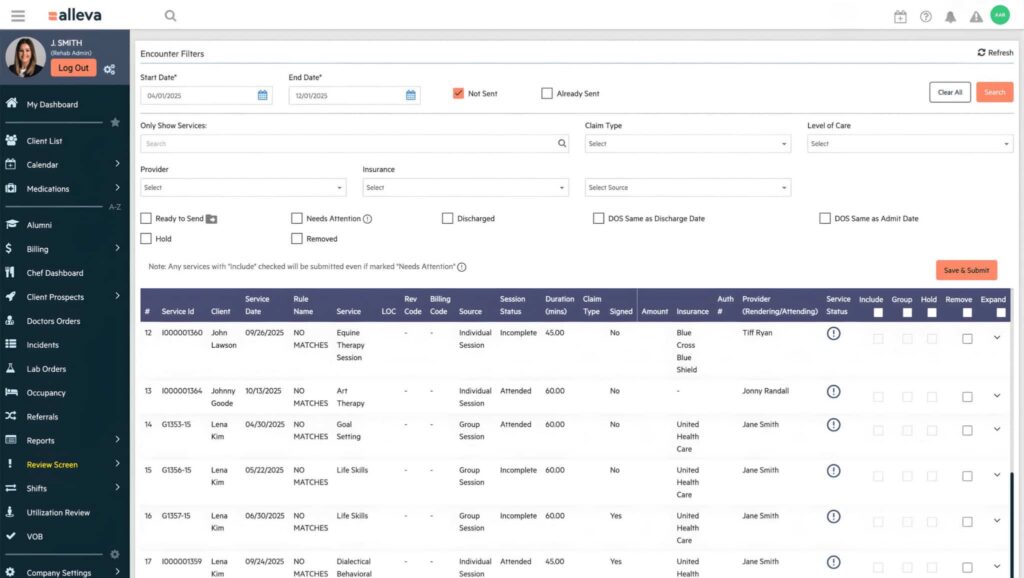
Alleva is behavioral health operations software built for treatment programs, not adapted from general medical software. Documentation, billing, compliance and analytics live on one record, so your clinical, revenue and compliance teams aren’t reconciling three systems.
The same platform works whether you’re opening your first facility or running many. Smaller teams get enterprise-grade billing and compliance tools without stitching vendors together, and multi-location operators get consolidated dashboards and governance across sites.
Key features:
- Customizable clinical templates, treatment plans and progress tracking in the Alleva EMR. When a clinician documents a group session, Alleva creates each attendee’s individual session note from it, so nobody documents the same group twice.
- Medication management in Alleva Core. Nurses record administration directly in the system, and medication counts and inventory update in real time. E-prescribing runs through an integration that sends orders to pharmacies and tracks them, and lab orders connect to each facility’s lab of choice for programs that turn that integration on.
- Alleva Billing with automated claim creation, pre-submission auditing, native Waystar clearinghouse integration, automatic ERA posting and reconciliation, and superbills generated straight from Patient Accounts for private-pay and out-of-network clients.
- InCheck for governance, risk and compliance: incident tracking to resolution, AI-assisted policy management and an EMR audit trail for chart audits, built around CARF, Joint Commission, HIPAA and state requirements.
- Release of information (ROI) tracking in every client chart, with InCheck chart audits that flag a missing ROI and open a plan of correction.
- Alleva Intelligence: multi-location dashboards, census forecasting, a Clinical Compliance Dashboard that flags overdue documentation, and Echo, an ambient tool that drafts SOAP and DAP notes for clinician review.
- Alleva Connect client and family portal.
Pros:
- One vendor for clinical, billing and compliance workflows.
- Built around treatment-program metrics like census, documentation timeliness and audit readiness.
- Scales from a single site to multi-location oversight without changing platforms.
- Recognized in the 2026 Capterra Shortlist and Software Advice FrontRunners for Mental Health Software.
Cons:
- Built for treatment programs, so solo private-practice therapists may want a lighter tool.
- Pricing is quote-based, so you’ll need a demo to compare cost.
- Part 2 consent is tracked and audited rather than hard-blocked: a disclosure made without an ROI on file is caught in an InCheck chart audit, not stopped at the point of release.
Customer result: Warriors Heart
Warriors Heart runs a treatment program for veterans, active-duty military and first responders in Bandera, Texas, and Milford, Virginia. Its team tracked Echo for six months in 2025, using internal metrics they picked before the period began. Among clinicians who became proficient with Echo, Warriors Heart reported:
- 30% less time spent on documentation
- 25% better medical-necessity documentation
- 5% fewer denied claims and 10% fewer missed charges
“Echo has raised the bar for documentation quality across our team.”
Rachel Mickelsen, Clinical Director, Warriors Heart
Clinicians review and sign every Echo draft. Results come from Warriors Heart’s own tracking and will vary by program.
2. TherapyNotes: Best for solo and small-group practices
TherapyNotes is an EHR for independent therapists and small private practices. It focuses on fast progress-note templates, scheduling and predictable published pricing.
Key features:
- Progress-note and treatment-plan templates for mental health clinicians.
- Scheduling, reminders and a client portal.
- Electronic billing for private-practice claims.
- Integrated telehealth.
Pros:
- Clinician-friendly notes with a short learning curve.
- Published per-plan pricing, so small practices can budget without a sales call.
Cons:
- Built for private practice, not per-diem PHP/IOP or residential billing.
- Not designed for multi-site program reporting or governance.
3. Sessions Health: Best for independent and telehealth-first therapists
Sessions Health is a mental health EHR for therapists who want a simple, low-cost start. It publishes per-practitioner pricing and offers a free tier for very small caseloads.
Key features:
- Customizable note templates, assessments and treatment plans.
- Integrated telehealth and scheduling.
- Insurance billing and online payments.
Pros:
- Low barrier to entry for new or solo practices.
- Straightforward setup for virtual-first teams.
Cons:
- Less depth for program-level billing, multi-site analytics or residential workflows.
- Teams with centralized billing should compare it against full outpatient EHRs.
For telehealth requirements, see our guide to HIPAA-compliant telehealth platforms for behavioral health.
4. Valant: Best for outpatient mental health clinics
Valant is an outpatient behavioral health EHR known for measurement-based care. It pairs treatment-plan tools and group notes with dashboards for standardized outcome measures.
Key features:
- Treatment plans with measurable goals.
- Support for patient-reported outcome measures (PROMs).
- Group-session notes and progress dashboards.
Pros:
- Strong outcomes tracking for clinics that report on measures.
- Purpose-built for outpatient care.
Cons:
- More setup and training than lightweight solo tools.
- Not built around residential or detox workflows.
Comparing outpatient options? Our outpatient EHR guide for behavioral health goes deeper.
5. Qualifacts: Best for CCBHCs and large agencies
Qualifacts serves multi-site agencies and CCBHCs (Certified Community Behavioral Health Clinics). Its focus is encounter-level documentation, configurable state reporting and system-wide analytics.
Key features:
- Encounter-level documentation at scale.
- Configurable state reporting templates.
- Enterprise integrations and analytics.
Pros:
- Built for state reporting and CCBHC requirements.
- Strong export options for enterprise KPIs.
Cons:
- Longer rollouts and higher cost than single-site tools.
- More platform than a small program typically needs.
6. Kipu: Best for addiction treatment and residential programs
Kipu focuses on addiction treatment and residential care. It supports census management, medication workflows and intake-to-treatment documentation.
Key features:
- Residential and episode-based workflows.
- Medication administration tracking for nursing teams.
- Intake, census and treatment templates.
Pros:
- Purpose-built for residential and SUD programs.
- Strong admissions-to-discharge flow for facility staff.
Cons:
- Billing and analytics may require separate tools, depending on your setup.
- Pricing and contracting are sales-led.
7. Netsmart: Best for county and community behavioral health systems
Netsmart serves large county, community and integrated behavioral health systems. Its strength is interoperability with public-sector and social-service partners.
Key features:
- Documentation, census and case-management workflows.
- Interoperability with county and state partners.
- Population-level reporting.
Pros:
- Proven at public behavioral health scale.
- Deep social-service integration.
Cons:
- Long implementations and a steeper clinician learning curve.
- Enterprise procurement is usually required.
How we evaluated behavioral health documentation software
We built this list from vendor documentation, public product pages, public regulatory texts and user reviews on public software-review platforms, all checked in November 2026. We also drew on feedback from behavioral health operators who’ve used or switched from these systems.
Criteria and weights:
| Criterion | Weight |
|---|---|
| Documentation and clinician experience | 20% |
| Billing integration and denial prevention | 20% |
| Compliance and 42 CFR Part 2 controls | 15% |
| Implementation and migration risk | 12% |
| Auditability and GRC features | 10% |
| Pricing and total cost of ownership | 10% |
| AI safety, human review and audit trails | 8% |
| Customer service and references | 5% |
Disclosure: Alleva publishes this guide and ranks itself first. In 2026, Alleva was named to the Capterra Shortlist and Software Advice FrontRunners for Mental Health Software.
What to look for in behavioral health documentation software
These are the capabilities that separate a dependable system from an expensive liability. Each includes a test to run live in the demo.
Progress notes, group notes and templates
Templates should enforce required fields and capture attendance automatically. Standardized notes cut chart backlog and the denials that come from missing elements.
Demo test: Build a PHP group note with 12 participants, complete the required prompts, and show how it maps to a claim. Our guide to documenting group therapy sessions lists what each note should capture. Then ask whether each attendee’s individual note comes from the group note or has to be written separately.
Treatment plans and outcome measures
Look for configurable goal libraries, measurable outcomes and automatic review reminders. They support utilization review and accreditation surveys.
Demo test: Produce a goal-linked progress note, then export 90 days of outcomes for one cohort.
PHP/IOP and per-diem workflows
Per-diem billing rolls a day of services into one charge, while CPT billing itemizes each service. Your templates have to produce the right format for each payer.
Demo test: Build a PHP day-of-service roster, generate the per-diem claim, and walk the claim through to the ERA (electronic remittance advice).
Billing integration and denial prevention
You want clearinghouse connectivity, claim checks before submission, and remittance posting tied back to the note. The tighter that loop, the fewer avoidable denials.
Demo test: Submit a sample claim from a signed note, simulate a payer response, and reconcile the ERA to the original claim. See how built-in EMR billing changes that workflow.
42 CFR Part 2 and SUD privacy controls
SUD records need consent gating, data segmentation and redisclosure controls. The section below covers what changed in 2026.
Demo test: Open a live patient record with segmented Part 2 data and run an audited release-of-information request.
E-prescribing, EPCS and PDMP lookups
Controlled-substance workflows need EPCS (electronic prescribing of controlled substances) and state PDMP checks inside the prescriber’s flow.
Demo test: Show EPCS two-factor sign-in, the audit trail, and a PDMP lookup for your state. Ask whether e-prescribing and lab orders are built in or run through an integration, and which pharmacies and labs you’d connect on day one.
Audit logs, consent records and GRC tools
Immutable audit logs, role-based access and consent records give you evidence for payer, state and accreditation reviews. Our EMR audit trail guide explains what auditors ask for.
Demo test: Export a consent-change audit log and run a 12-month compliance report.
What the 2026 Part 2 deadline means for your documentation system
HHS finalized updates to 42 CFR Part 2 in February 2024, and the rule took effect April 16, 2024. Compliance was required by February 16, 2026, according to the HHS 42 CFR Part 2 final rule fact sheet.
Since that date, OCR (the HHS Office for Civil Rights) accepts Part 2 complaints and can open investigations. For SUD programs, that turns consent and disclosure handling into enforceable documentation work, not just policy.
What the rule changed that your software has to support:
- Single consent for TPO: Patients can give one consent covering treatment, payment and health care operations, so your system must record that consent and its scope.
- Redisclosure tracking: Records disclosed under that consent carry redisclosure limits, so segmentation and labeling need to travel with the data.
- Breach notification: Part 2 records now follow HIPAA-style breach notification, which depends on audit logs showing who accessed what.
- Business associates: Business associates now fall within Part 2’s qualified service organization definition, which matters for your vendor’s BAA.
- Updated notices: Notices of Privacy Practices had to be updated by the same date.
The accounting-of-disclosures requirement has a separate compliance date, still tied to a future HIPAA Privacy Rule update. Ask vendors how they’ll handle it when that date is set.
What to ask in the demo:
| Question | What a strong answer shows |
|---|---|
| How is a TPO consent captured and scoped? | Consent stored as structured data, linked to the chart, with effective and revocation dates |
| How are Part 2 records labeled? | Segmentation that follows the data into exports and outbound exchange |
| Who accessed this SUD record last month? | An exportable audit log filtered by patient and user |
| What happens when consent is revoked? | Automatic restriction of future disclosures, with a logged event |
| How does your BAA address Part 2? | Explicit Part 2 language, not HIPAA-only terms |
Also ask whether the system blocks a disclosure when consent is missing, or flags it afterward in a chart audit. Both approaches exist, and your release-of-information policy should match the one you buy.
Your compliance officer or counsel should confirm how these requirements apply to your program. Our behavioral health compliance guide covers the wider picture.
How much does behavioral health documentation software cost?
Costs usually span the subscription, implementation and migration, training, integrations, claim or clearinghouse fees, and ongoing support. Ask every vendor for an itemized quote.
| Cost component | Typical pricing | What drives it | Applies to |
|---|---|---|---|
| Subscription / license | Per user, per site or enterprise | Modules and user count | All sizes |
| Implementation and data migration | Quoted by scope | Field mapping, templates, legacy cleanup | Small clinics to enterprise |
| Training and change management | Quoted | Role-based training, super-user programs | All sizes |
| Integrations / third-party fees | Quoted | HL7 (Health Level Seven) and FHIR (Fast Healthcare Interoperability Resources) connectors, telehealth, PDMP, e-prescribing | Small clinics to enterprise |
| Claim / clearinghouse fees | Per claim or bundled | Billing volume and whether billing is built in | All sizes |
Costs teams often underestimate:
- Cleaning and normalizing legacy records.
- Lost productivity while clinicians adjust.
- Add-on modules for outcomes, analytics or telehealth.
- Support upgrades and priority-service fees.
How to implement behavioral health documentation software
Start with a clear scope, named owners and realistic dates. You’ll need clinical leads, a revenue cycle lead, IT and security, a compliance officer and training champions.
| Organization type | Typical timeline | Notes |
|---|---|---|
| Solo clinician | 2–8 weeks | Fast decisions, small data set |
| Small clinic (2–25 providers) | 8–12 weeks | Local integrations and schedule changes |
| Multi-site / enterprise | 3–9+ months | Standardization and phased rollouts |
| Discovery phase | 2–6 weeks | Stakeholder interviews and workflow mapping |
| Stabilization | 2–8 weeks after go-live | Fixes, tuning and follow-up training |
The rollouts that go sideways usually share three causes: data-mapping gaps, thin clinician training, and payer flows nobody tested.
Before go-live, confirm:
- End-to-end workflow tests with test patients.
- Billing tested in a payer sandbox, with ERA reconciliation.
- Full data reconciliation and user acceptance sign-off.
- A security review and least-privilege access checks.
- Performance testing at peak volume.
Our EHR implementation checklist and EMR migration guide cover each step.
How to evaluate AI documentation assistants in a demo
Run three live checks: a timed AI draft followed by clinician edits, a provenance export, and a PHI (protected health information) retention probe. Any vendor should be able to show clinician sign-off on every AI-drafted note.
- Time-savings test: Generate drafts for intake, progress and discharge notes. Time the clinician’s edits and log each error as an omission, a fabrication or a coding issue.
- Provenance test: Ask for machine-readable logs with the model version, timestamps and user IDs, plus a trace from the AI draft to the final signed note.
- PHI retention test: Submit de-identified test tokens, then check later outputs and logs for echoes. Get written terms that your PHI isn’t used to train models, and a deletion timeline.
Put these in the contract:
- Exportable drafts, timestamps and model-version data for every output.
- Provenance logs with immutable storage.
- Data retention and deletion terms, plus a written no-training commitment.
- Human review requirements written into acceptance criteria.
For more on where AI fits clinically, read AI in behavioral health.
What the CMS prior authorization rule means for your EMR choice
The CMS Interoperability and Prior Authorization Final Rule (CMS-0057-F) puts most of its requirements on impacted payers: Medicare Advantage plans, Medicaid and CHIP programs, and qualified health plan issuers on the federal exchanges.
Those payers began new prior authorization process requirements in January 2026 and must stand up FHIR-based Prior Authorization APIs by January 1, 2027, per the CMS fact sheet on CMS-0057-F.
On the provider side, the rule adds an Electronic Prior Authorization measure for MIPS-eligible clinicians starting with the 2027 performance period. If your prescribers report MIPS, your EMR’s ability to request prior authorization electronically will start to matter.
What to verify in demos:
- OpenAPI or Swagger documentation and a sandbox account.
- FHIR R4 support for core resources such as Patient, Practitioner, Coverage and ExplanationOfBenefit.
- A plan for the HL7 Da Vinci prior authorization guides (Coverage Requirements Discovery, Documentation Templates and Rules, and Prior Authorization Support).
- SMART on FHIR app launch with role-based scopes.
- Consent-aware handling of Part 2 data in any outbound exchange.
If a vendor can’t produce API specs, sandbox access or a payer-tested example, treat its FHIR claim as unverified and budget for custom integration. Our behavioral health EMR buying guide includes an integration checklist.
FAQs about behavioral health documentation software
How long does implementation usually take?
Plan on 2–8 weeks for a solo clinician, 8–12 weeks for a small clinic, and 3–9+ months for multi-site rollouts. A pilot with high-volume users reduces disruption.
What does behavioral health documentation software do?
It captures and stores clinical notes, treatment plans and compliance records in one searchable chart. It also standardizes templates so notes support billing and audits.
How should I evaluate vendors?
Map each vendor’s features to your workflows, test them in a sandbox, and insist on live demos using your own sample data.
Which integrations are must-haves?
Billing and clearinghouse, labs, telehealth, e-prescribing and identity management. Ask for HL7 or FHIR documentation and API service levels in writing.
Can behavioral health documentation software produce superbills?
Many systems can, and it matters if you serve private-pay clients, out-of-network clients seeking reimbursement, or anyone who files their own claims. In Alleva Billing, staff open Patient Accounts, select the client, choose Generate Superbill from the Actions menu, then review services, billing details and payments before sharing it. Superbills include modifiers and place of service. Facilities on the Alleva EMR without Alleva Billing run the Super Bill report under Reports, then Insights. A session appears there only when it has a billing code, the client is marked attended, the session is completed and unit costs are set.
How much should I budget?
There’s no standard price. Ask for an itemized three-year total cost of ownership that separates license, implementation, integrations and claim fees.
What does a safe data migration look like?
Export legacy charts, validate the field mapping, run a parallel period, and test 10–20 representative patient records end to end before cutover.
What should I test during demos?
Have your clinicians create and sign notes, generate claims, schedule recurring groups and run a compliance report. Time each task.
Is this software HIPAA-compliant?
Vendors provide safeguards, but compliance stays your organization’s responsibility. Verify encryption in transit and at rest, multi-factor authentication, detailed audit logs, and a signed business associate agreement, and ask for SOC 2 reports and penetration-test summaries.
Quick picks by organization type
- Treatment programs of any size that want one platform: Alleva, for EMR, billing, compliance and analytics on one record, from a first facility to multi-location groups.
- Solo clinicians and small private practices: TherapyNotes or Sessions Health, both with published pricing.
- Outpatient clinics focused on outcomes: Valant.
- CCBHCs and large agencies: Qualifacts.
- County and community systems: Netsmart.
Want to see how notes, billing and Part 2 controls work in one record? Book a demo and we’ll walk your own programs and payers through Alleva, or call (877) 425-5382 if you’d rather talk first.
This article is for general information and isn’t legal, compliance or financial advice. Talk with your compliance officer or legal counsel about requirements for your organization.

Kayla Briones is Sr. Product Marketing Manager at Alleva.