

Therapy software selection depends on three factors: how well a platform fits behavioral health documentation, how it connects clinical work to billing, and how it proves compliance. This guide helps you compare options against those factors so you can reduce administrative load, protect patient data, and support better clinical workflows.
You will find clear outcomes to aim for, practical steps to evaluate vendors, and the tradeoffs between all-in-one platforms and best-of-breed integrations. A platform like the behavioral health EMR built for clinical and operational teams shows how documentation, scheduling, billing, and compliance can live in one connected workflow. For the full comparison, see our EMR software buying guide.
The focus stays on systems built for behavioral health teams, not general medical software adapted after the fact.
Key Takeaways
- Fit matters more than feature count: Therapy software should match behavioral health note formats (SOAP, DAP, BIRP), level-of-care workflows, and your payer mix — not just list generic EHR features.
- A signed BAA is non-negotiable: Any vendor handling protected health information should sign a Business Associate Agreement and document HIPAA safeguards before you contract.
- Behavioral health adds extra rules: 42 CFR Part 2 for substance use records and mental health parity requirements shape configuration in ways general EHRs often miss.
Ready to see how a connected platform handles intake, documentation, billing, and compliance together? You can request a personalized demo to evaluate fit for your team.
What therapy software is and who it is for
Therapy software centralizes behavioral health operations into one connected system. It combines clinical documentation, scheduling, intake, billing, and compliance so your team works from a single client record instead of stitching point tools together.
Solo clinicians, group practices, addiction treatment centers, community mental health programs, and integrated clinics all benefit from clearer workflows and less tool fragmentation. A little planning here saves you from chaotic charts and duplicated intake forms later.
Common problems therapy software solves include intake bottlenecks, double bookings, inconsistent notes, denied claims, and audit risk. Matching platform scope to your practice size and accreditation needs helps you avoid paying for features you will not use. That fit often determines implementation effort and return on investment.
Top Therapy Software for Behavioral Health Operations
1. ALLEVA – Best for Behavioral Health Treatment Centers
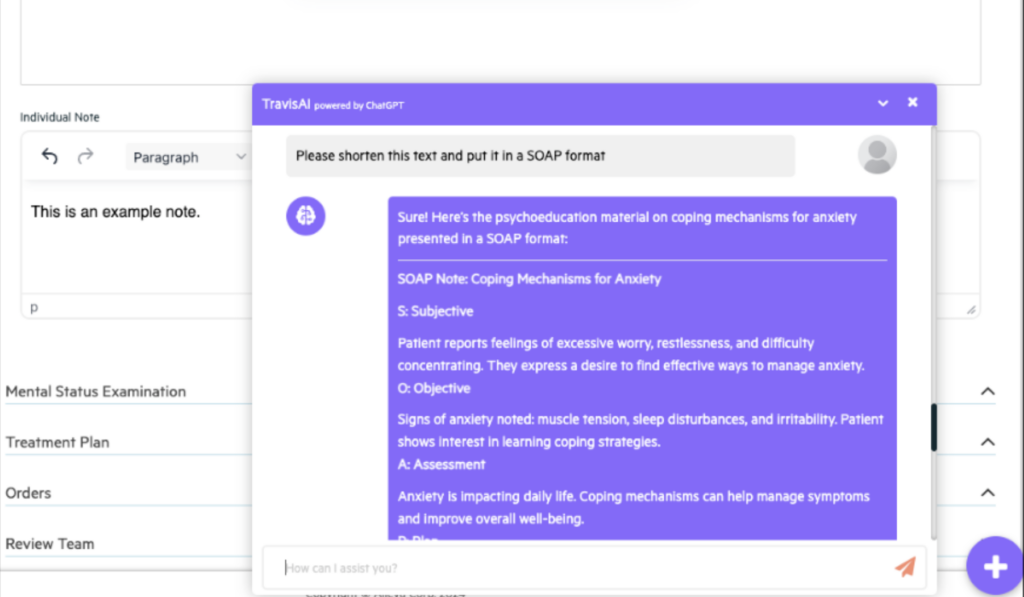
Alleva isn’t a general-purpose EHR with a behavioral health setting bolted on — it’s a platform built exclusively for treatment centers, and that focus shows up in every corner of the product. Where most EHRs ask clinicians to bend their workflow around software designed for primary care or hospitals, Alleva is shaped around the realities of addiction and mental health treatment: the documentation demands, the ever-shifting insurance requirements, the coordination across multidisciplinary teams, and the simple fact that the people doing this work would rather spend their time with clients than buried in paperwork.
At its heart, Alleva is a full EHR that spans the entire continuum of care, from admissions and treatment planning through progress notes, e-prescribing, outcomes tracking, billing, and discharge. It scales cleanly across levels of care, with purpose-built support for Intensive Outpatient and Outpatient (IOP/OP), Partial Hospitalization (PHP), Residential (RTC), and Detox/medically monitored withdrawal — each with workflows that match how those programs actually run, whether that’s flexible outpatient scheduling, structured daily PHP programming, 24/7 residential shift handoffs, or vitals tracking and protocol management for detox.
Where Alleva really stands apart is its AI layer. Echo, its HIPAA-compliant ambient AI, listens during sessions and generates structured, audit-ready notes in real time — supporting DAP, SOAP, UR, and more — and, importantly, never saves the recordings, so only the compliant note remains. TravisAI rides alongside as an in-app assistant, answering questions and guiding staff through the platform on the spot. The result is the thing clinicians actually care about: dramatically less time spent wrestling with note phrasing and insurance language, and more time delivering care. The testimonials reinforce this — teams describing documentation going from an overwhelming, fall-behind chore to something they can knock out in a few sentences.
ALLEVA FEATURES
- Ambient AI notes with Echo and TravisAI
- Built-in revenue cycle management and billing
- Medication management with ePrescribe and safety alerts
- Client and family portal with telehealth
- Real-time analytics and custom dashboards
Pros
- Purpose-built for behavioral health
- Ambient AI generates insurance-ready notes
- Covers full continuum of care
- Responsive, dedicated support model
- Hands-on onboarding and data migration
Cons
- Niche focus, not general medical
- Geared to facilities over individuals
ENSORA HEALTH — Best for mental health and rehab therapy practices
Ensora Health builds EHR and practice management software through two core products: TheraNest for mental health and Fusion for PT, OT, and speech therapy. Each is tailored to its discipline with add-ons for billing, payments, and telehealth.
Ensora works well for specialty practices that want a platform shaped to their exact workflow.
ENSORA HEALTH FEATURES
- TheraNest for mental health practices
- Fusion for PT, OT, SLP teams
- AI Session Assistant for documentation
Pros
- Specialized products by discipline
- Transparent public pricing
Cons
- Two products confuse buyers
- Best features cost extra
- Not for medical specialties
SESSIONS HEALTH — Best for affordable, easy-to-use mental health EHR
Sessions Health is an all-in-one, HIPAA-compliant EHR built specifically for mental health professionals. It unifies scheduling, documentation, billing, telehealth, and a client portal in one simple platform.
Sessions Health works well for therapists switching from clunkier systems, since reviewers praise how intuitive it is.
SESSIONS HEALTH FEATURES
- Customizable notes, assessments, and treatment plans
- Electronic claims and ERA auto-posting
Pros
- Affordable, strong-value pricing
- AI Assist for progress notes
Cons
- Mental health focus only
- Fewer enterprise integrations
- Newer name in market
THERAP — Best for I/DD, HCBS, and LTSS providers
Therap is an online documentation system for human service providers and government agencies serving I/DD, HCBS, and long-term support populations. It centralizes records, billing, incident reporting, and compliance across single and multi-state agencies.
Therap works well for large, multi-location agencies that need real-time individual data and audit reports from anywhere.
THERAP FEATURES
- Electronic health records and case management
- Billing, claiming, and EVV tools
Pros
- Incident reporting and management
- Deep compliance and reporting
Cons
- Built for I/DD, not clinics
- Dense interface, 70+ tools
- Not aimed at solos
JANE — Best for multidisciplinary health and wellness clinics
Jane is a web-based practice management platform for health and wellness practitioners that handles booking, charting, scheduling, billing, and payments. It is built for interdisciplinary clinics, from physios and massage therapists to counsellors and midwives.
Jane works well for clinics that want one beautifully designed system with pricing that scales by practitioner count.
JANE FEATURES
- Online booking with automated reminders
- Integrated payments and insurance billing
Pros
- Intuitive, well-loved design
- Unlimited customer support
Cons
- Less behavioral-health specialized
- Add-on fees for payments
- Insurance handling varies regionally
SIMPLEPRACTICE — Best for solo and group therapists
SimplePractice is a HIPAA-compliant EHR and practice management platform for therapists and health and wellness professionals. It combines telehealth, scheduling, billing, a deep template library, and insurance tools in one place.
SimplePractice works well for new practices because it offers free credentialing and payer paneling at signup.
SIMPLEPRACTICE FEATURES
- Integrated HIPAA-compliant telehealth
- ePrescribe and insurance claims tools
Pros
- Robust documentation template library
- Free credentialing on signup
Cons
- Higher tiers get pricey
- Add-on fees for features
- Not behavioral-health exclusive
THERAPY IQ — Best for unifying clinical, billing, and compliance workflows
Therapy iQ (TiQ) is an AI-powered, all-in-one practice management platform purpose-built to unify clinical, financial, operational, and compliance workflows. It aims to replace the 7-10 separate tools many practices glue together just to operate.
Therapy iQ works well for growth-minded owners thanks to “TransFAIRency” pricing, where you only pay for the features you use.
THERAPY IQ FEATURES
- AI transcription and documentation sidekick
- Built-in telehealth and group sessions
- Insurance, billing, and reporting dashboards
Pros
- One platform replaces many
- Pay only for use
- Free data migration included
Cons
- Newer, smaller user base
- Some features still rolling out
- Free trial required to evaluate
Core features: notes, scheduling, billing, telehealth, and more
A capable behavioral health platform should span clinical documentation, scheduling, billing, telehealth, client intake and portal, reporting, measurement tools, and supervision or audit logs. Telehealth use expanded sharply during and after the COVID-19 pandemic, which makes integrated video a baseline expectation rather than an add-on.
Choosing a system built for multidisciplinary behavioral health teams helps you avoid stitching together point solutions. The following table summarizes what to prioritize in each core area.
Core feature priorities by category
| Feature area | What to prioritize | Why it matters |
|---|---|---|
| Clinical documentation | Configurable SOAP/DAP/BIRP templates, e-signature, progress tracking | Speeds charting and supports audit readiness |
| Scheduling & reminders | Calendar sync, recurring sessions, waitlists, SMS/email reminders | Protects access and reduces no-shows |
| Billing & claims | Electronic claims, ERA posting, eligibility checks, CPT/HCPCS mapping | Reduces denials and speeds collections |
| Telehealth | Embedded HIPAA-compliant video, consent and recording controls | Keeps sessions tied to the clinical record |
| Client portal & intake | E-forms, consent capture, secure messaging | Accelerates admissions, cuts front-desk work |
| Reporting & analytics | Utilization, revenue, and outcome dashboards | Surfaces gaps that hide in disconnected systems |
| Measurement-based care | Built-in PROMs tied to notes, automated scoring | Enables data-driven treatment adjustments |
| Supervision & audit logs | Role-based access, supervision queues, immutable trails | Supports compliance and accreditation |
These features matter most when they connect. A connected platform reduces manual handoffs and reveals revenue and quality gaps that often stay hidden across separate tools. For a deeper look, this breakdown of features that improve behavioral health connectivity maps capabilities to daily workflow.
[Claim needs verification by Alleva — confirm product-level session-recording and retention controls before publishing specific telehealth recording claims.]
Pricing: tiers, typical costs, discounts, and trial terms
Behavioral health software pricing ranges from per-clinician subscriptions to module-based packages. Cost and implementation complexity strongly shape adoption, so the pricing model affects both your budget and your rollout.
If you want one source of truth for clinical and operational workflows, an integrated platform bundles EMR, billing, analytics, and compliance rather than charging for each separately. The table below outlines the common pricing structures.
Common pricing models compared
| Pricing model | How it works | Best fit |
|---|---|---|
| Per-clinician subscription | Predictable monthly seat fee for core clinical and scheduling features | Solo clinicians and small practices |
| Tiered or module pricing | Pay for selected modules (billing, CRM) and transaction volumes | Practices needing selective advanced features |
| Enterprise agreement | Volume discounts, dedicated implementation, negotiated SLAs, multi-year terms | Multi-location and complex organizations |
Typical ranges vary by feature set and support level. Small private-practice plans commonly run ~$30–$150 per clinician monthly, while integrated RCM, advanced analytics, or dedicated account management push prices higher. Optional add-ons such as telehealth, premium templates, and RCM services affect the final price and contract terms.
Group, nonprofit, and multi-site discounts are often negotiable. Limits on SMS volume, claims, or transactions vary by vendor and contract. Confirm whether data exports, migrations, and training are included or billed separately.
During demos, ask about data migration scope, implementation timelines, contract length and termination terms, export and data ownership, and SLA details. Also confirm who manages updates and what ongoing training looks like. Clear answers up front prevent surprises and help your team adopt the platform without losing billable time.
Compliance, HIPAA, and data security
Behavioral health software must comply with HIPAA rules and support the safeguards your organization is accountable for. Choose software that documents HIPAA compliance and signs a Business Associate Agreement (BAA). Federal guidance on covered entities and business associates explains why a written BAA is required and where contractual responsibility sits.
Ask vendors for a sample BAA and written confirmation they will sign yours. That clarifies who holds HIPAA responsibility and where liability rests. For a sense of where things go wrong, this list of common HIPAA pitfalls to avoid is a practical reference.
What to request about BAAs includes a sample BAA you can review, a signed commitment to execute your agreement during contracting, and clarification of any subprocessor relationships and liability carve-outs.
Technical safeguards to verify:
- Encryption standards for data at rest and in transit.
- Immutable audit logs and how long logs are retained.
- Multi-factor authentication and role-based access controls tailored to multidisciplinary care teams.
- Documented disaster recovery tests with stated recovery time and recovery point objectives.
Certifications and uptime expectations:
- Current SOC 2 or ISO 27001 reports and summarized penetration-test findings.
- An SLA that defines uptime, incident response times, and notification timelines.
- Hosting locations, data residency options, and disaster-recovery plans you can use for CARF or Joint Commission readiness.
If a vendor cannot provide evidence for these items, treat it as a red flag. Ask how they will close the gap before go-live, because audit readiness matters as much as day-to-day usability. Tools like continuous compliance management built for behavioral health are designed to keep this documentation organized year-round.
Telehealth integrated into behavioral health workflows
Integrated telehealth ties video sessions to clinical records, consent workflows, and audit trails. That connection reduces administrative steps and helps simplify documentation and audit readiness compared with standalone video tools.
Integrated telehealth typically provides in-platform video, a virtual waiting room, documented consent flows, and session controls so notes and audit logs stay connected. Built-in video keeps workflows unified and support centralized.
Third-party apps such as Zoom may offer advanced meeting features or broader device support. They also add single sign-on, integration, and data-handling work for your operations team. The lessons from the rapid shift to telehealth are worth reviewing before you decide.
Reliability and pricing checks:
- Ask about bandwidth requirements, mobile performance, and reported uptime or SLA.
- Confirm whether telehealth is included in your base plan.
- Check limits for group sessions and multi-party facilitator controls.
Getting clarity on these tradeoffs helps you pick a setup that reduces administrative work while protecting compliance and patient experience.
Billing, claims processing, and revenue workflows
Behavioral health billing connects clinical encounters to paid claims through enrollment, eligibility, submission, posting, and denial management. Streamlining these steps helps you capture revenue reliably and reduce administrative work. Small wins add up across a busy month.
For example, you can enroll payers and collect payer IDs, automate daily eligibility checks, and generate claims from the encounter or superbill. Confirming CPT support for codes such as 96127 keeps behavioral health services billable, and tracking per-claim clearinghouse fees avoids hidden costs. Integrated behavioral health billing and revenue cycle tools are designed to connect these steps inside one platform.
Key checks and workflows:
- Payer enrollment and eligibility. Automate daily checks and store payer IDs.
- Claim creation and submission. Generate claims from encounters and validate CPTs before clearinghouse submission.
- Clearinghouse fees and edits. Compare per-claim and batch fees and confirm payer-specific validation rules.
- ERA/EFT posting and reconciliation. Automate remittance posting and reconcile electronic funds transfers with deposits.
- Denial management and appeals. Track denials by reason, assign owners, and fix root causes.
- Reporting and revenue KPIs. Monitor payment lag, denial rate, AR aging, and reconciliation accuracy to surface leakage early.
Posting ERAs correctly and tracking denial KPIs reduces missed payments and clarifies your revenue health. That visibility naturally leads to reviewing integration and RCM options for a connected platform.
[Claim needs verification by Alleva — verify payer-specific CPT coverage and clearinghouse fee structures against current contracts or payer portals before publishing specifics.]
Notes, templates, and measurement-based care workflows
Start by picking or building templates that match your programs and clinicians. A behavioral health EMR that centralizes documentation, workflows, and reporting keeps templates, assessments, and billing logic connected. Use a small library of standard and program-specific templates to reduce variability and speed charting.
Build a template library with standard intake, progress, and discharge forms plus custom program variants. Tie templates to behavioral-health-specific workflows so handoffs between admissions, clinical teams, and billing stay consistent. Macros for common text and program-level overrides keep notes both efficient and clinically accurate.
To capture notes faster, some platforms offer voice-to-text or AI-assisted summaries that you review and finalize for accuracy. Keep automatic saved drafts, timestamps, and clinician attribution so records remain defensible. AI-assisted clinical documentation tools are designed to reduce typing time while keeping a clinician in control of the final note.
For audit readiness, enable immutable audit trails and version history. Record every edit, signer, and timestamp to support HIPAA, Joint Commission, and CARF expectations without excessive manual tracking.
For measurement-based care, embed standardized PROMs and PROs with automated scoring and reassessment triggers. Verify that MBC assessment codes map to billable codes and payer rules before relying on automated billing. The guidance on getting your compliance documentation audit-ready pairs well with this workflow.
Scheduling, client portal, and automated reminders
Centralized scheduling, a secure patient portal, and automated reminders reduce administrative work and keep clinical, consent, and payment records connected. Strong scheduling and portal tools cut back-and-forth and protect access to care.
Scheduling features to look for include multi-calendar views, Google and Outlook sync, waitlists, recurring sessions, and group-therapy blocks. These reduce manual coordination and help lower no-shows.
Patient portal capabilities should include secure messaging, digital intake forms, and integrated billing so notes, consents, and payments live in one auditable place. Reminder options should cover SMS, email, and push notifications.
Use documented opt-in, clear per-message fee disclosure, and simple opt-out workflows to maintain consent and TCPA compliance. These components also shape how intake, billing, and compliance controls integrate across the platform.
Mobile access: clinician and client apps
Mobile access shapes both clinician and client experiences. Choose native apps when you need offline notes, device integrations, and reliable push notifications. Pick mobile web when you want fast, cross-platform access with no installation friction.
Native apps usually give clinicians offline-capable progress notes, smoother telehealth, and tighter device integrations. Client-facing apps typically prioritize a secure portal, easy booking, telehealth links, and asynchronous messaging to support engagement.
For your team, weigh clinician workflows, HIPAA-compliant security needs, and how often clinicians must work offline. User experience quality matters more than flashy features. Keep clinician flows minimal and task-focused, and confirm feature parity across iOS and Android so nothing surprises you after rollout.
Customization, user roles, supervision, and multi-location support
Behavioral health software should enforce role-based customization that maps permissions to real-world roles. Custom roles such as admin, clinician, biller, and supervisor restrict access to sensitive fields, reduce compliance risk, and speed clinical and billing handoffs.
Supervision tools should capture supervisory notes, sign-offs, and an immutable audit trail. The HIPAA Security Rule requires audit controls for electronic protected health information, so clear role mapping also reduces duplicate work and audit queries.
Multi-location support means location-level settings, consolidated reporting, and flexible payment options such as integrated card gateways. That reduces reconciliation work across campuses and helps finance teams focus on care. Getting roles and locations right also prepares you to scale.
Integrations, API access, data hosting, migration, and offboarding
Expect calendar sync, payment gateways, clearinghouse connections, lab results, and telehealth links as standard for behavioral health platforms. Interoperability rules require API access and patient data portability, so confirm vendors expose documented APIs, webhook events, and sandbox access for testing.
Typical integrations and API exposure:
- Calendar sync: iCal and Exchange.
- Payments: PCI-aware gateways.
- Clearinghouses: EDI 837/835 connections.
- Labs: HL7/CCD imports.
- Telehealth: partner links or embedded vendors.
Vendors commonly complete onboarding in 4 to 12 weeks, import CCD/CSV clinical and billing records, and offer live training plus documentation. Ask for a sample migration timeline and verification steps.
For offboarding, require full data export in CCD, CSV, and EDI with a documented transfer SLA. Confirm export fees, timelines, and a verification process before you sign.
Sales checklist to request:
- API documentation and sandbox access.
- Sample data export and migration timeline.
- Existing integrations list and partner references.
- Training plan and go-live support.
- Offboarding policy and fee schedule.
Integration depth, migration support, and clear offboarding terms shape how quickly you regain operational continuity if you ever switch systems.
How to evaluate and choose the right therapy software
Start by mapping stakeholder needs, running hands-on demos, and piloting with clear success metrics. A structured checklist for clinicians, operations, billing, and compliance reduces risk and speeds adoption. This guide to the features to prioritize in a behavioral health EMR can seed your checklist.
Map needs by role. List the clinician, operations, billing, and compliance tasks each system must solve, and why those outcomes matter day to day. Clinicians need fast documentation and schedule sync; billing teams need clean claims exports and AR visibility.
During demos, test the notes workflow, claims submission, and a live telehealth call to confirm usability. Ask for real data imports and role-based user views, and capture screenshots or short clips to compare later.
Run a 4 to 8 week pilot with defined caseloads and weekly checkpoints. Set measurable goals for adoption and integration, and use checkpoints to surface integration and training gaps early.
Track time saved per session, billing days outstanding, and audit prep hours to quantify return on investment within the pilot window. Small wins build momentum for broader rollout.
Call peers at similar-sized programs about onboarding time, hidden costs, and support responsiveness. Focus on programs that share your payer mix and accreditation needs.
Review SLAs for uptime and support, confirm data ownership and export formats, and identify termination fees that could limit a future migration. All-in-one platforms simplify operations and reduce integrations, while best-of-breed tools often offer deeper specialty features. Choose based on your tolerance for integration work versus the value of connected workflows built for behavioral health.
What to include in a vendor comparison grid
A clear comparison grid reveals operational and compliance tradeoffs and helps you choose between an all-in-one platform and best-of-breed tools. Map your top three operational pain points to the grid columns so you can see which vendor reduces manual work the fastest. If the shortlist is still empty, a roundup of top-rated mental health record systems gives you a defensible starting set of vendors to score.
Key fields to include:
- Pricing model and total cost of ownership.
- Included features: EMR, RCM, telehealth, CRM.
- Onboarding, data migration, and implementation scope.
- Support hours, phone support, and dedicated customer success.
- HIPAA compliance and signed BAA.
- Native mobile apps and user experience.
- Measurement-based care workflows and outcome tracking.
- Integration options, API availability, and multi-location support.
- Customization and configuration for behavioral health programs.
Vendor-fit notes by organization size:
- Small private practice: simple pricing, telehealth plus notes, basic billing.
- Group practice: robust RCM, multi-location support, reliable phone support.
- Enterprise behavioral health: full EMR plus RCM, integrations, customization, and dedicated onboarding.
Choose breadth when you want fewer integrations and unified data. Choose depth when you need specialty capabilities and can absorb integration work.
How operations teams run programs on therapy software
Therapy software connects intake, clinical care, compliance, and billing into one client record so teams avoid duplicated work and fragmentary audits. Integrated documentation supports audit readiness across the Joint Commission and CARF expectations.
On the revenue side, a single client record can speed claims submission, shorten days to bill, and centralize admissions tracking so fewer referrals fall through the cracks. That reduces manual handoffs and makes financial performance more predictable.
Centralized documentation also supports audit readiness and unified reporting, which means fewer surprises during reviews. Care teams share treatment plans, tasks, and progress notes in one place so clinical handoffs stay consistent.
Operational benefits include reduced administrative time, a centralized client journey, unified KPI visibility, and fewer system handoffs. Connecting these pieces makes it easier to improve billing accuracy and admissions velocity, which directly supports program sustainability.
See the platform in action
A connected behavioral health platform can simplify your workflows from intake to billing while keeping compliance visible. A short walkthrough tailored to your practice shows intake-to-billing paths, telehealth reliability, and how customizable templates can reduce documentation time.
To evaluate fit for your team, you can see how a connected platform works in a guided demo or call us at Call (877) 425-5382.
Frequently asked questions about therapy software
What is therapy software and how is it different from a general EHR?
Therapy software is a purpose-built practice management and electronic health record system tuned for behavioral health workflows. It combines clinical documentation, scheduling, billing, telehealth, measurement-based care, and client portals into one product. Unlike a general EHR, it includes therapy note formats (SOAP, DAP, BIRP), behavioral health code sets, automated outcome-measure workflows, and supervision features that match therapy practice needs.
How much does therapy software typically cost per clinician per month?
Costs vary by feature set and support level. Small private-practice plans commonly range from roughly $30 to $150 per clinician monthly. Larger or enterprise packages with integrated RCM, advanced analytics, or dedicated account management run higher and add implementation fees, plus optional add-ons such as telehealth and premium templates.
Is therapy software HIPAA-compliant and will the vendor sign a BAA?
Vendors serving U.S. providers should support HIPAA safeguards and typically sign a Business Associate Agreement. This contractual requirement is described by HHS as part of HIPAA vendor responsibilities. Ask the vendor for a written BAA and documentation of technical safeguards such as encryption, access controls, and audit logs.
Does therapy software include integrated telehealth and is it reliable?
Many platforms include built-in video sessions, waiting rooms, and consent capture so clinicians and clients never leave the record to meet. Reliability depends on vendor infrastructure and network conditions. Evaluate call success rates, minimum bandwidth requirements, and mobile experience during a pilot to confirm acceptable quality for your caseload.
How are insurance claims and billing handled, and are there per-claim fees?
Billing workflows usually let you submit electronic claims via a clearinghouse, receive ERAs and EFTs, and manage denials in the platform. Some vendors offer optional full RCM services. Per-claim clearinghouse fees are common with a third-party clearinghouse, so confirm fees and behavioral health CPT support (such as 96127) during contract review.
Can I customize notes, intake forms, and treatment plans for my practice?
Most therapy systems let administrators and clinicians create and edit templates, custom intake forms, and treatment-plan libraries. Look for role-based permissions so supervisors and billers access only the fields they need, plus template versioning and e-signature support for consent and release forms.
Are there mobile apps for clinicians and clients?
Many vendors offer native iOS and Android apps for clinicians and mobile-friendly client portals. Clinician apps typically support scheduling, secure messaging, telehealth, and quick note entry, sometimes with offline caching. Client apps focus on appointments, telehealth, and secure forms. Test speed, offline behavior, and feature parity during a trial.
Is there a free trial or demo, and what should I test?
Vendors commonly provide a guided demo and either a limited free trial or sandbox. During that time, test real workflows: create an intake, complete a progress note, submit a test claim, run a telehealth session on mobile and desktop, and export a client record. Also validate support responsiveness and training materials.
How long does onboarding and data migration usually take?
Onboarding varies by practice size and data complexity. Single-clinician practices often onboard within 1 to 4 weeks, while multi-location organizations with historical billing and charting can need 6 to 12 weeks or more. Confirm typical timelines, included migration services, and what portion of the work your team must complete.
What are the vendor’s data hosting locations, and can I export my data if I leave?
Vendors commonly host data in major U.S. cloud regions and should disclose hosting locations and disaster-recovery plans on request. You should also have a documented offboarding policy and the right to export your data in open formats. Ask for export timelines, sample export files, and any extraction fees before signing.

Kayla Briones is Sr. Product Marketing Manager at Alleva.